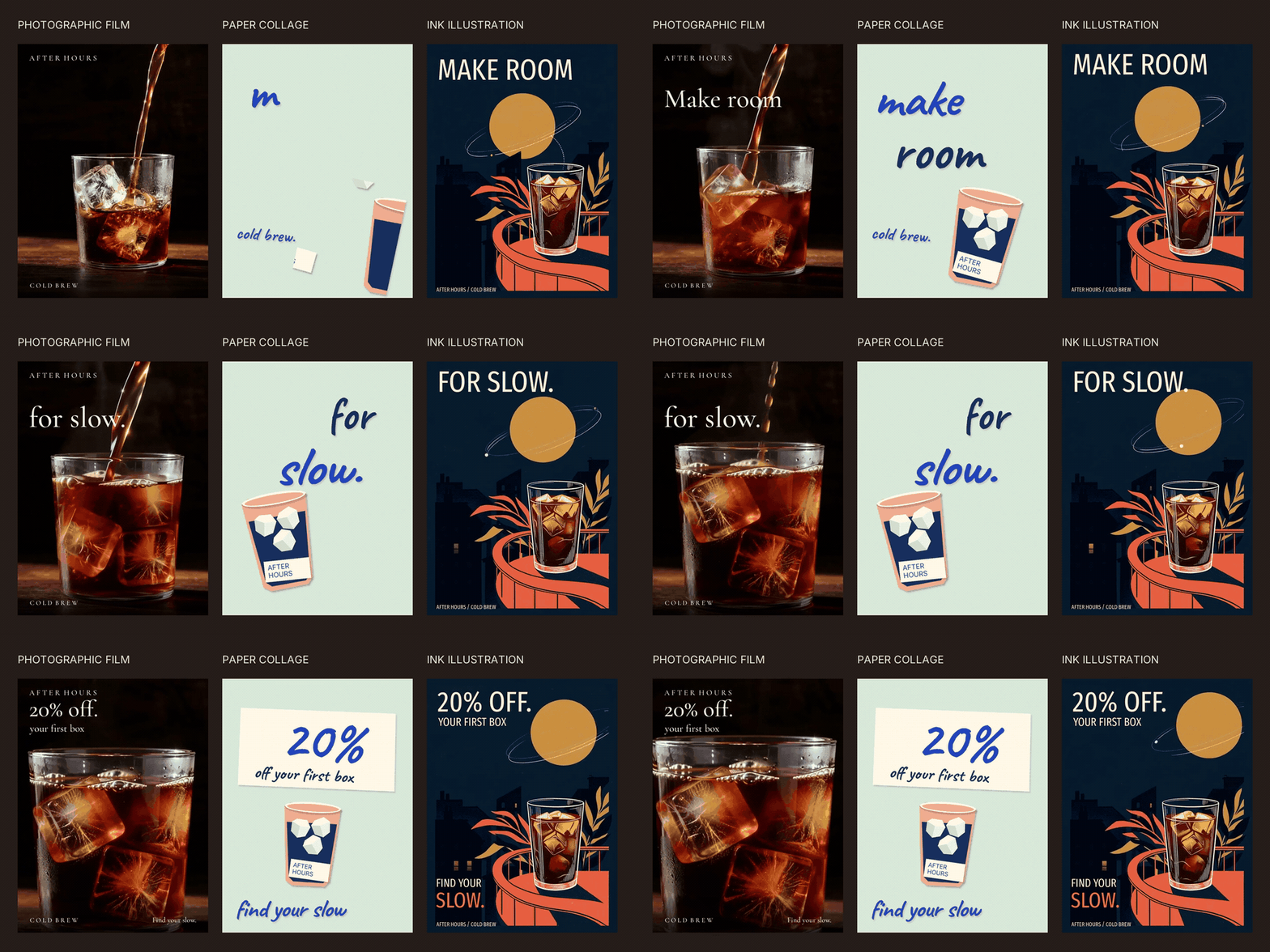
Three ads can share a message without sharing a look. For this fictional After Hours cold-brew campaign, we made a dark photographic film, a handmade paper animation and an illustrated midnight café spot. Then we changed the offer across all three with one request.
Watch a single direction: photographic film, paper animation, or animated ink illustration.
The useful structure is simple: keep the approved copy in one file, and let each direction have its own images, typography and motion. You can use it to pitch a campaign or prepare variants for testing. These examples explore different packaging and visual identities; they are not a test of which ad performs best.
Fix the message, leave room for the direction
The shared message is “Make room for slow.” Each version ends with “20% off your first box” and “Find your slow.” Everything around those words can change: the palette, typeface, product view, layout and pacing.
Start with this brief:
Create three 12-second ads for the fictional After Hours cold-brew brand. Share the message “Make room for slow”, the first-box offer and the closing line “Find your slow”. Store those values in campaign.json. Give each ad its own visual direction and pacing. Keep the offer editable, and save the source files alongside each export.
Build three different kinds of movement
Photographic: let the coffee move
A close-up of coffee pouring over ice gives the film its motion: liquid rises, ice shifts and highlights change. Serif type sits in the dark space above the glass. It doesn't need a second layer of busy graphic transitions.
We generated the moving source with MiniMax H3 Max. Here is a reusable prompt:
A twelve-second cold-brew film: amber coffee pours into a clear tumbler over large ice cubes against a dark background. Warm side light catches the stream, condensation and refraction. The liquid rises naturally; the stream stops and the drink settles. Use a subtle camera move. Keep the upper-left area dark and quiet for typography. No words, labels or logos.
Keep exact offers out of generated footage. Add them afterward, and check that changing highlights never wash out the text.
Paper: assemble the picture
The paper direction uses cut shapes, faceted ice, uneven edges and handwritten headlines. Pieces enter separately, then the cup travels into the next composition. A broad coupon carries the closing offer; bold handwriting keeps the headline and discount readable in the comparison.
This version is authored in Python/Pillow. Its shapes and text remain editable; it does not depend on another generated image for each revision.
Illustration: give the scene its own rhythm
The third direction is a midnight café illustration in navy, coral and ochre. A drawn orbital trail moves around the moon while leaves sway beside the iced coffee. Condensed typography stays in the quiet navy space, clear of the illustration.
We generated a keyframe with Nano Banana 2 and animated it with MiniMax H3 Max. The final film stays illustrated; exact words and offers are added afterward. Use this direction prompt:
Create a screen-printed midnight café illustration in navy, coral and ochre: an iced-coffee glass, curved balcony, botanical leaves and a large moon. Leave quiet navy space for type. Animate the orbital ink trail, gently swaying leaves and subtle liquid movement. Keep the composition and illustrated style stable; no generated words or logos.
Keep the offer separate from the film
The project reads the offer from campaign.json. Its renderer combines the photographic film, procedural paper animation and illustrated film with their own text layouts. FFmpeg encodes the outputs.
You can run this locally with the included assets. No new generation is needed to change the discount. Longer replacement copy may need a layout adjustment, so inspect all three exports after an edit.
In Voyager, the desktop creative agent our team builds, the files and previews sit beside the revision conversation. With an agent provider configured, we made this request:
Change campaign.json: 15% off. → 20% off. Render all three directions to exports/v2; run python3 compare.py v2 and present the comparison. Preserve the base films, source files and exports/v1. Do not generate new media.
Description / transcript
Three ads show 15 percent off. In Voyager, a request changes campaign.json to 20 percent and renders the three directions again. The photographic and illustrated films, render and scene sources, and earlier exports remain unchanged. The final outputs all show 20 percent off.
The agent changed the offer from 15% to 20%, rendered all three versions and preserved the source assets and previous exports. That is the reusable part of the workflow: three different creative directions, one place to update the approved offer.
Download the editable project. Unzip it and open index.html to compare the videos offline. The README includes the render commands, exact generation inputs, fonts and illustration source. The included films let you try the offer edit without a Voyager account or paid generation access.
Make your next project in Voyager
Create an account, download Voyager, and start making.