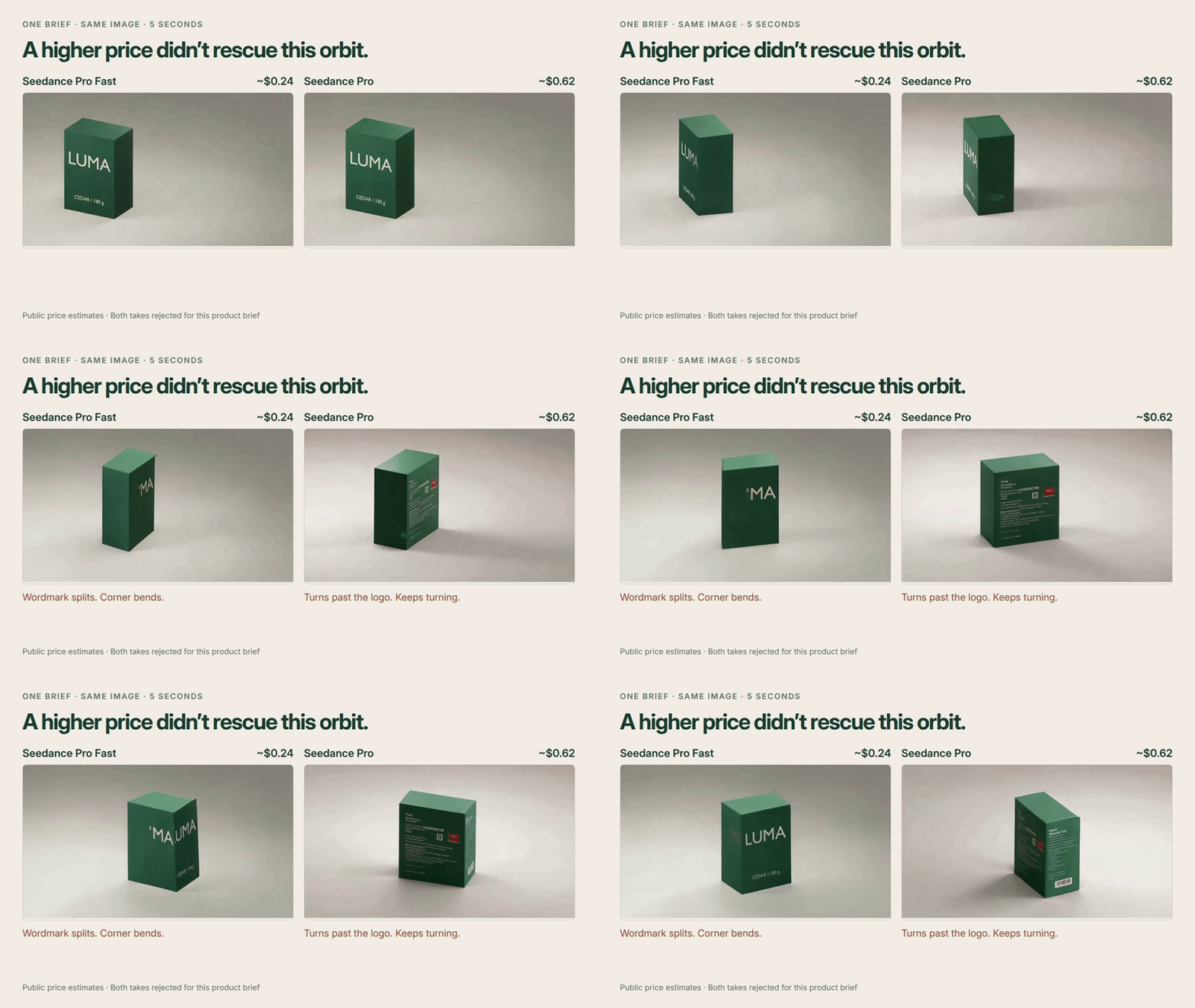
A five-second product clip can look expensive and still be unusable. If the camera hides the logo or invents packaging copy, its generation price tells you little about the cost of finishing the ad.
We tried two simple launch-shot briefs with Seedance 1.0 Pro Fast and the more expensive Pro. Neither model produced a finished ad we would use. Here is how to compare the failures, keep track of every attempt and decide whether a rerun is worth paying for.
Start with a shot you can judge
Use an image you own. Our fictional LUMA package has a large wordmark, small product copy and space on the right for a headline: useful constraints for a launch page or social ad.
Here is the exact push-in prompt:
Animate this product image into a five-second launch shot. Slowly push the camera closer over the first four seconds, then settle for the final second. Keep the LUMA wordmark legible, preserve the rectangular box and all packaging text, and keep the product stationary. Leave the right third clear for a headline. Soft studio light. No cuts, new objects or added text.
The second brief asked for a different camera move:
Animate this product image into a five-second launch shot. Orbit the camera thirty degrees clockwise around the stationary box over the first four seconds, revealing more of its right side, then settle for the final second. Keep the LUMA wordmark legible and preserve the rectangular box and all packaging text. Leave the right third clear for a headline. Soft studio light. No cuts, new objects or added text.
Before generating, write down what must pass: readable branding, unchanged packaging copy, stable package shape, the requested motion, clear headline space, no flashes or cuts, and a subdued final second. Check the small type as closely as the logo.
Compare the failures before the prices
Each pair used the same image, prompt and seed, requesting five seconds at 1080p. Model names and prices were hidden during review.
| Brief | Pro Fast | Pro |
|---|---|---|
| Push-in | Keeps LUMA, but adds nonsense packaging copy | Keeps LUMA, but adds duplicate branding and nonsense copy |
| 30° orbit | Splits the wordmark and bends a corner | Rotates past the logo toward the back; keeps turning |
Both push-ins preserved the main wordmark, but invented smaller text. Neither was ready for an ad. We had left small type outside the initial pass/fail checklist; this is why packaging copy belongs in yours.
At fal’s public example rates, the four attempts were estimated at about $1.73 in generation fees: roughly $0.49 for two Fast takes and $1.24 for two Pro takes. These are provider estimates, not itemized charges from our account. Pricing varies with duration and resolution. Pro Fast pricing, Pro pricing.
The calculation to keep is:
Cost per usable shot = total generation spend ÷ accepted shots.
With zero accepted shots, report “no usable shot yet.” Don’t divide by zero, exclude rejected attempts, or treat a successful push-in as a replacement for a required orbit. Two briefs cannot establish a model’s general success rate.
Rerun one shot in Voyager
You can do this comparison in a spreadsheet and any video tool. Voyager, which our team builds, keeps the input, saved prompts, clips and experiment ledger beside the agent conversation. This workflow needs a configured coding-agent provider and paid video-model access.
After reviewing Fast, we asked the desktop agent to rerun only the orbit with Pro. It kept the originals and added the new result to the ledger. The more expensive take still failed the brief. A separate Pro push-in completed the paired comparison.
Reusable adaptation of that request:
Reject the orbit take: the wordmark splits and the box corner bends. Keep both originals. Rerun only the orbit with the selected model, using the exact saved image, prompt, seed, duration and resolution. Add its receipt and estimated cost to the ledger. Leave acceptance undecided until review.
Description / transcript
Silent video. 0–5s: two orbit takes from the same image and brief, Pro Fast at about $0.24 and Pro at about $0.62 in public estimates. Fast splits the wordmark and bends a corner; Pro turns the logo out of view. Both are rejected for this brief. 5–9.5s: the actual Voyager desktop shows the clips and review page together. 9.5–14s: a labeled still hold of the actual request asks to rerun only the orbit, preserving the source, saved prompt and settings while changing the model. 14–17.5s: a labeled still hold of the completed response confirms the originals remain and the new take still fails the wordmark rule. 17.5–22s: count shots you can use, keep every attempt, and divide total cost by accepted shots. If none pass, there is no usable-shot cost yet.
If exact packaging matters, the next useful step may be a controlled 3D render or compositing the original label instead of another blind retry. The download includes the editable Blender source as well as all four unedited model outputs.
Download the comparison kit. Unzip it and open index.html: review the clips with model names hidden, reveal the prices, and calculate costs using your own acceptance decisions. Videos and controls work offline; generation requires separate model access.
Make your next project in Voyager
Create an account, download Voyager, and start making.