
 Read Markdown
Higgsfield and Kling are not two rival video models. Kling is a model family, built by Kuaishou and sold through its own app at kling.ai and a developer API. Higgsfield is a platform that licenses Kling and runs it next to Seedance, Veo, Sora, Wan and its own tools. Every Kling video model since 2.1 is on Higgsfield's model list, including 3.0, 3.0 Turbo, 3.0 Omni and 3.0 Motion Control (Higgsfield help centre). So the question is not which generator is better. It is whether to run Kling inside Higgsfield or in Kling's own app, and the answer changes with the job.
The short version: run Kling on Higgsfield when the clip is one step in a workflow that also needs a consistent character image, a storyboard, another model for a shot Kling handles badly, or a plugin inside Premiere, After Effects, Resolve, Photoshop, Figma or Blender. Run Kling in its own app when you want the newest Kling capability the week it lands, video extension, the largest element library, team workspaces, or the cheapest per-second rate at high volume. Developers now have a real choice, because both vendors sell Kling 3.0 by the second at the same list price and differ on minimums.
Everything below was read from both vendors' own pages on 17 September 2026. Prices on both sides change often; the full Higgsfield plan breakdown lives in Higgsfield pricing, and the comparison with Runway, which is a different kind of decision, is in Higgsfield vs Runway.
One is a platform, the other is a model
Kuaishou launched Kling in June 2024 and has followed it with 1.6, 2.0, 2.1, 2.6 and 3.0 (Wikipedia). Kling 3.0 rolled out fully on 31 January 2026, with a 5 February press release claiming 60 million creators and 600 million videos to date (Kling release notes, Kuaishou via Yahoo Finance). The model is sold three ways: a consumer app at kling.ai with a credit subscription, a developer platform with prepaid API packages, and licences to third-party platforms.
Higgsfield is one of those third-party platforms, and the one that has leaned hardest into Kling. Its help centre recommends Kling for "longer clips, multi-shot continuity, and physically coherent motion", against Seedance for human motion and Wan for first-and-last-frame control (Higgsfield help centre). Around the licensed models it sells its own layer: Soul for consistent character images, Popcorn for storyboards, Cinema Studio for camera-directed shots, a Lipsync Studio, plugins for the main editing and design apps, a hosted MCP server and CLI for coding agents, and a newly launched pay-as-you-go API.
That structure decides most of what follows. Higgsfield cannot ship a Kling feature before Kuaishou ships it, and its pricing for Kling is a markup or a subsidy on top of Kuaishou's, depending on the plan. What it can do is put Kling next to things Kling's app does not have.
Which Kling you get on each side
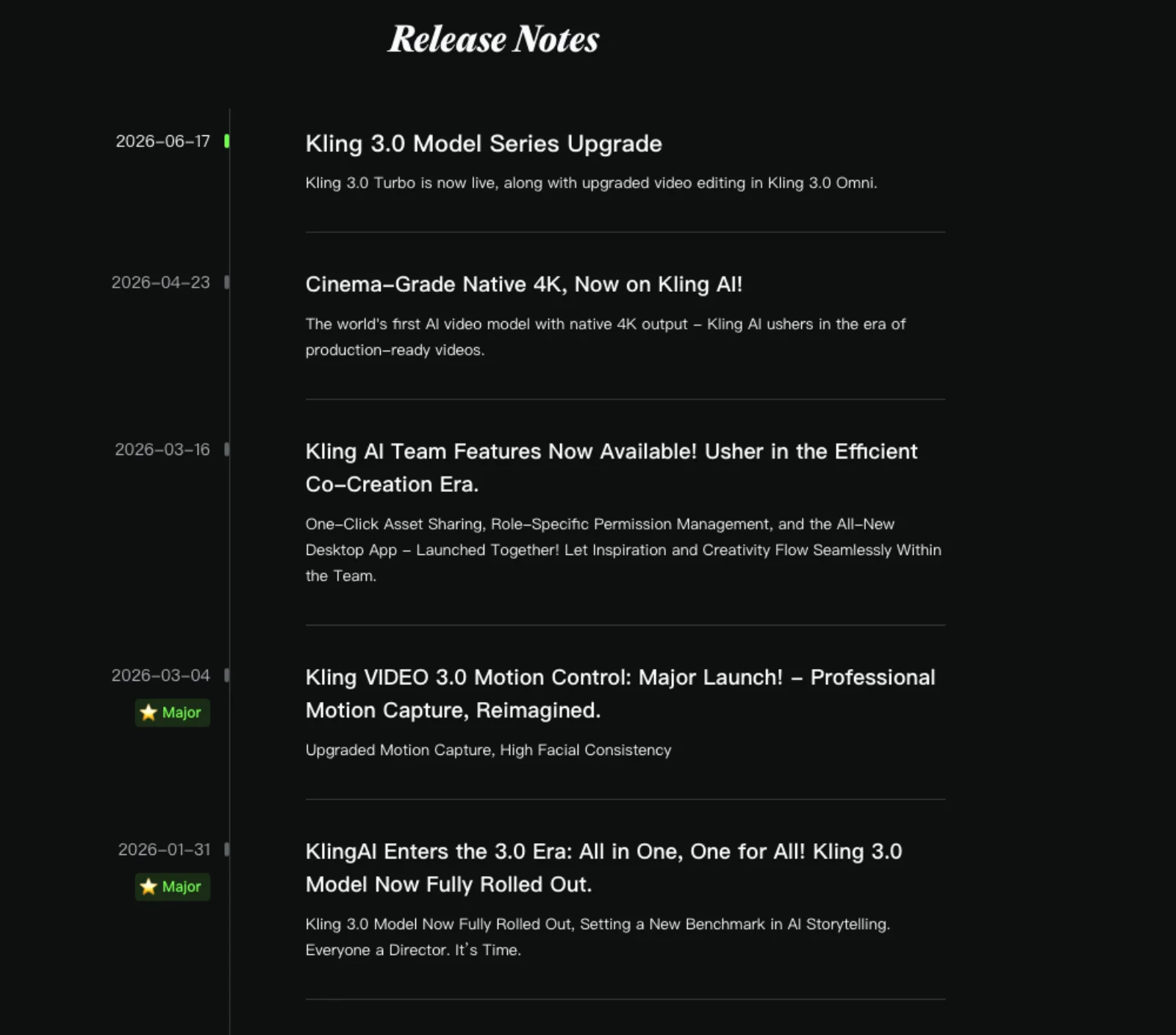
The two sides are closer on versions than a year ago. In 2025 there were often weeks between a Kling release and its arrival on hosting platforms. In 2026 the gap has been days: Kling's release notes date Motion Control 3.0 to 4 March and Higgsfield's guide to it is dated 5 March; Kling's 3.0 Turbo note is dated 17 June and Higgsfield's changelog entry 16 June, which is the same day across time zones (Kling release notes, Higgsfield blog, Higgsfield changelog).
The differences are in the app features around the model, not the model itself.
| Capability | Kling's own app (kling.ai) | Kling on Higgsfield |
|---|---|---|
| Kling 3.0 text, image, start and end frame, native audio | Yes, 3 to 15 s, 720p and 1080p (Kling guide) | Yes, 3 to 15 s, 720p, 1080p and 4K (help centre) |
| Native 4K output | Yes, since 23 April 2026, 30 credits per second (Kling blog) | Yes, about 30 credits per 5 s (pricing) |
| Kling 3.0 Turbo | Yes, since 17 June 2026 | Yes, 1080p, since 16 June 2026 |
| Kling 3.0 Omni (reference video, multi-element, editing) | Yes, up to 15 s, 1080p (Omni guide) | Yes, listed at 4K, plus Omni Edit at 1080p |
| Motion Control 3.0 (reference video 3 to 30 s onto a character image) | Yes (Motion Control guide) | Yes, 720p and 1080p, also through the MCP since 9 June |
| Multi-shot in one generation | Yes; Kling's guide shows four to six shots | Yes; Higgsfield's guide describes up to five shots (Higgsfield blog) |
| Elements (reference bundles for a subject) | Yes; 2 to 4 images per element, library of 30 to 500 elements by tier (Element guide) | Yes, as tagged elements; no stated library cap |
| Voice control add-on | Yes, 2 credits per second; "VIDEO 2.6 Voice Control" free for subscribers | Not listed |
| Lip sync and talking avatars | Yes; Avatar and Lip Sync are API products too | Yes, Kling Avatars 2.0, Kling Speak and Kling Lipsync inside Lipsync Studio |
| Video extension | Yes, on paid tiers (membership) | Not on the Kling model page |
| Kling 2.6, 2.5 Turbo, 2.1, 2.1 Master, O1 | 2.6 and O1 still documented; older versions not confirmed on the current app | All listed, with 2.6 and O1 including their edit modes |
| Canvas Agent (storyboard to batch generation in chat) | Yes, since 29 January 2026 | No; Higgsfield has its own Canvas and Popcorn instead |
| Team workspace, permissions, desktop app | Yes, since 16 March 2026 | Team and Scale plans with shared credit pool |
| .mov export, keyframe extraction | Yes | Not listed |
Two cautions on the table. Neither vendor publishes a full parameter list per version, so "not listed" means the feature does not appear on the vendor's own page for Kling, not that it is impossible. And the same model does not guarantee the same output: prompt enhancement, default settings and reference handling differ by surface, and Higgsfield's guide describes its own workflow for elements and multi-shot prompts. The text-to-video versus image-to-video post covers what each starting point locks regardless of the app.
What Higgsfield adds around Kling
Other models one click away. Higgsfield's video list on its pricing page runs to Seedance 2.0 and 2.5, Veo 3.1, Sora 2 in four variants, Wan 3.0 and 3.0 Prime, Hailuo 2.3, Grok Video and its own DoP, each with a credit cost per clip printed next to it (Higgsfield pricing). If Kling gives you a beautiful establishing shot and a bad product close-up, you re-run the close-up on Seedance without leaving the project or buying a second subscription.
Character images before video. Soul 2.0 generates consistent character images at 0.12 credits each, and Popcorn builds storyboards of up to eight frames with the same character, lighting and setting across panels, then hands them to video (Higgsfield storyboard page). Kling's app has an image model and an element library, but the image-first pipeline is the thing Higgsfield built its brand on.
Cinema Studio. Version 4.0, released 12 August 2026, offers camera and lens presets, an emotion wheel, colour presets and generations up to 30 seconds (Higgsfield changelog). It is a directed-shot tool that sits over several models; it is not Kling, but it is where Higgsfield users who want camera control tend to start.
Plugins, MCP, CLI. Official plugins exist for Figma and FigJam, Photoshop, Premiere Pro and After Effects, DaVinci Resolve and Blender, all billed from the same plan credits (Higgsfield help centre). The hosted MCP server at mcp.higgsfield.ai exposes Kling 3 among 30-plus models to Claude, Cursor and any MCP client, with OAuth instead of API keys (Higgsfield MCP). Kling's app has none of these; its developer route is the API.
Unlimited windows. Plus and Ultra include "7-day unlimited" Kling 3.0 on the web app, alongside 365-day unlimited on a set of image models. Starter does not. The fine print matters: unlimited applies "only via higgsfield.ai" and never through the MCP, CLI, Canvas or Supercomputer, and "may be subject to dynamic speed adjustments during high-traffic periods" (Higgsfield pricing).
What Kling's own app has that the hosted version lacks
First access to app features. The model versions reach Higgsfield within days. The app features around them do not travel: video extension, the Canvas Agent, .mov export, keyframe extraction, voice control and the daily free multi-view element generation are on kling.ai only.
The element library. Kling's guide gives specific limits: each element takes two to four reference images, Video 3.0 binds up to three elements per generation, Omni up to seven without a video input, and the library holds 30 elements for non-members rising to 500 on Ultra (Element guide). Higgsfield exposes elements but publishes no equivalent limits, so anyone building a recurring cast of characters can plan on Kling's numbers and only guess at Higgsfield's.
Batch and queue behaviour. Kling's paid tiers generate up to four videos per request, queue "unlimited tasks" and get "fast-track generation"; the free tier gets one video per request in the standard queue (Kling membership). Higgsfield's equivalent is concurrent jobs: one on Free, two on Starter, six on Plus, eight on Ultra, with Plus and Ultra also labelled "unlimited paid parallel generations" (Higgsfield pricing).
Team features from the model vendor. Since March 2026 Kling has shared assets, role permissions and a desktop app. Higgsfield's Team plan is priced per seat from two seats and pools credits, so both sides serve teams, but Kling's is included in an individual Ultra plan rather than a separate tier.
Community. Kling's Explore feed and its own prompt guides are written for its own model. Higgsfield's Academy and Community sections cover every model it hosts. This matters less than it sounds; both sets of guides are free and neither requires the subscription to read.
Price per second of 1080p Kling 3.0
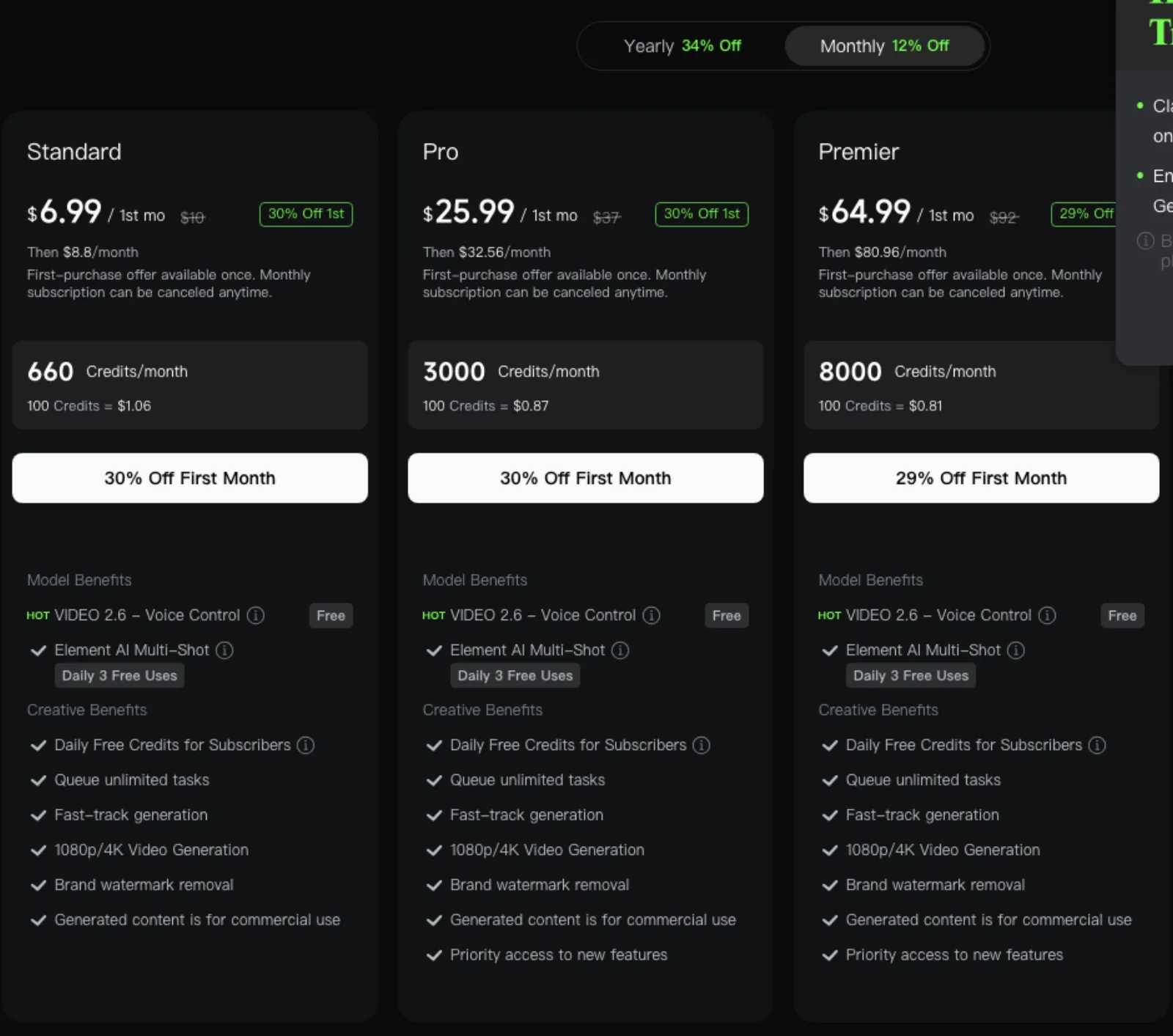
The two credit systems are not comparable directly, so the table converts both to dollars per second of 1080p Kling 3.0 output on each plan, at the renewal price, using each vendor's published credit rate on 17 September 2026. Kling's app bills 8 credits per second at 1080p without native audio and 12 with it (Kling guide). Higgsfield's pricing page lists Kling 3.0 at "~8 credits/5s" at 1080p and does not say whether that rate includes audio, so treat its figure as the lower bound.
| Plan (renewal price) | Credits per month | 1080p Kling 3.0, no audio | With native audio | 5 s clip with audio |
|---|---|---|---|---|
| Kling Standard, $8.80/mo | 660 | $0.107/s | $0.160/s | $0.80 |
| Kling Pro, $32.56/mo | 3,000 | $0.087/s | $0.130/s | $0.65 |
| Kling Premier, $80.96/mo | 8,000 | $0.081/s | $0.121/s | $0.61 |
| Kling Ultra, $159.99/mo | 26,000 | $0.049/s | $0.074/s | $0.37 |
| Kling Ultra, $1,429.99/yr | 26,000 | $0.037/s | $0.055/s | $0.28 |
| Higgsfield Starter, $19/mo | 270 | $0.113/s | not stated | $0.56 or more |
| Higgsfield Plus, $59/mo ($47 annual) | 1,200 | $0.079/s ($0.063/s) | not stated | $0.39 ($0.31) or more |
| Higgsfield Ultra, $129/mo ($99 annual) | 3,000 | $0.069/s ($0.053/s) | not stated | $0.34 ($0.26) or more |
| Higgsfield Plus or Ultra, inside the 7-day unlimited window | n/a | $0 marginal on the web app | ||
| Kling API, list | prepaid units | $0.112/s | $0.168/s | $0.84 |
| Higgsfield API, list | USD balance | $0.168/s (Kling 3.0 Pro) | $0.84 |
Sources: Kling membership, Kling API pricing, Higgsfield pricing, Higgsfield API pricing. Kling's yearly tiers are 34% off the list price, so Standard is $79.20 a year, Pro $293.04, Premier $728.64 and Ultra $1,429.99.
Three things stand out. First, at the entry level Higgsfield's credit is cheaper per second of Kling than Kling's own Standard plan, and Plus at $47 a month lands near Kling's Premier at $81. Second, at the top Kling's Ultra tier undercuts everything except Higgsfield's unlimited window, and the window is a week per month on the web only. Third, 4K costs the same relative premium on both sides: 30 credits per second on Kling (about $0.18/s on Ultra monthly) and about 30 credits per 5 seconds on Higgsfield (about $0.20/s on Ultra annual), and $0.42/s at list on both APIs.
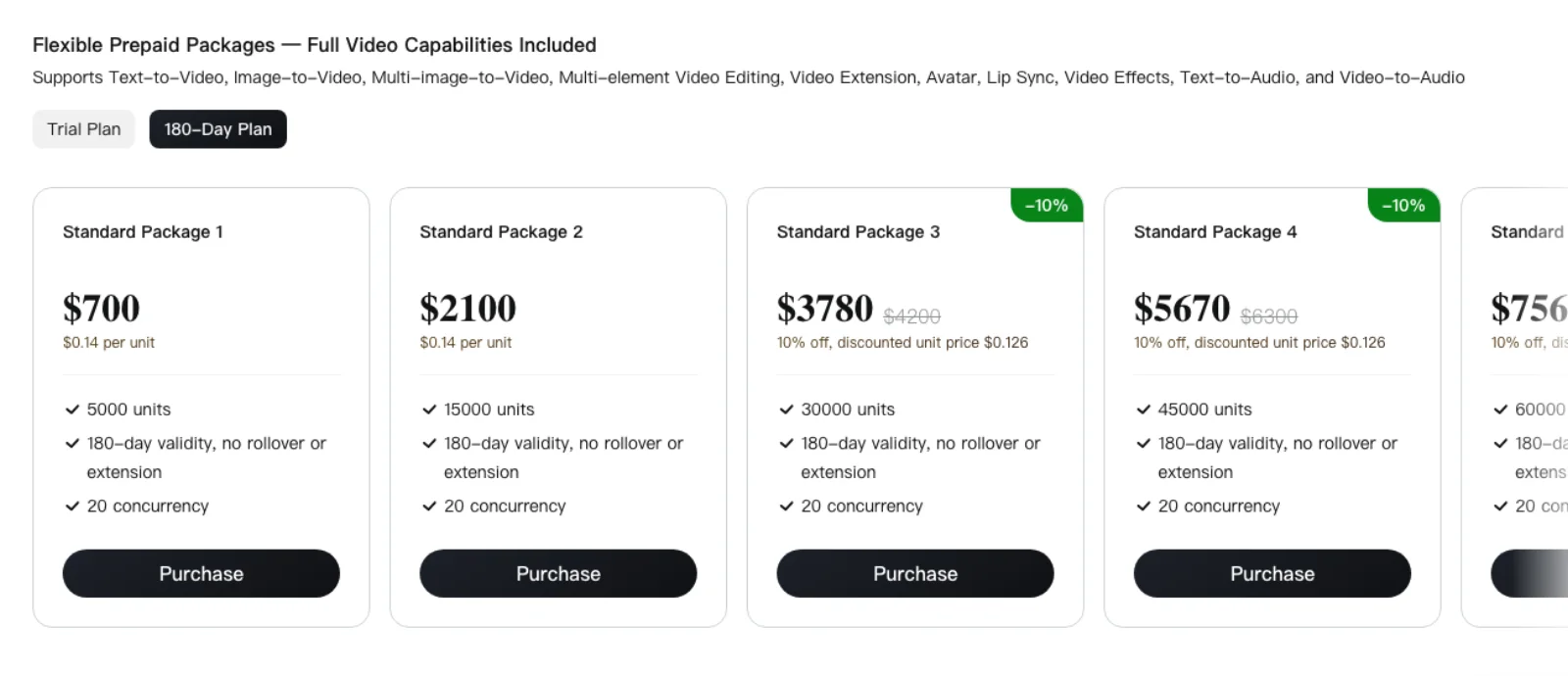
On the APIs, the list prices match line for line: Kling 3.0 at 1080p with audio is $0.168/s on Kling's developer platform and $0.168/s for "Kling 3.0 Pro" on Higgsfield's, 4K is $0.42/s on both, and Turbo is $0.14/s on both. Higgsfield is running a launch offer that halves those for a limited time, with the comparison page dated 16 September 2026. The lasting difference is the minimum: Kling sells 5,000 units for $700 with 180-day validity and 20 concurrent requests; Higgsfield's API bills from a US dollar balance with a $5 minimum top-up and 20 concurrent requests on key creation (Kling API pricing, Higgsfield help centre).
Free tiers, limits and queues
Kling's Basic tier is free with no monthly credits, no 1080p or 4K, no extension, one video per request, a watermark and no commercial use (Kling membership). Kling's credit policy describes daily login credits "subject to platform announcement" rather than a fixed allowance (Kling credits policy), so the daily figure you may have seen quoted is promotional and can change. Paid credits expire a month after issue; purchased credits last two years.
Higgsfield's Free plan is "limited use": one concurrent job, no fast-track, no commercial use, and, per its Kling 3.0 page, "free access to Kling 3.0 with a limited number of generations" (Higgsfield pricing, Higgsfield Kling 3.0). Subscription credits expire at renewal; top-up packs last 90 days (Higgsfield help centre).
Neither free tier is a way to evaluate 1080p output. Kling's cheapest paid month is $6.99 once, then $8.80; Higgsfield's is $19.
Rights and training
Both vendors say you own what you generate, and both reserve the right to train on it.
Higgsfield's terms, updated 27 August 2026, say it "does not claim ownership of your inputs or outputs" and does not restrict commercial use, with rights surviving cancellation; outputs may be used to improve its models unless you delete them or are on an Enterprise agreement (Higgsfield help centre). Its pricing table nonetheless lists commercial use as "not included" on Free, which in practice means the watermark.
Kling's membership page grants "generated content is for commercial use" on every paid tier and withholds it from Basic. Its user policy, effective 21 April 2026, gives you ownership of the content, asks that outputs be labelled as generated by Kling AI where the interface does not already carry the mark, and reserves the right to use your content to train its models (Kling user policy). The policy also carries a general clause restricting commercial use of Output that the paid-tier benefit overrides; if your use is sensitive, read section 4 rather than the pricing page.
What you can do after the render
Both surfaces return a rendered file. Neither gives you a project you can reopen and change a single shot in, which is the distinction what editable means for AI video draws. The practical differences are in what you can re-run.
On Kling's app, a paid subscriber can extend a finished clip, run Omni's video editing on it, re-use the same bound elements in the next generation, and, in the Canvas Agent, revise through multi-round dialogue and batch the results. Frame extraction turns any generated frame into a new start or end frame.
On Higgsfield, the same Kling generation can be pushed into Omni Edit or O1 Video Edit, upscaled, relit or colour-graded with Higgsfield's standalone video tools, or sent to a plugin inside your editor. During an unlimited window, re-running a Kling 3.0 prompt on the web costs nothing, which changes how many variations you are willing to try. Outside the window, every re-run is credits on both sides.
Job to tool
| Job | Run Kling where | Why |
|---|---|---|
| A single cinematic clip, best possible Kling output | Kling's app | Every 3.0 mode including 4K, extension and voice control, on a subscription from $8.80; nothing Higgsfield adds is needed |
| Character consistency across many shots | Kling's app for the cast, either for the shots | Kling publishes element limits and holds up to 500 elements on Ultra; Higgsfield's Soul and Popcorn are stronger for the image-first version of the same job |
| Social ad that ends up in Premiere, After Effects or Resolve | Higgsfield | The plugins and Lipsync Studio keep the round trip inside the editor; Kling's app has no plugin surface |
| Batch generation, dozens of variants a day | Higgsfield Plus or Ultra during the unlimited window; Kling Ultra otherwise | The window is free on the web for seven days a month; Kling's Ultra is the cheapest steady rate, at $0.055 to $0.074 per second with audio |
| Developer calling the model from code | Higgsfield API to start, Kling API at volume | Same list price per second; Higgsfield's $5 minimum against Kling's $700 package, but Kling's platform is the source and documents every mode |
| Cheapest single 5-second 1080p clip | Higgsfield Ultra annual ($0.26) or Kling Ultra annual ($0.28 with audio) | Within a few cents of each other; at lower tiers Higgsfield Plus beats Kling Standard and Pro |
The honest summary is that Kling's app wins on the model and Higgsfield wins on everything around it. If the clip is the deliverable, go direct. If the clip is an ingredient, the platform earns its place.
Frequently asked questions
Does Higgsfield use Kling? Yes. Higgsfield licenses Kling's video models and lists 3.0, 3.0 Turbo, 3.0 Omni and Omni Edit, 3.0 Motion Control, 2.6, 2.5 Turbo, 2.1, 2.1 Master and O1 on its Kling help page, plus Kling Avatars 2.0 in Lipsync Studio (Higgsfield help centre). Higgsfield also hosts Seedance, Veo, Sora, Wan, Hailuo and Grok video models and builds its own tools on top.
Is Kling better than Higgsfield? The question compares a model with a platform. Higgsfield's Kling output comes from the same Kling model, so any difference in a given clip is down to settings, prompt handling and references rather than a different engine. Kling's own app has features Higgsfield's Kling page does not list, such as extension and voice control; Higgsfield has models, character tools, plugins and an MCP that Kling's app does not.
Is Kling free? There is a free Basic tier with a watermark, no 1080p, one video per request and no commercial use. Kling's credit policy describes daily credits as promotional and subject to announcement, not a fixed allowance. The first paid month is $6.99 on Standard, then $8.80 (Kling membership).
Which is cheaper, Higgsfield or Kling? For a second of 1080p Kling 3.0 on 17 September 2026: Higgsfield Plus ($0.063 to $0.079) is cheaper than Kling Standard ($0.107 without audio, $0.160 with) and Pro ($0.087 and $0.130); Kling Ultra ($0.049 to $0.074 monthly, $0.037 to $0.055 annual) and Higgsfield Ultra ($0.053 to $0.069, audio not stated) are within a few cents of each other, and Higgsfield's 7-day unlimited window is cheaper than either while it lasts. The APIs list the same per-second prices.
Can I use Kling's newest model in Higgsfield? Almost always within days. Kling 3.0, Motion Control 3.0 and 3.0 Turbo each appeared on Higgsfield within a day or two of Kling's release note. Higgsfield's pricing page warns that new models "may be done on a rolling basis and not available to all users at launch", and app-side features such as extension and the Canvas Agent stay on kling.ai.
Make your next project in Voyager
Create an account, download Voyager, and start making.
