Blog/Workflows
How to brief an AI video agent: the four things every brief needs
Prompt guides teach you to describe one shot. Creative-brief templates are written for a human crew. An agent needs the job, the viewer, the constraints, and what done looks like.

Anvisha Pai, Co-founder & CEO, Voyager
12 min read·Sep 15, 2026

A brief for an AI video agent is not a long prompt. A prompt describes what one shot looks like. A brief describes why the video exists and what would make it wrong, and leaves the shots to the agent. If you have moved from typing into a clip generator to handing a whole job to something that plans, generates and assembles, the thing you write has to change with it. Four parts cover it: the job, the viewer, the constraints, and what done looks like. Get those four right and the first cut comes back close enough to correct instead of restart.
A prompt is a shot. A brief is a job.
Every video model publishes a prompt formula, and they all describe the same thing: a single shot. Runway's guide recommends [Camera] shot of [subject] [action] in [environment], with supporting descriptions after (Runway Academy). Kling's is Subject + Movement + Scene, then camera, lighting and atmosphere (Kling). Google's Veo guidance lists subject, action, style, camera positioning and motion, composition, focus and ambiance (Gemini API docs). OpenAI's Sora 2 guide puts it well: prompting is like "briefing a cinematographer who has never seen your storyboard" (OpenAI cookbook).
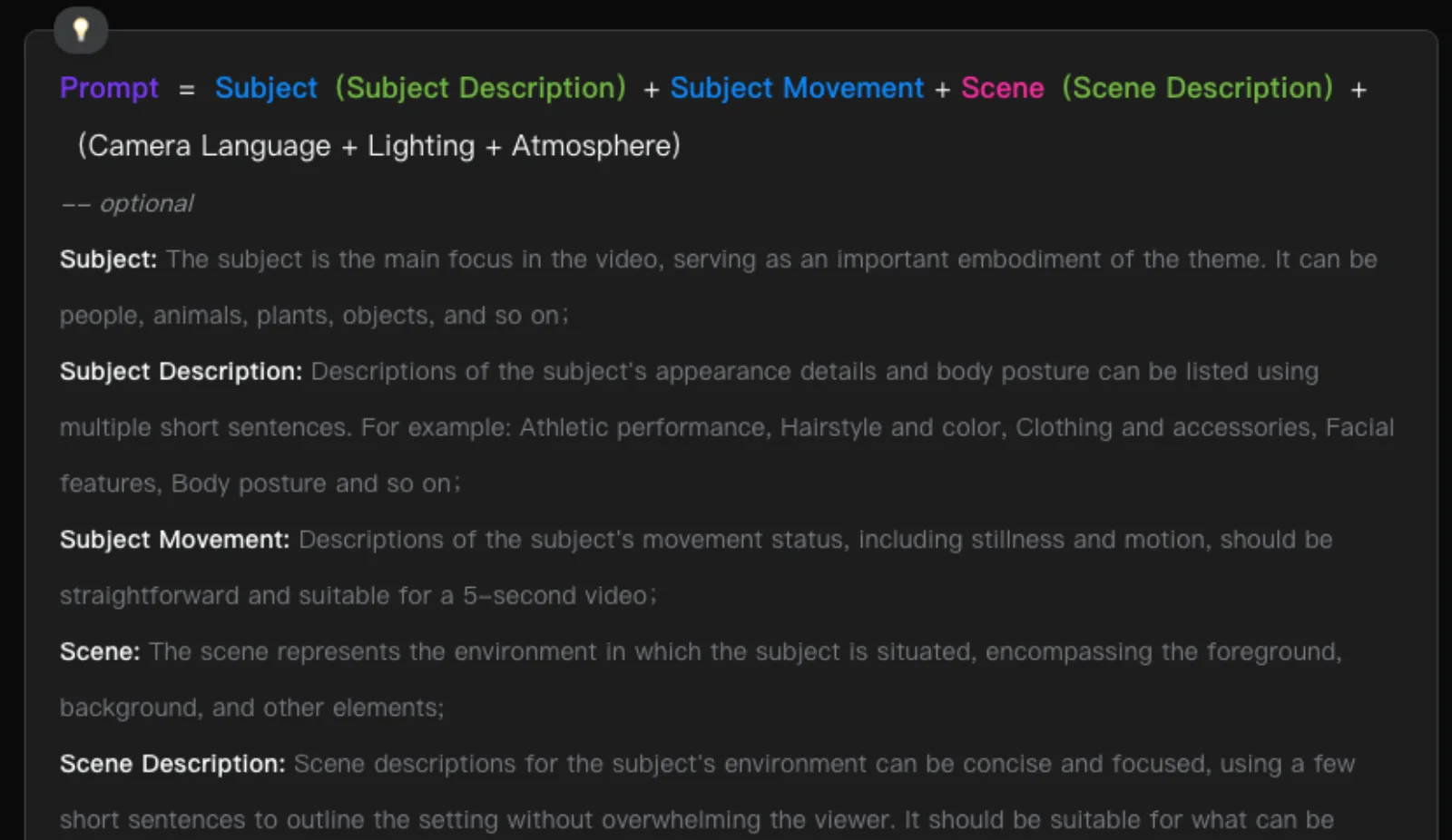
Kling's prompt formula, from its text-to-video guide. Every field describes the frame. Nothing in it says what the video is for.
That is the right analogy, and it exposes the gap. A cinematographer still needs to know what the film is for. The formulas above are what an agent writes, one per shot, after it has decided what the shots are. What you write is the layer above: the reason the video exists, who it is for, what it may and may not do, and how you will judge it.
A traditional creative brief sits at that layer, but it was written for a production company with a two-week schedule: a page or two covering objective, audience, competition, budget, mood boards, deadlines and deliverables. An agent does not need the pitch-meeting parts. It needs the four decisions it cannot make for you.
Here is the same idea as a prompt and as a brief, so the difference is concrete.
Prompt: Slow dolly-in on a matte black smartwatch on a concrete plinth, soft top light, shallow depth of field, 5 seconds.
Brief: A 20-second vertical teaser for the Series 3 watch, for people who already own the Series 2 and are deciding whether to upgrade. The one thing they need to see is the new always-on display next to the old one. Use the two product renders attached; do not invent a watch. No music with vocals. Done means a cut where the display comparison is the longest shot and the last frame is the pre-order date.
The prompt gets you a nice shot of a watch. The brief gets you a plan you can approve or correct before anything renders.
1. The job
What the video has to do, and where it will run. One outcome, one placement.
"Announce the launch" is not a job. "Get existing customers to pre-order the upgrade" is. A single outcome tells the agent what the longest shot should be and what the last frame should say. When a brief carries three outcomes, the cut serves none of them, and the fix is to split it into three videos.
Placement decides more than people expect. It sets the aspect ratio, the duration ceiling, and whether the viewer has sound on. Those are model parameters, not creative choices: Veo generates 4, 6 or 8 second clips in 16:9 or 9:16 (Gemini API docs); Kling offers 5 or 10 seconds in 16:9, 9:16 or 1:1 (Kling); Sora 2 runs 4 to 20 seconds at set resolutions (OpenAI cookbook). An agent that knows the placement can plan shot lengths that fit what the models actually produce. An agent that does not will guess, and the guess is usually landscape.
The job also names the proof the agent may use. Every current model takes reference inputs, and that is where products, faces and logos come from: Veo accepts up to three reference images, Kling's O1 model up to seven, MiniMax's Hailuo and ByteDance's Seedance up to nine images plus video and audio (Kling O1 guide, MiniMax docs, Seedance on Dreamina). If a real product has to appear, attach the renders and say so. Prose cannot hold identity across shots; references can. Which input each shot should start from is its own decision, covered in text-to-video vs image-to-video.
2. The viewer
Who is watching, and what they already believe.
"Everyone" produces the average of everything. It is the most common failure in briefs written by people who know the product too well. The upgrade teaser above works because the viewer already owns the old model. The same product briefed for someone who has never heard of it needs a different first shot, a different pace and probably a different length.
Two questions do most of the work. Where are they when they see it? That sets sound-on or sound-off, which decides whether the message lives in the voiceover or in the frame. And what do they already know? That decides what you can skip. A viewer who knows the category does not need the problem explained; a viewer who does not will not sit through a feature list.
Write the viewer as a person in a situation, not a demographic. "A Series 2 owner scrolling with sound off, who has seen the launch headline and is deciding whether it is worth it" gives the agent a hook, a format and a reason to put the comparison up front. "Tech-savvy consumers 25 to 45" gives it nothing.
3. The constraints
Two kinds, and they behave differently.
Hard constraints are facts the cut must obey: total length, aspect ratio, the assets that must appear, brand rules, claims that cannot be made, the deadline, and the budget in credits or minutes if that matters. List them plainly. An agent can plan around a hard constraint it knows about and cannot plan around one it discovers on a revision.
Taste constraints are direction: tone, pace, references, and what to avoid. These are where most briefs go wrong, in two ways.
The first is negatives. Every vendor guide says the same thing about prompts: describe what you want, not what you do not. Runway's guidance is explicit, and Google's Veo guide tells you to state the positive condition instead of naming the thing to exclude (Runway Academy, Google Cloud Veo guide). That is a prompt-level fact about how models read text. Your brief is the right place for "never show the watch on a wrist" precisely because the agent, not the model, reads the brief. It translates the rule into positive shot descriptions. So put your negatives in the brief, and keep them out of anything that goes to a model directly.
The second is reference overload. Ten mood-board images with no hierarchy tell the agent nothing about which one wins when they conflict. Two references and a sentence about what each one is for ("this for the pace, this for the colour") beats a folder.
A useful split for what to generate versus what to reuse:
| Reuse from your assets | Let the agent generate |
|---|---|
| The product, from renders or photos | Environments and backgrounds |
| Faces of real people | Abstract motion, transitions, texture |
| Logos, type, on-screen copy | Camera moves around your assets |
| Existing footage you own | Music beds and sound design |
| Claims and numbers, verbatim | Pacing and shot order |
Anything in the left column that the agent invents is a mistake you will catch on review, so say up front that it is fixed.
4. What done looks like
This is the part a traditional brief handles worst, and it is the part that makes an agent run correctable. Where a conventional brief has success metrics at all, they are post-publish numbers like views and conversions. For an agent, done means the first cut you will accept without a second run. Write the acceptance test before the run, in three lines:
- The one shot that must exist. The display comparison, held long enough to read.
- The one thing a viewer should be able to say afterwards. "The new screen stays on."
- The delivery. 20 seconds, 9:16, captions burned in, last frame is the date.
Three lines is enough to judge the plan. When the agent returns its shot list, you check it against the test, not against your taste in the moment. If the must-exist shot is four seconds in a twenty-second cut, you can say so before a frame renders. That is the cheapest correction there is, and it is only possible because you wrote down what done looks like.
The published workflow that comes closest to this is ngram's: the brief carries an audience, a single promise, proof, a narrative arc and constraints, and the agent returns a one-line objective and a six-scene plan for approval before anything is rendered (ngram). The approval gate is the point. A plan is cheap to change. A render is not.
A worked brief
The whole thing, for a small product, in under 200 words.
Job. A 30-second vertical teaser for Pocket, a receipts app for freelancers, to run as a paid placement on Instagram Reels. Outcome: taps to the App Store listing.
Viewer. A freelancer scrolling with sound off who has just spent a Sunday doing expenses. They know the pain. They do not know Pocket exists.
Constraints. Use the two attached app screenshots for any UI; do not invent screens. The brand green is #1F7A4D. No people's faces. Captions burned in, since sound is off. The only claim allowed: "scan a receipt in one tap". Reference: the pace of the attached 15-second clip, not its look.
Done. The must-exist shot is a receipt being scanned and appearing in the app, at least six seconds. A viewer should be able to say "it scans receipts for me". 30 seconds, 9:16, ends on the app icon and the line "Free on iOS".
A plan that comes back from a brief like this looks something like: hook on the Sunday pile of receipts (3 seconds), the one-tap scan (7 seconds, the must-exist shot, built from the first screenshot), the result in the app (5 seconds, second screenshot), a short montage of receipts becoming rows (8 seconds), and the close (7 seconds). You read that against the three lines under Done and either approve it or send one correction.
When the first cut is wrong
There are three kinds of correction, and they cost very different amounts. Knowing which one you need is most of the skill.
Correct the plan. Before generation. The shot list is wrong, the order is wrong, the must-exist shot is too short. This is a sentence, and it costs nothing. It is available only if the agent shows you the plan first, which is the thing to look for in any agent you consider.
Correct a shot. After generation. One clip missed: the product drifted, the camera revealed something off-frame, the lighting fought the reference. Models are stateless between generations and hold identity through reference inputs, not prose, so a single shot can go wrong while the rest is fine. Regenerate that shot, with a tighter reference if identity was the problem, and keep everything else. If a tool cannot do this without re-rolling the whole cut, the second revision costs as much as the first. Whether it can is the first of the four questions to ask any tool before you commit a project to it.
Correct the brief. Something was missing, and every shot shows it. The viewer was wrong, the outcome was vague, or a hard constraint never got written down. This is the only case that justifies starting over, and it is the case the four parts above are there to prevent.
The pattern to watch for: if you find yourself correcting shot after shot for the same reason, stop. That is a brief problem wearing a shot problem's clothes.
Where Voyager fits, and where it does not
Voyager is built for exactly this shape of work: you give it a brief, it plans the shots, explains the plan in plain language, and lets you redirect before and during the run. It is in private preview, so treat that as the intended shape rather than a finished product, and check the current behaviour against your own job before relying on it.
If what you need is one beautiful shot, a brief is overhead and a prompt into a model you like is the faster route. The four parts earn their keep when the deliverable is a cut, with several shots, a message and a place it has to run.
Frequently asked questions
What is the difference between a prompt and a brief? A prompt describes what one shot looks like and goes to a model. A brief describes why the video exists, who it is for, what it must and must not do, and what a finished cut looks like, and goes to an agent, which writes the prompts. Every vendor prompt formula is a shot description; none of them carries the job.
How long should a brief be? As long as it takes to state the job, the viewer, the constraints and the acceptance test, and no longer. The worked example above is under 200 words. A traditional brief runs one to two pages because it is written for a crew and a schedule. Length is not the measure; whether the agent can plan from it is.
How do I keep the same product or character across scenes? With reference inputs, not descriptions. Attach the renders or photos and say they are fixed. Current models accept between three and nine reference images, and identity across shots comes from those, not from adjectives in a prompt.
Should I write the shot list myself or let the agent plan it? Let the agent plan it, then check the plan against your Done lines. If you already have a script or a shot list, give it as a reference and say which parts are fixed. Writing every shot yourself throws away the reason for using an agent, but leaving out the acceptance test throws away your ability to correct it.
Why did the agent ignore part of my brief? Usually one of three things: two constraints conflicted and it picked one, a negative rule was ambiguous, or too many references pulled in different directions. Read the plan it returned, find the line where it diverged, and correct that line rather than the output.
Can I give the agent a script instead of a brief? Yes, and it helps. A script still needs the job and the viewer around it, though. A script tells the agent what is said; it does not tell it where the video runs, who is watching, or what shot must exist for the cut to count as done.
