
Nano Banana is Google's consumer name for the image models inside Gemini, and two of them are selectable inside Photoshop today: Gemini 3.1 with Nano Banana 2 and Gemini 3 with Nano Banana Pro. They sit in the model picker of Generative Fill and Generate Image on the desktop app, next to Adobe's own Firefly models and two FLUX models from Black Forest Labs (Generative Fill, Generate Image). A generation with either Google model costs 20 to 40 generative credits against one credit for Firefly, which is the fact that decides whether the arrangement makes sense for you (partner models in Adobe products).
This post covers what the models are, where they appear in Photoshop and how to select them, what they cost on each plan compared with calling the model directly, what Photoshop adds around them, and what you give up by not going to Google. Every Adobe page cited was read on 21 September 2026, and every Google price comes from the Nano Banana model reference, which reads Google's pricing page and records the date.
What Nano Banana is
Google DeepMind's image models carry two names each: an engineering name and a consumer name. Nano Banana Pro is Gemini 3 Pro Image, announced on 20 November 2025 and built for legible text, long instructions and work from up to 14 reference images (Google announcement). Nano Banana 2 is Gemini 3.1 Flash Image, released on 26 February 2026 as the faster, cheaper generalist that became the default in the Gemini app (Google developer post). Nano Banana 2 Lite, Gemini 3.1 Flash Lite Image, followed on 30 June 2026 as the volume tier, fixed at 1K output; it is not in Photoshop (Nano Banana 2 Lite). The original Nano Banana, Gemini 2.5 Flash Image from August 2025, is being shut down by Google on 2 October 2026 (Gemini API pricing).
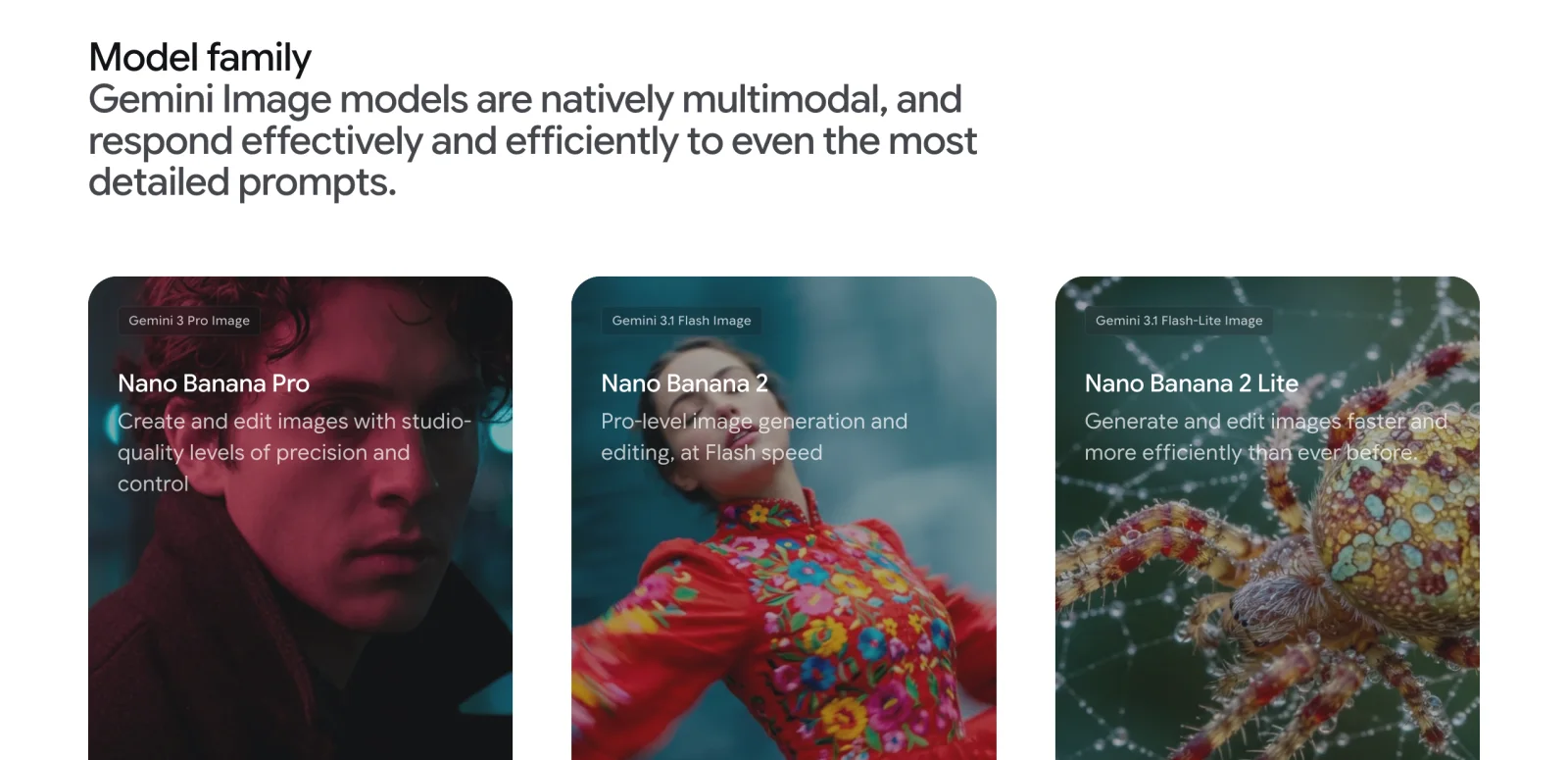
Adobe's labels combine both names: "Gemini 3.1 (with Nano Banana 2)" and "Gemini 3 (with Nano Banana Pro)". There is no menu item that just says Nano Banana (Generative Fill). The pages for Nano Banana 2 and Nano Banana Pro have the full parameter lists and the same twelve prompts run through each.
Where it appears in Photoshop
Adobe added Google's Gemini 2.5 Flash Image and Black Forest Labs' FLUX.1 Kontext [pro] to Generative Fill in the Photoshop beta on 25 September 2025, the first time non-Adobe models appeared in the app (Adobe blog). The list has changed since. On 21 September 2026 Adobe documents partner models on two desktop surfaces:
- Generative Fill. Adobe models: Firefly Fill & Expand, Firefly Image 5, Firefly Image 1. Partner models: FLUX.2 pro, FLUX Kontext pro, Gemini 3.1 (with Nano Banana 2), Gemini 3 (with Nano Banana Pro) (Generative Fill, page dated 15 September 2026).
- Generate Image, the text-to-image tool for a new document. Adobe models: Firefly Image 5, Firefly Image 3. Partner models: Gemini 3.1 (with Nano Banana 2), Gemini 3 (with Nano Banana Pro), FLUX.2 pro. The picker arrived here in the June 2026 release, version 27.8 (Generate Image, What's new).
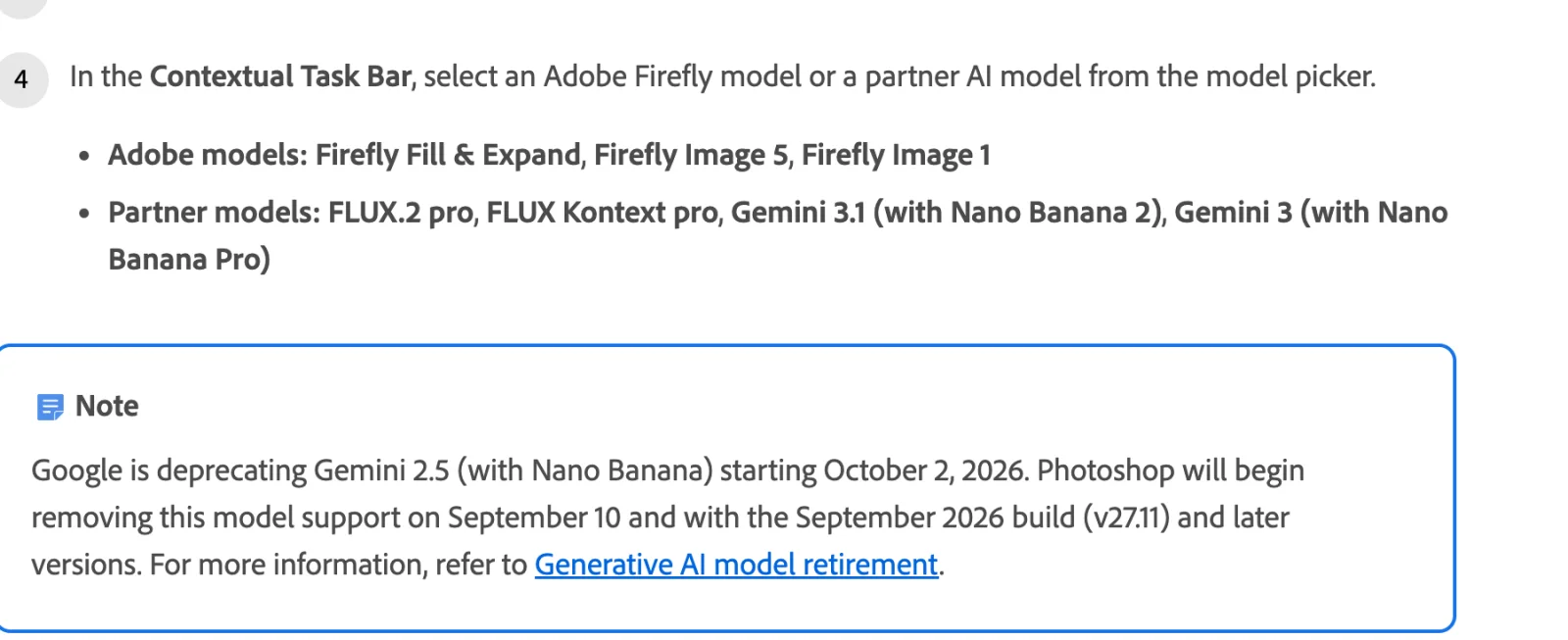
Two surfaces that do not expose the Google models, as documented:
- Generative Expand lists only Adobe models: Firefly Fill & Expand, Firefly Image 3 and Firefly Image 1 (Generative Expand, page dated 23 February 2026). Extending a canvas with Nano Banana is not something Adobe documents.
- Photoshop on the web and mobile. The web help for Generative fill describes a prompt box and a reference image and says the feature "deducts one standard generative credit per generation", with no model picker (Photoshop on the web). The iPhone help for Generate image likewise shows sizes and a prompt only (Photoshop on mobile). Adobe's own product page answers "Can I use Gemini 3 (with Nano Banana Pro) in Photoshop?" with "directly in Photoshop on desktop when using Generative Fill" (Photoshop Generative Fill).
So the practical answer is: desktop Photoshop, current release, Generative Fill or Generate Image.
How to select it, step by step
Adobe's documented flow for Generative Fill (Generative Fill):
- Open an image with File > Open.
- Make a selection with any selection tool; Adobe's example is the Selection Brush.
- Click Generative Fill in the Contextual Task Bar.
- In the Contextual Task Bar, open the model picker and choose a model. Adobe groups the list into Adobe models and Partner models; pick Gemini 3.1 (with Nano Banana 2) or Gemini 3 (with Nano Banana Pro).
- Type a prompt. With a Firefly model you may leave it blank to fill from surrounding pixels; Adobe's reference-image page says that for partner models you "enter a detailed prompt" (Reference Image).
- Click Generate, then choose a variation in the Properties panel.
The first time you choose a partner model, Adobe shows a confirmation modal that each user must accept before that model will run; if a partner model refuses to generate, Adobe's troubleshooting advice is to check that you accepted it (partner models FAQ). The active model is printed in the task bar, the Properties panel and the progress bar, and stored on the generative layer (Adobe Design).
For Generate Image the steps are the same minus the selection: in a new document click Generate Image, type a prompt, choose the model, click Generate (Generate Image).
To add reference images with a partner model, enter the prompt first, then click the Reference image icon and upload. Adobe's limit is up to 3 images for FLUX and up to 8 for Gemini (Reference Image, page dated 18 August 2026).
What it costs in generative credits
Adobe meters every generative feature in credits, and partner models are classed as premium features. The published rates on 21 September 2026 (partner models in Adobe products, page dated 10 September 2026):
| Model in the picker | Credits per generation | Adobe's footnote |
|---|---|---|
| Firefly Fill & Expand, Firefly Image 1 (standard) | 1 | Unlimited on Creative Cloud Pro and Firefly plans (credits FAQ) |
| Firefly Image 5 (premium) | 10 | (credits FAQ) |
| Gemini 3.1 (with Nano Banana 2) | 20 at 1K, 20 at 2K, 30 at 4K | "For a limited time" |
| Gemini 3 (with Nano Banana Pro) | 40 | "For a limited time" |
| FLUX.2 | 20 | "For a limited time" |
| FLUX.1 Kontext [pro] | 10 |
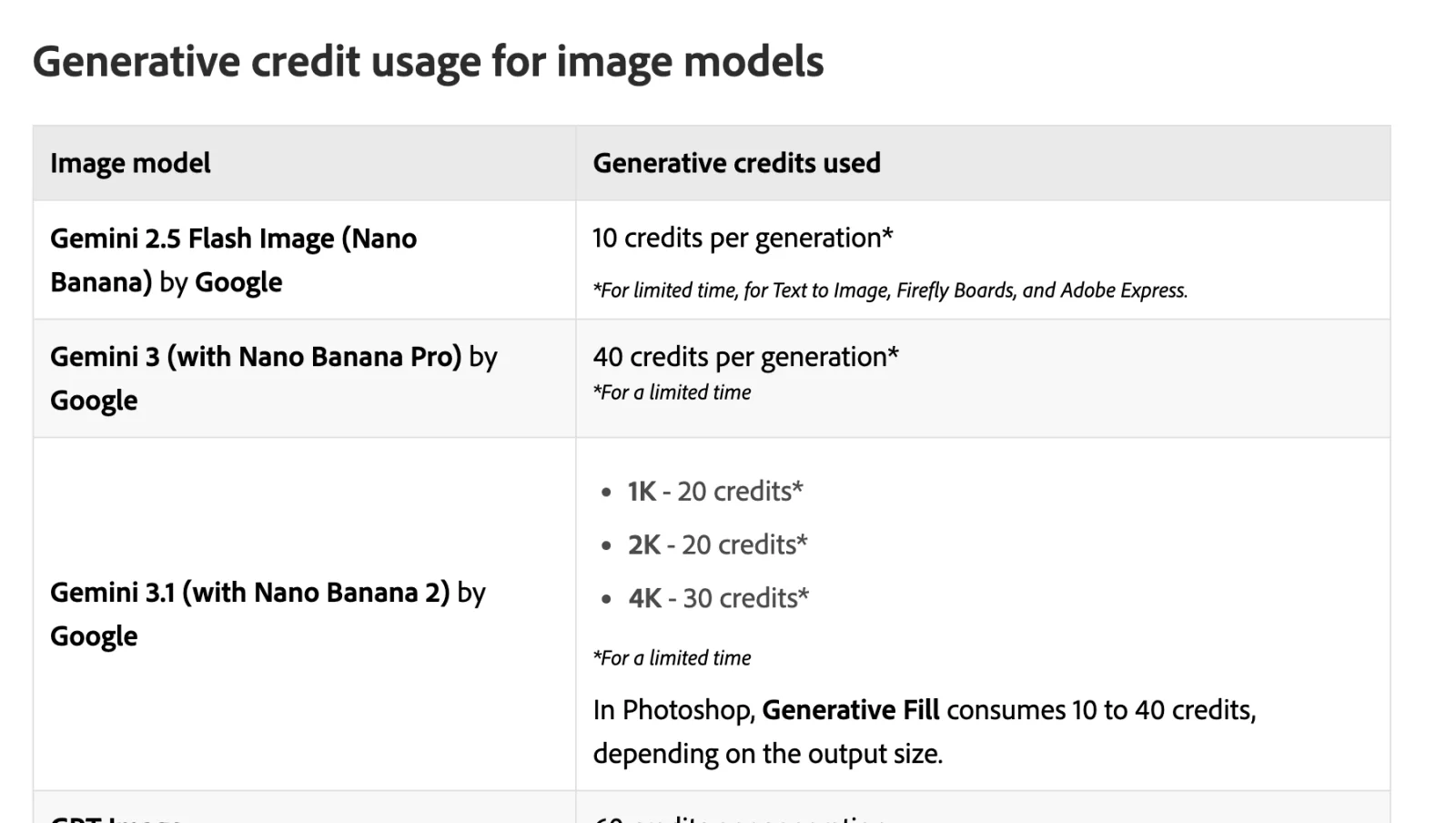
Under the Nano Banana 2 row Adobe adds: "In Photoshop, Generative Fill consumes 10 to 40 credits, depending on the output size." The Generative Fill help page itself does not describe an output-size control, so which sizes Photoshop actually offers for the Google models is not stated anywhere Adobe publishes; the credit table implies 1K, 2K and 4K tiers for Nano Banana 2 and a flat rate for Pro.
Three rules from the credits FAQ shape the bill (credits FAQ, page dated 10 September 2026). Credits are deducted up front and refunded, usually within minutes, if a generation fails. They reset monthly and do not roll over. And "unlimited access" on Creative Cloud Pro and Firefly plans covers standard features only, so Firefly Fill & Expand is free there while a Nano Banana generation still spends 20 to 40 of the monthly 4,000.
Which plans can use it
Adobe's US Photoshop plans page shows a checkmark for "Access to top models from Adobe, Google, OpenAI, and more" on all four individual plans (Photoshop plans). What differs is the number of credits behind that checkmark:
| Plan (US, annual, billed monthly) | Price | Credits per month | Desktop Photoshop |
|---|---|---|---|
| Photoshop single app | US$22.99 | 25 | Yes |
| Photography (with Lightroom, 1 TB) | US$19.99 | 1,000 | Yes |
| Creative Cloud Pro | US$69.99, US$34.99 for the first three months for new subscribers | 4,000 | Yes |
| Firefly Pro | US$19.99 | 4,000 | No, web and mobile only |
Twenty-five credits on the single-app plan is one Nano Banana 2 generation a month, and not enough for a single Nano Banana Pro generation at 40. Adobe says plans without premium access get "complimentary generations" to try premium features, and that generating more means adding a Firefly plan or moving to Creative Cloud Pro (credits FAQ). The single-app plan is listed as having standard and premium access, so the constraint is the allowance, not eligibility.
Two other conditions. "Availability of partner models may vary by country or region," and Photoshop's generative features are not available to users in China (partner models, Photoshop generative AI FAQ). Adobe restricts some partner models to individual plans while it reviews them for business use, but that list is Seedance and Kling; the Google models are not on it. On enterprise plans, administrators can switch individual partner models on or off in the Admin Console (partner models FAQ). Adobe publishes no age requirement specific to partner models.
What Photoshop adds around the model
A generative layer. Every Generate creates a new layer with a mask, so the original pixels are untouched and the result can be re-masked, blended, transformed or deleted. Adobe's FAQ notes that once a generative layer exists you need to save as PSD or another layered format to keep it (Photoshop generative AI FAQ). The model name is recorded on that layer (Adobe Design).
Selections as the mask. Generative Fill only touches the area you selected, and Photoshop's selection tools define it. The August 2026 release, version 27.10, added mask-targeted AI edits and a Markup tool for drawing guidance on the canvas (What's new).
Variations and Generate Similar. Each generation returns several variations to pick from in the Properties panel, and Generate Similar produces new versions of a chosen result (Generative AI features overview).
Content Credentials. Adobe attaches Content Credentials to generated content so that a viewer can see which generative AI source made it, and says these will indicate content created with partner models (partner models FAQ). In Photoshop the panel is Window > Content Credentials (Beta), and there is a preference to enable it for saved documents (Content Credentials). Google, for its part, watermarks every Nano Banana image with SynthID (Google announcement); Adobe does not say whether that watermark survives the Photoshop pipeline, so assume it may.
No training on your content. Adobe states that content is never used to train partner or Adobe models, and that it only offers a partner model if the provider contractually agrees to that. What is sent is the prompt and any reference images (partner models FAQ).
Commercial use and indemnity, where Adobe draws the line. Adobe's answer on whether partner-model outputs are safe for commercial use is that you "decide which models to use and are responsible for determining whether a partner model is appropriate for your project" (partner models FAQ). The Firefly IP indemnity offered to eligible business customers covers a list of Eligible Firefly Features, and the list's first footnote excludes "capabilities that Adobe may develop that are denoted in the user interface as being powered or provided by non-Adobe trained models" (Adobe Firefly product description, published 27 August 2026). Adobe's design write-up says the picker was built to make clear that Firefly is "the only model that meets Adobe's criteria for commercial safety" (Adobe Design). Google's own use policy applies to the model's output on every surface (Google generative AI use policy).
What you lose versus using the model directly
The Photoshop integration is a fill tool with a model behind it. The Gemini API exposes more of the model. Comparing Adobe's documentation with Google's (Gemini API image generation guide, read 21 September 2026):
- Output size. Google offers 512px, 1K, 2K and 4K for Nano Banana 2 and 1K, 2K and 4K for Pro, with 4K at 4096 pixels on the long side. Photoshop's credit table implies 1K, 2K and 4K tiers for Nano Banana 2 and does not state sizes for Pro. For comparison, Adobe's Photoshop FAQ, updated February 2026, says the Firefly model returns 1024 by 1024 pixels to Photoshop (Photoshop generative AI FAQ); an earlier September 2025 announcement had described output "in up to 2K resolution", and the FAQ is the more recent statement.
- Aspect ratio. The API accepts fourteen fixed shapes on Nano Banana 2, from 21:9 to 1:8 strips, and ten on Pro. Photoshop's selection defines the region instead, and Adobe does not document what shape is requested from the model.
- Reference images. Google allows up to 14 references, split into objects, characters and styles; Photoshop allows up to 8 for Gemini (Reference Image).
- Multi-turn editing. Google describes conversational editing, where you follow up with "keep everything the same, but change the lighting", as the recommended way to iterate. Photoshop has no conversation with the model; each Generate is a fresh request, and iteration means a new prompt or Generate Similar.
- Thinking level, web grounding and text output. Nano Banana 2 accepts a thinking level and can search the web and Google Images before drawing; Pro always thinks and can search the web. The model can also answer in text alongside the image. None of these controls is documented in Photoshop.
- Text rendering. Google pitches both models on legible in-image text, including translating text inside an image. Adobe's documentation does not restrict this; for a poster with a paragraph of copy, Generate Image is the closer fit to what Google demonstrates than a Generative Fill patch.
- Batch and seeds. The API has a batch tier at half price and hosted endpoints expose a seed for reproducibility. Photoshop offers neither.
- Model choice. The API has Nano Banana 2 Lite at about half of Nano Banana 2's price. Photoshop does not.
What the direct route lacks is everything in the previous section: the layer, the mask, the selection tools, the Content Credentials, and no need to leave the file.
The cost comparison
The direct prices, from Google's pricing page via the model reference (read 9 September 2026, Nano Banana 2, Nano Banana Pro): Nano Banana 2 is $0.067 at 1K, $0.101 at 2K and $0.151 at 4K on the Gemini API, or a flat $0.08 at 1K on fal. Nano Banana Pro is $0.134 at 1K or 2K and $0.24 at 4K on the Gemini API, or $0.15 on fal. Batch halves the Google rates. Google confirmed the same figures on its pricing page on 21 September 2026 (Gemini API pricing).
For the Photoshop side, the honest unit is the price of a credit if you use the whole monthly allowance: plan price divided by credits. On a plan you already pay for, the marginal cost of a generation is zero until the credits run out, so the column is the cost of the credits, not necessarily what you feel.
| Route | Price per credit | Nano Banana 2, 1K or 2K (20 credits) | Nano Banana 2, 4K (30 credits) | Nano Banana Pro (40 credits) |
|---|---|---|---|---|
| Photoshop single app, $22.99 for 25 | $0.92 | $18.39 | exceeds the month's credits | exceeds the month's credits |
| Photography plan, $19.99 for 1,000 | $0.020 | $0.40 | $0.60 | $0.80 |
| Creative Cloud Pro, $69.99 for 4,000 | $0.0175 | $0.35 | $0.52 | $0.70 |
| Creative Cloud Pro, intro $34.99 for 4,000 | $0.0087 | $0.17 | $0.26 | $0.35 |
| Gemini API, direct | $0.067 at 1K, $0.101 at 2K | $0.151 | $0.134 at 1K or 2K, $0.24 at 4K | |
| fal, direct | $0.08 at 1K, $0.12 at 2K | $0.16 | $0.15 at 1K or 2K, $0.30 at 4K |
The arithmetic: $22.99 / 25 = $0.9196 per credit, times 20 = $18.39. $19.99 / 1,000 = $0.01999, times 20 = $0.40 and times 40 = $0.80. $69.99 / 4,000 = $0.0175, times 20 = $0.35, times 30 = $0.525, times 40 = $0.70. Firefly Pro at $19.99 for 4,000 credits would be $0.005 per credit, but it does not include desktop Photoshop, and desktop is where the picker lives.
Read across a row and the pattern is consistent: on the Photography plan or Creative Cloud Pro at full price, a Nano Banana 2 generation through Photoshop costs about four to six times the direct API price, and a Pro generation about six times. On the single-app plan the comparison is not close. A Photography-plan subscriber running 50 Nano Banana 2 fills a month spends the entire 1,000-credit allowance on work that would cost $3.35 to $5.05 on the API; the same 50 fills with Firefly Fill & Expand cost 50 credits. What the multiple buys is the layer and mask workflow and staying in the file.
FLUX and Firefly for the same job
Photoshop's other partner models are Black Forest Labs' FLUX.2 pro at 20 credits and FLUX Kontext pro at 10 (partner models). Direct, FLUX.2 [pro] is priced by the megapixel, $0.03 for a 1K image on BFL's API or fal, with editing from $0.045 (FLUX.2 Pro). So at the same 20 credits, Photoshop charges the same for FLUX.2 pro as for Nano Banana 2, while the direct prices differ by about two times; the credit tariff flattens the vendors' own pricing. FLUX allows 3 reference images in Photoshop against Gemini's 8 (Reference Image). At launch Adobe characterized FLUX Kontext as the model for "contextual accuracy, perspective, and environmental harmony" and the Google model for "stylized elements, graphic details, and imaginative scene additions" (Adobe blog); that is marketing, not a measurement.
Firefly Fill & Expand is one credit, or free on Creative Cloud Pro and Firefly plans, it is the only model that accepts a blank prompt to fill from surrounding pixels, it is the only option in Generative Expand, and it is the only one inside Adobe's indemnity. Firefly Image 5 is 10 credits. For removing an object, extending a background or cleaning a plate, Firefly is the default for a reason. The case for spending 20 to 40 credits on Nano Banana is a job where Google's model is documented to do something specific: rendering text, following a long instruction, composing from several reference photos, or matching a look that Firefly does not produce.
The partner list changes
Adobe's Generative Fill page carries a note that Google is deprecating Gemini 2.5 with Nano Banana from 2 October 2026 and that Photoshop began removing it on 10 September, with the September 2026 build, version 27.11, dropping it entirely (Generative Fill). Adobe's retirement page lists Gemini 2.5 alongside Gemini 3 Flash Preview as deprecated on 10 September 2026, after Sora 2, Runway Aleph, Imagen 3 and 4, Veo 2 and 3, Marey, Ideogram and Pika 2.2 earlier in the year (Generative AI model retirement). Adobe says models may be removed "due to factors such as low usage, quality concerns, contract expiry, or the end of provider support".
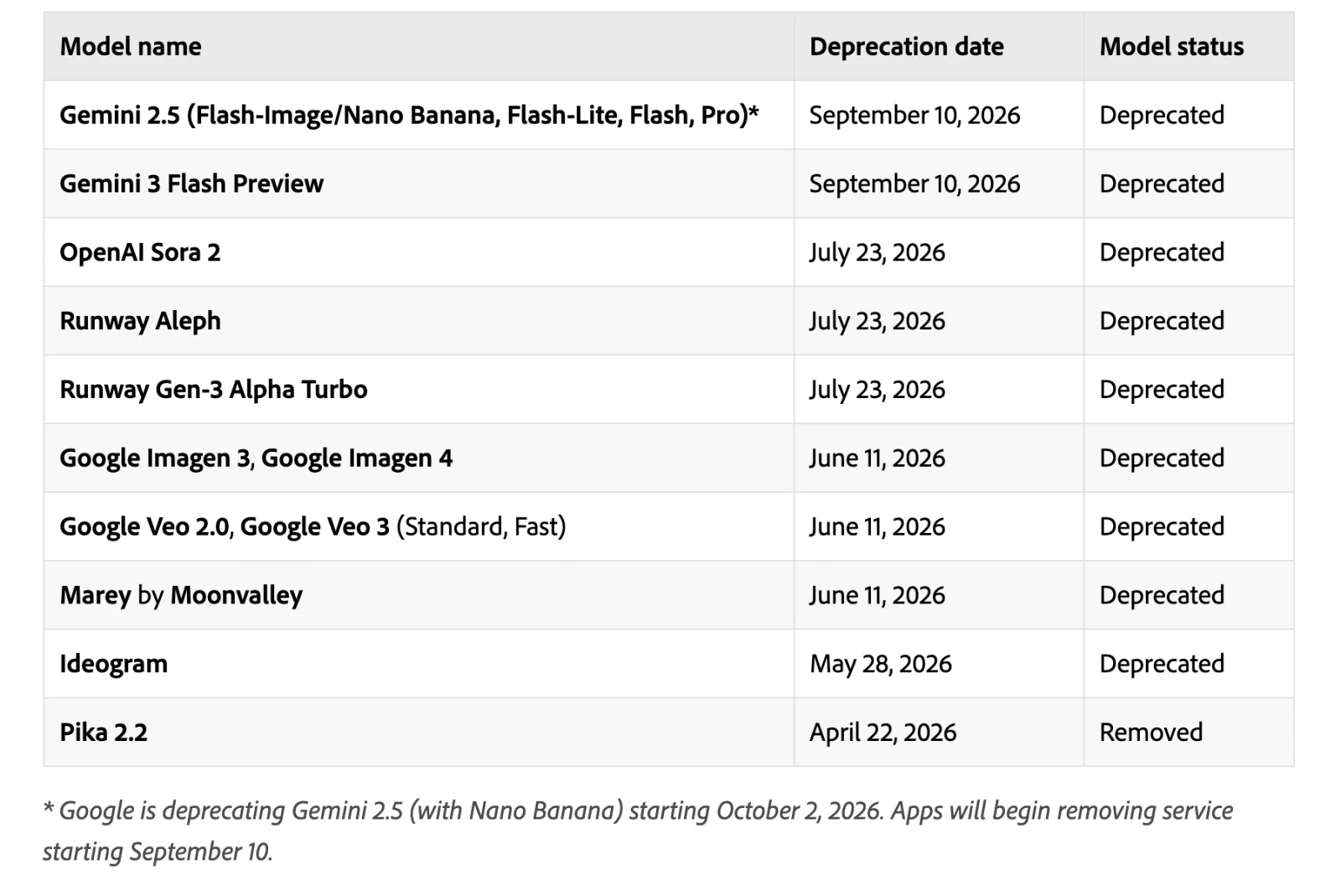
Two consequences: a workflow that depends on one model's look should keep its outputs, because a retired model cannot be regenerated, and the credit rates all carry a limited-time asterisk, so the table above is a snapshot, not a tariff.
Frequently asked questions
Is Nano Banana in Photoshop? Yes, on the desktop app. Generative Fill offers Gemini 3.1 (with Nano Banana 2) and Gemini 3 (with Nano Banana Pro) under Partner models, and Generate Image offers the same two (Generative Fill, Generate Image). Generative Expand, Photoshop on the web and Photoshop on mobile document Firefly only.
How many credits does Nano Banana cost in Photoshop? Twenty for Nano Banana 2 at 1K or 2K, 30 at 4K, and 40 for Nano Banana Pro, each marked "for a limited time" on 21 September 2026. A Firefly Fill & Expand generation is one credit (partner models).
Can I use Nano Banana in Photoshop on the 25-credit plan? The single-app plan has the partner-model checkmark, but 25 credits is one Nano Banana 2 generation a month and fewer than one Pro generation. Adobe's route to more is a Firefly plan or Creative Cloud Pro (Photoshop plans, credits FAQ).
Is it cheaper to use Nano Banana directly? Per image, yes, by a wide margin: $0.067 to $0.151 for Nano Banana 2 and $0.134 to $0.24 for Pro on the Gemini API, against $0.35 to $0.80 in credits on the Photography or Creative Cloud Pro plans and $18.39 on the single-app plan. The Photoshop price buys the layer and mask workflow (Nano Banana 2, Nano Banana Pro).
Is Nano Banana output in Photoshop covered by Adobe's indemnity? Adobe's Firefly IP indemnity list excludes features "denoted in the user interface as being powered or provided by non-Adobe trained models", and Adobe says you are responsible for judging whether a partner model suits your project (Adobe Firefly product description, partner models FAQ).
Does Adobe or Google train on my images? Adobe says content is never used to train partner or Adobe models and that it only offers a partner model whose provider agrees to that contractually. The prompt and any reference images are sent to the partner to generate (partner models FAQ).
What happened to the original Nano Banana in Photoshop? Gemini 2.5 Flash Image is being retired. Google shuts it down on 2 October 2026, and Photoshop removes it with version 27.11, the September 2026 build (Generative AI model retirement).
Make your next project in Voyager
Create an account, download Voyager, and start making.
