
Every Photoshop plan comes with a monthly allowance of generative credits, and every generative feature either spends them or is on a short list that does not. A Generative Fill with an Adobe Firefly model costs one credit. A fill with Google's Nano Banana Pro costs up to forty. The Remove tool costs nothing. Credits reset on your billing date and do not roll over, and when they are gone you either wait, buy a credit add-on, or move to a plan where the standard features are unmetered. The catch is that the plan most people buy for Photoshop, the single-app plan, comes with 25 credits a month, while the cheaper Photography plan comes with 1,000. Everything below was read from Adobe's own pages on 21 September 2026, and the pages carry "for a limited time" footnotes on most partner-model prices, so check them before you commit to a plan.
What a generative credit is
Adobe describes generative credits as "tokens you can use to generate high-quality image, vector, video, and audio outputs" across Creative Cloud apps, and says there is only one type of credit. Whether a credit is spent on a "standard" or a "premium" feature depends on which features your plan can reach (generative credits FAQ, updated 10 September 2026). Credits are tied to your Adobe ID, not to an app, so the same pool serves Photoshop, Illustrator, Lightroom, Premiere, Adobe Express and the Firefly web and mobile apps (generative credits access and use, updated 20 August 2026). Adobe Stock credits are a separate thing and cannot be spent on generation (FAQ).
Credits are deducted when you press Generate, not when you keep a result. Adobe says they are "deducted up front", and that a failed generation is "typically refunded to your credit balance within minutes", with video refunds taking up to 24 hours (FAQ). Each generation in Photoshop returns several variations; the credit price is per generation, not per variation.
Standard, premium and free features in Photoshop
Adobe sorts every generative feature into two classes. Standard features "use 1 credit per generation", with a few exceptions that cost more. Premium features "need more power to run and thus require more generative credits per use", and every partner model from Google, OpenAI, Black Forest Labs, Topaz and others counts as premium (Creative Cloud generative AI features, updated 10 September 2026).
For Photoshop, that page lists the split as follows:
- Standard: Generative Fill, Generative Expand, Generate Background, Generate Image, Generate Similar, Generative Upscale with the Firefly model, and Harmonize.
- Premium: Generative Fill with Firefly Image 5, Rotate Object, Generative Fill with the partner models (Gemini 3 with Nano Banana Pro, Gemini 3.1 with Nano Banana 2, FLUX.1 Kontext [pro], FLUX.2 pro), and Generative Upscale, AI Denoise and AI Sharpen with Topaz Labs models.
- Free: the Remove tool, which Adobe lists as "currently not consuming credits".
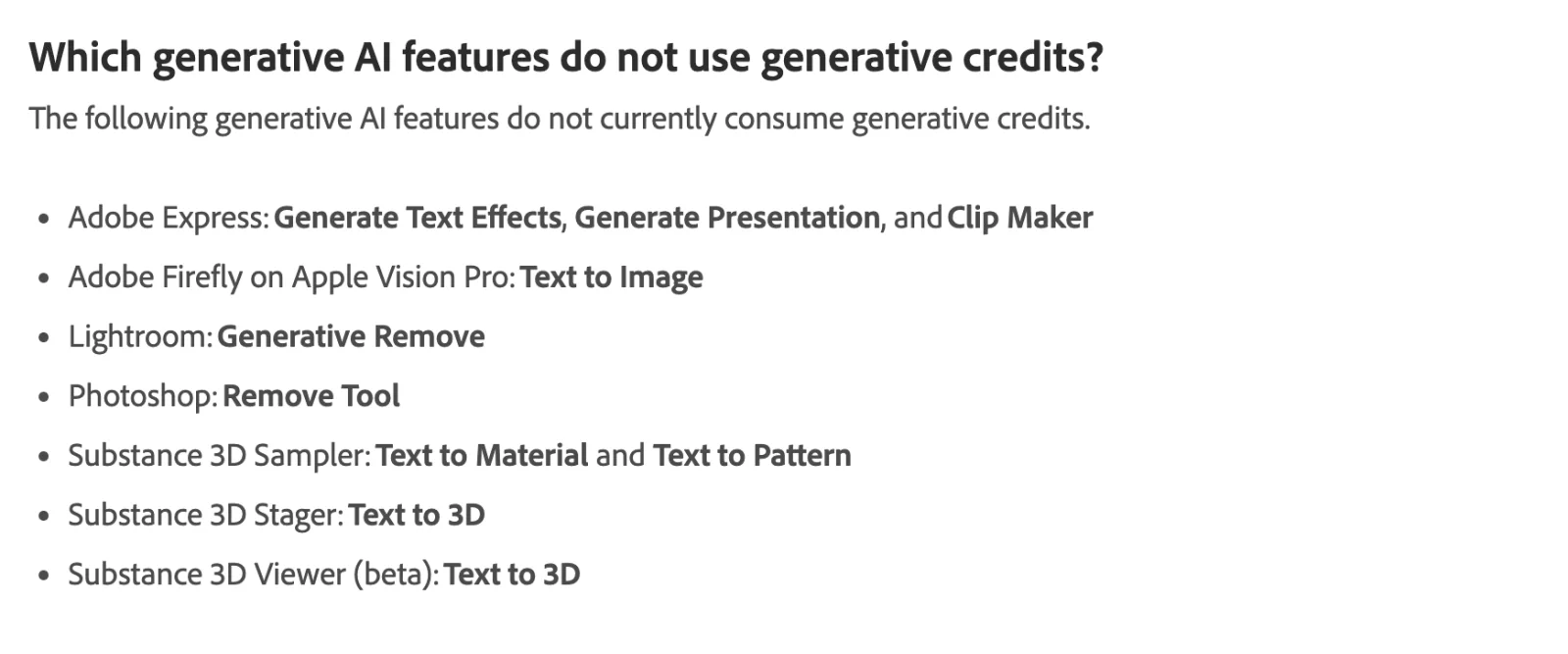
Two standard features cost more than one credit. Harmonize, which matches a pasted object's color and light to its background, "is a standard feature but consumes 5 credits per generation". Generative Upscale with the Firefly model "consumes more than one credit and is based on file output size", and Adobe does not publish the scale (features page).
The premium Firefly features have fixed prices. Generative Fill with Firefly Image 5 costs 10 credits. Rotate Object costs "20 credits per object, only applied on first rotation for each" (FAQ).
What the partner models cost
Adobe's partner models page carries the per-generation rates, and most of them are footnoted "for a limited time" (partner models in Adobe products, updated 10 September 2026). The models available inside Photoshop's Generative Fill picker on 21 September 2026 were FLUX.2 pro, FLUX Kontext pro, Gemini 3.1 with Nano Banana 2 and Gemini 3 with Nano Banana Pro, alongside Adobe's Firefly Fill & Expand, Firefly Image 5 and Firefly Image 1 (Generative Fill, updated 15 September 2026).
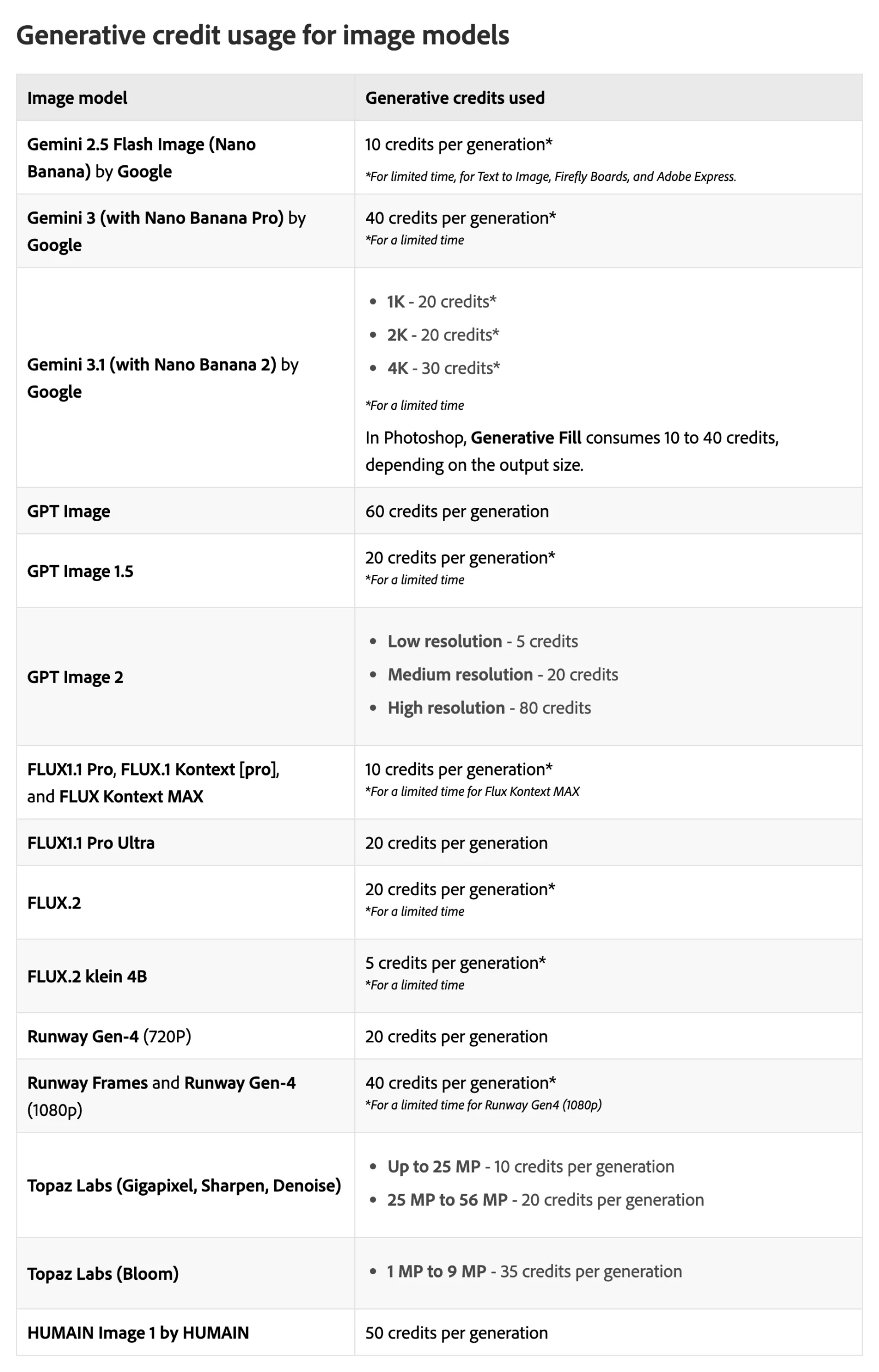
| Feature in Photoshop | Model | Credits per generation | Class |
|---|---|---|---|
| Remove tool | Adobe | 0 | Free |
| Generative Fill, Expand, Generate Background, Generate Image, Generate Similar | Firefly Fill & Expand, Firefly Image 1 | 1 | Standard |
| Harmonize | Firefly | 5 | Standard |
| Generative Upscale | Firefly | More than 1, by output size, unpublished | Standard |
| Generative Fill | Firefly Image 5 | 10 | Premium |
| Rotate Object | Firefly | 20 per object, first rotation only | Premium |
| Generative Fill | FLUX.1 Kontext [pro] | 10 | Premium |
| Generative Fill | FLUX.2 pro | 20 (limited time) | Premium |
| Generative Fill | Gemini 3.1 with Nano Banana 2 | 20 at 1K or 2K, 30 at 4K (limited time) | Premium |
| Generative Fill | Gemini 3 with Nano Banana Pro | 40 (limited time) | Premium |
| Generative Upscale, AI Sharpen, AI Denoise | Topaz Gigapixel, Sharpen, Denoise | 10 up to 25 MP, 20 from 25 to 56 MP | Premium |
| Generative Upscale | Topaz Bloom | 35 for 1 to 9 MP | Premium |
Sources: features page, FAQ, partner models, all read 21 September 2026.
One line on the partner page deserves attention: under the Gemini rates it says "In Photoshop, Generative Fill consumes 10 to 40 credits, depending on the output size." So a Nano Banana fill on a small selection can cost less than the headline 40, and a large one costs the full amount. The page does not publish the size thresholds. It also states that the listed rates "are only available on the most up-to-date version of the app", that "usage rates may vary", and that "plans are subject to change" (partner models).
Partner models come and go. Adobe's Generative Fill page notes that Google is deprecating Gemini 2.5 with Nano Banana from 2 October 2026 and that Photoshop began removing it on 10 September with the v27.11 build (Generative Fill). A workflow priced around one model can change price when that model is replaced.
Credits per plan
Adobe's FAQ carries the full table, with separate columns for people who subscribed before and after 17 June 2025, because that date cut the single-app allowance from 500 to 25 for new subscribers (FAQ). The plans that include desktop Photoshop, and the Firefly plans that include Photoshop on the web and mobile, are summarized here with US prices from Adobe's plan pages on 21 September 2026.
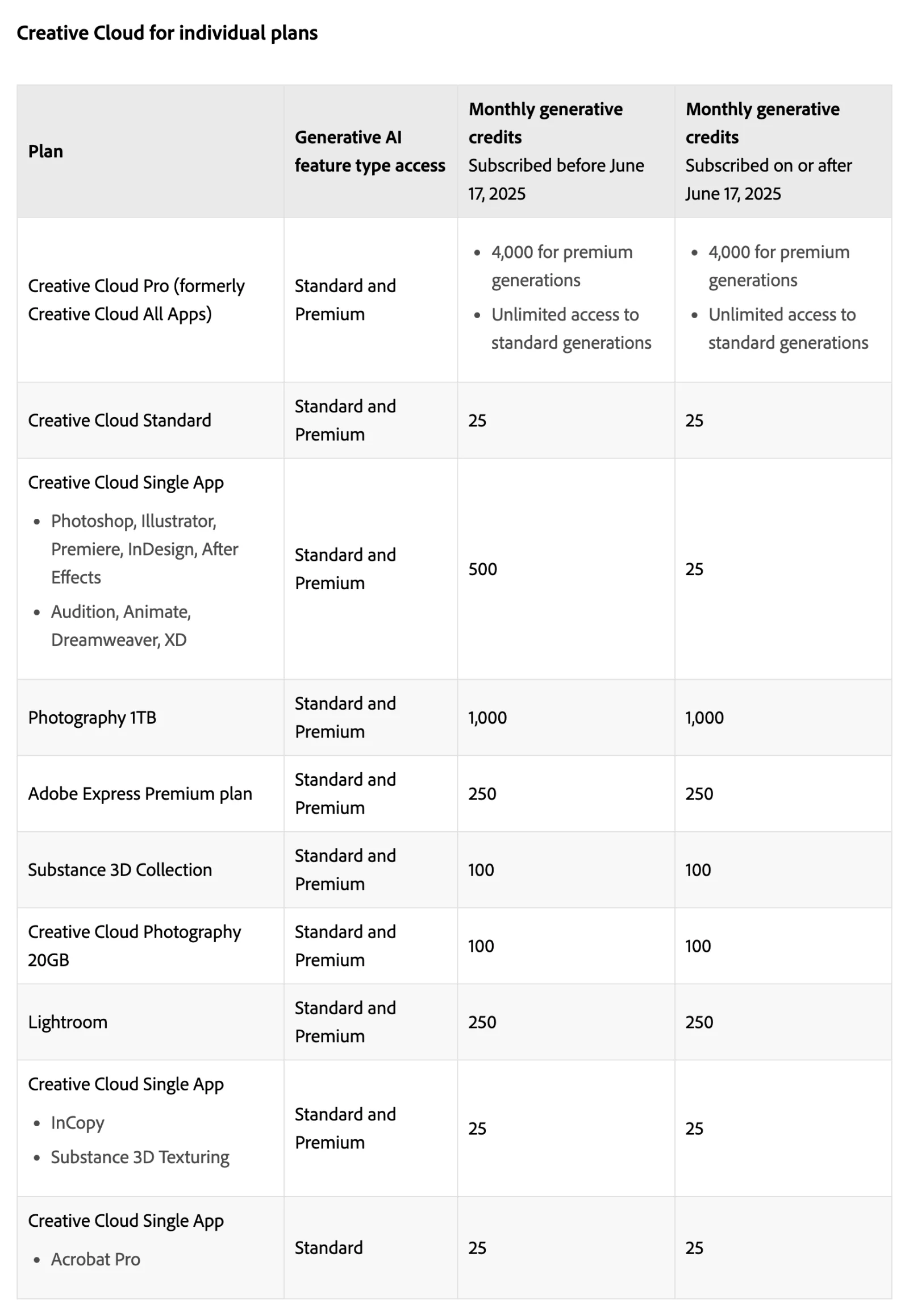
| Plan | US price, 21 September 2026 | Desktop Photoshop | Credits a month | Standard features |
|---|---|---|---|---|
| Photoshop single app | US$22.99/mo, annual billed monthly | Yes | 25 (500 if subscribed before 17 June 2025) | Metered |
| Photography 1TB (Photoshop, Lightroom) | US$19.99/mo | Yes | 1,000 | Metered |
| Creative Cloud Standard | US$54.99/mo | Yes, with 20+ apps | 25 | Metered |
| Creative Cloud Pro | US$69.99/mo (US$34.99 for the first three months, new subscribers) | Yes, with 20+ apps | 4,000 for premium | Unlimited |
| Firefly Standard | US$9.99/mo | No, Firefly only | 2,000 for premium | Unlimited |
| Firefly Pro | US$19.99/mo | Web and mobile Photoshop only | 4,000 for premium | Unlimited |
| Firefly Pro Plus | US$49.99/mo (US$34.97 first year, offer ends 21 October) | Web and mobile Photoshop only | 10,000 for premium | Unlimited |
| Firefly Premium | US$199.99/mo (US$139.91 first year, offer ends 21 October) | Web and mobile Photoshop only | 50,000 for premium | Unlimited |
| Photoshop mobile and web plan | Not on the US comparison page | No | 100 | Metered |
| Photoshop for teams (single app) | US$37.99/mo per license | Yes | 25 (500 before 17 June 2025) | Metered, standard features only |
| Creative Cloud Pro for teams | US$99.99/mo per license | Yes | 4,000 for premium | Unlimited |
| Creative Cloud for enterprise, Edition 4 | Contract | Yes | 4,000 for premium (8,000 on Edition 5) | Unlimited |
Sources: Photoshop plans, Creative Cloud plans, Firefly plans, teams plans, FAQ. Firefly plans are listed as billed monthly; the Creative Cloud prices are the annual-contract, billed-monthly figures Adobe shows by default, and month-to-month and prepaid annual terms differ.
Three things in that table are easy to miss. First, the Photography plan costs three dollars less than Photoshop alone and includes forty times the credits, which Adobe's own Photoshop comparison page shows side by side (Photoshop plans). Second, Creative Cloud Standard, the 20-app plan Adobe introduced in 2025, carries the same 25 credits as the single app (changes to individual plans, updated 12 February 2026). Third, the teams single-app plans are marked "Standard" only in Adobe's table, so a Photoshop for teams license cannot use the partner models at all without a Firefly plan on top (FAQ).
Free accounts get something different: "a limited number of free daily generations across all generative AI features, available on a curated set of models", refreshing daily, in Firefly, Adobe Express, Photoshop on the web and the mobile apps. Adobe does not publish the daily number (FAQ).
Several plans stack. If you hold two subscriptions, "your monthly generative credit allocation is the sum of each subscription's allocation", and the combined pool resets on the billing date of whichever plan you bought first (FAQ). That is how a Photography plan plus a Firefly Standard plan behaves: 1,000 plus 2,000 credits, and the Firefly plan's unlimited standard access applies across the account.
What "unlimited standard generations" means, and what it excludes
On Creative Cloud Pro, the Firefly plans, the credit add-on plans and Creative Cloud for enterprise Edition 4 and above, standard features do not deduct credits. Adobe's wording: "you can use generative AI features as often as you like. Generative credits won't be used or deducted." The credits those plans include are spent only on premium features (FAQ).
The exclusions matter. Unlimited covers the standard list only, so in Photoshop that is Firefly-model Generative Fill, Expand, Generate Background, Generate Image, Generate Similar, Firefly Generative Upscale and Harmonize. Firefly Image 5, Rotate Object and every partner model still draw credits. Standard features used inside Firefly Graph, Adobe's node-based workflow tool, "continue to be metered" even on unlimited plans. And unlimited has guardrails: Adobe says it has protections against "automatic scripting, account sharing, and reselling", and that if usage patterns trigger them "you might see a temporary restriction on your use of generative AI features" (FAQ).
Reset and rollover
For paid plans, credits "renew monthly on the billing date of which you started your plan", and "generative credits do not roll over to the next month." The reset date is shown in the Account menu on adobe.com. For free plans, credits are allocated on first use of a Firefly feature and expire one month later (FAQ).
Inside Photoshop, the Generative Credits Usage panel shows the balance and per-feature costs; it sits next to the workspace selector, in the contextual task bar when a generative feature is active, in the Properties panel when a generative layer is selected, and in the Generative Upscale, AI Sharpen and AI Denoise dialogs (FAQ). Before a feature first spends a credit, Adobe shows a one-time notice that it "may consume generative credits"; premium features are marked with a colored icon background, a crown icon or the word Premium (access and use).
What happens when you run out
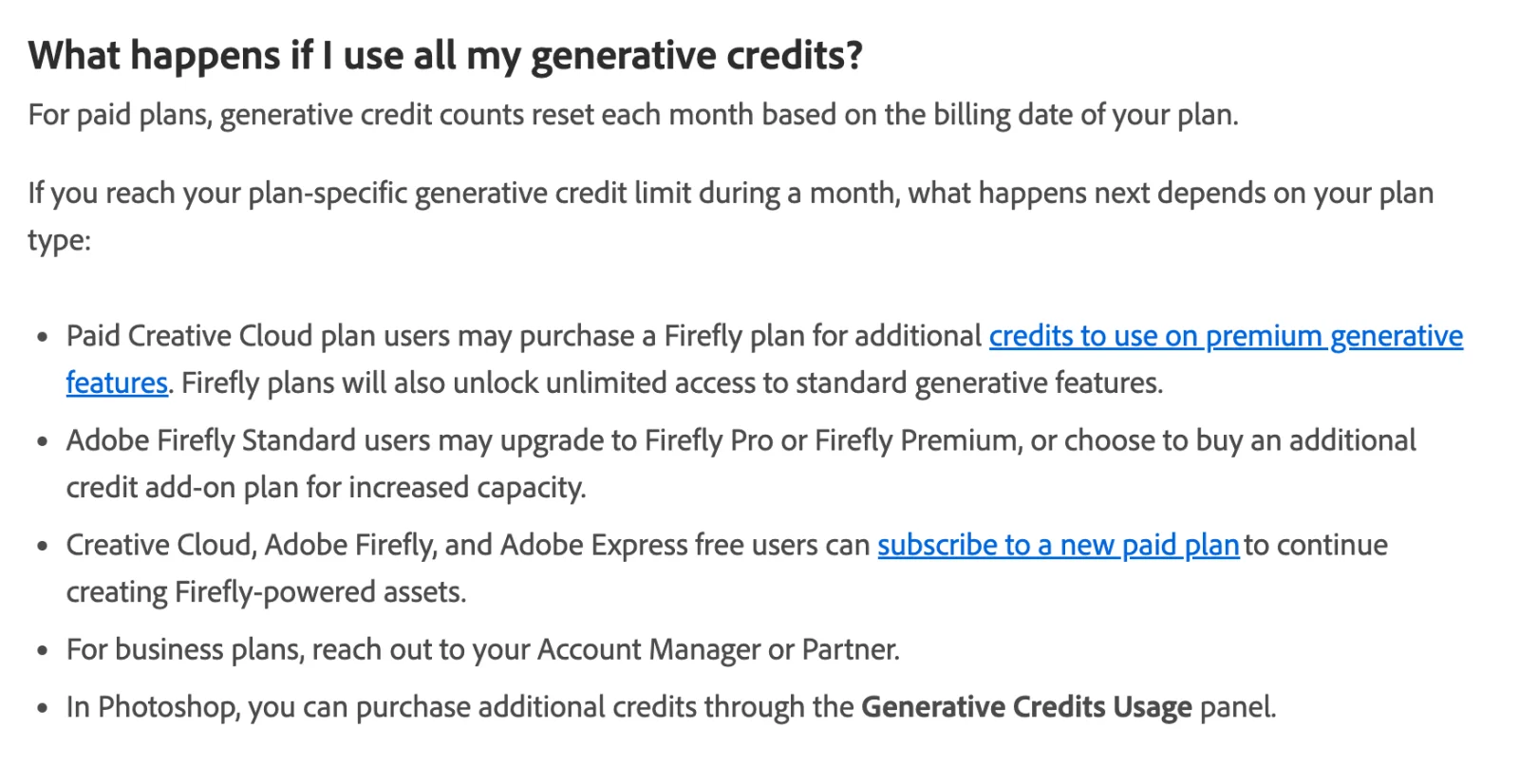
Adobe's current answer is that you wait for the reset or buy more. Paid Creative Cloud users "may purchase a Firefly plan for additional credits", which also switches on unlimited standard access; Firefly Standard users can upgrade or buy an add-on; free users can subscribe; business users contact their account manager; and in Photoshop the purchase runs through the Generative Credits Usage panel (FAQ).
That is a change from how the system launched. In September 2023 Adobe wrote that after the "fast" credits were consumed, "subscribers can continue to generate content at slower speeds" (Adobe blog, 13 September 2023). The slow lane does not appear anywhere on the current FAQ, the access page or the add-on page, so the safe reading is that a metered plan stops generating when the balance hits zero, and that a premium feature you cannot afford shows a paywall rather than a queue. The one documented queue is for Firefly Premium subscribers, whose Text to Video and Image to Video jobs are "queued and processed in the background with an unspecified completion time" once credits run out, up to 20 at a time (FAQ). Adobe also states that it "will not charge you for additional credits unless you decide to buy more" (access and use).
Buying more: add-ons and upgrades
Credit add-on plans are monthly subscriptions, not one-off packs. Adobe's add-on page priced them at 2,000 credits for US$9.99 a month, 7,000 for US$29.99, 10,000 for US$49.99 and 50,000 for US$199.99 on 21 September 2026 (generative credits add-ons). The FAQ's plan table also lists a 4,000-credit add-on, but the add-on page did not show a price for it. Every add-on plan brings unlimited standard generations with it, which is why a 2,000-credit add-on on top of the Photoshop single app changes the arithmetic more than the number suggests (FAQ).
The add-on prices match the Firefly plan prices almost line for line: Firefly Standard is US$9.99 for 2,000 and Firefly Pro is US$19.99 for 4,000 (Firefly plans). The Firefly plans add the Firefly web and mobile apps, and from Pro up, Adobe Express Premium and Photoshop on web and mobile. For a desktop Photoshop user who only wants credits, the add-on and the Firefly plan cost the same at the 2,000 tier; the Firefly plan is the better buy if you will use the Firefly app.
Two older products are gone. The original "Adobe Firefly" plan and the "generative credits add-on" from 2023, both 100 credits, stopped selling on 12 February 2025; existing subscribers keep them, but they cover standard features only (FAQ).
Video, audio and the other apps
Credits are one pool across the account, so Firefly video and audio features draw from the same balance as Photoshop fills. The rates are steep by comparison: Firefly's Generate Video costs 100 credits per second at 1080p, 50 at 720p and 20 at 540p; Generative Extend in Premiere runs from 50 to 175 credits per second by resolution and frame rate; Translate Audio costs 5 credits per second; Generate Speech costs 10 credits per 1,000 characters with Adobe's model and 15 with ElevenLabs; Generate Music costs 20 credits per minute (FAQ). A single five-second 1080p Firefly clip is 500 credits, which is half a Photography plan's month. Partner video models range from 15 credits per second for Kling 2.5 Turbo to 450 for Luma Ray3 HDR at 4K (partner models).
Plans without premium access still get a taste: Adobe currently allows "2 free video generations and 40 seconds of video and audio clip translation" as complimentary tries (FAQ).
In the other apps the pattern is the same as Photoshop. Illustrator's Text to Vector Graphic, Generative Recolor and Generative Shape Fill are standard; its Turntable feature is premium at 20 credits, and its Remove Background is free. Lightroom's Generative Remove is free and its Generative Expand is standard. Adobe Express's Text Effects, Generate Presentation and Clip Maker are free (features page, FAQ).
Web, mobile, teams and enterprise
Photoshop on the web and the mobile apps use the same account balance. A Firefly Pro, Pro Plus or Premium plan includes "Adobe Photoshop on web and mobile (full access)" without the desktop app (Firefly plans). Adobe's FAQ lists a separate "Photoshop mobile and web plan" with 100 credits a month and "Standard and Premium" access, but that plan was not on the US Photoshop comparison page on 21 September 2026 (FAQ).
For teams and enterprise, credits are per user. "Generative credits are not pooled or shared across users in Creative Cloud for teams or enterprise plans." The exception is enterprise customers on an Enterprise Term License Agreement with Edition 5, Edition 4 or Edition 4 with Premium Stock, who can buy Shared Credits that assigned users draw from "once their individual monthly credits are exhausted" (FAQ). Those enterprise editions can also restrict which partner models are available through the Admin Console (partner models). Some partner models, including Kling and Seedance, are available to individual accounts only while Adobe reviews them for business use; none of those are in Photoshop's picker.
How the system got here
- 13 September 2023. Adobe announces "fast" generative credits across Creative Cloud, Firefly and Express plans, with slower generation after the allowance is spent, an add-on of 100 credits for US$4.99 a month coming in November, and a price rise on 1 November 2023 that took the single-app plan from US$20.99 to US$22.99 (Adobe blog). Single-app plans carried 500 credits.
- October 2024. The FAQ's exceptions list grows to include the Firefly video beta, Photoshop's Generative Workspace beta, Premiere's Generative Extend beta and Express's Clip Maker (FAQ update log).
- 12 February 2025. Firefly Standard (US$9.99, 2,000 credits) and Firefly Pro (then US$29.99, 7,000 credits) launch alongside the Firefly video model, with "unlimited access to Firefly imaging and vector features" on both. The 2023 Firefly and add-on plans stop selling the same day, and the standard-versus-premium split and the rate card appear on the FAQ (Adobe news, FAQ).
- 17 June 2025. In North America, and from 1 August 2025 elsewhere, Creative Cloud All Apps becomes Creative Cloud Pro at US$69.99 with unlimited standard generations and 4,000 premium credits; Creative Cloud Standard appears at US$54.99 with 25 credits; and new single-app and Photography subscribers drop to 25 credits (changes to individual plans).
- February 2026. The FAQ's log records an update to the Photography 1TB and Lightroom allowances; the current table shows Photography 1TB at 1,000 credits for subscribers on either side of the June 2025 date. Firefly subscribers get a first-year "unlimited generations" promotion on selected image and video models in the Firefly app (Adobe blog, 2 February 2026).
- March to August 2026. Firefly Pro Plus and the 10,000-credit add-on arrive in March; Rotate Object gets its 20-credit price in June; enterprise Edition 5 with 8,000 credits and the multi-plan reset rule appear in August (FAQ update log).
- September 2026. Photoshop v27.11 begins removing Gemini 2.5 with Nano Banana ahead of Google's 2 October retirement (Generative Fill).
The direction is consistent: the allowance on the plans people buy for Photoshop alone has gone from 500 to 25, while unlimited standard use moved into the Pro and Firefly tiers and the partner models became the thing credits are really for.
Three monthly workloads, priced
The arithmetic below uses the rates in the tables above, the US annual-billed-monthly prices, and the smallest add-on that covers the shortfall. It assumes the "limited time" partner rates hold and that Nano Banana Pro fills run at the full 40 credits. Remove tool use is free everywhere and is left out.
An occasional user: 40 Firefly Generative Fills and 5 Generative Expands a month. That is 45 credits.
- Photoshop single app: 25 credits covers 25 fills. The rest waits for next month, or a 2,000-credit add-on at US$9.99 makes standard use unlimited. US$22.99 alone, or US$32.98 with the add-on.
- Photography: 45 of 1,000 credits. US$19.99.
- Creative Cloud Pro: standard is unlimited. US$69.99, or US$34.99 for the first three months.
- Firefly Pro, Photoshop on the web only: standard is unlimited. US$19.99.
A retoucher working daily: on 20 working days, 15 Firefly fills, 5 expands and 2 Harmonize operations at 5 credits each, plus 4 Topaz upscales a month under 25 MP at 10 credits. That is 20 × (15 + 5 + 10) = 600 credits, plus 40 for the upscales, or 640.
- Photoshop single app: 25 credits is under two days of work. With the 2,000-credit add-on, the 600 standard credits become free and the 40 Topaz credits come from the add-on. US$32.98.
- Photography: 640 of 1,000. US$19.99, with 360 to spare.
- Creative Cloud Pro: 600 standard credits are free, 40 Topaz credits from 4,000. US$69.99.
A designer leaning on partner models: on 20 working days, 6 Nano Banana Pro fills at 40 and 4 FLUX.2 fills at 20, plus 100 Firefly Image 5 fills at 10 across the month. That is 20 × (240 + 80) = 6,400, plus 1,000, or 7,400 credits, all premium.
- Photoshop single app: 25 included. The 10,000-credit add-on at US$49.99 covers it. US$72.98.
- Photography: 1,000 included, 6,400 short. The 7,000-credit add-on at US$29.99 brings the pool to 8,000. US$49.98.
- Creative Cloud Pro: 4,000 included, 3,400 short. The 7,000-credit add-on makes it 11,000 for US$99.98, or two 2,000-credit add-ons make it 8,000 for US$89.97, since credits from multiple plans stack.
- Firefly Pro Plus, Photoshop on the web only: 10,000 included. US$49.99, or US$34.97 in the first year.
The marginal price of a credit is what the per-image numbers come from. At the 2,000-credit add-on rate, a credit costs half a cent, so a Firefly fill is US$0.005, a Firefly Image 5 fill is US$0.05, a FLUX.2 fill is US$0.10 and a Nano Banana Pro fill is US$0.20. At the 50,000 tier a credit is US$0.004 and a Nano Banana Pro fill is US$0.16. The 25 credits bundled with the Photoshop single app are a different case: if you treat the plan as the price of those credits, each one costs US$0.92, which is why nobody should be choosing a plan on the bundled count alone.
The pattern across all three workloads is that Photography is the cheapest way to run desktop Photoshop with credits at any volume, the single app only makes sense with an add-on attached, and Creative Cloud Pro pays for itself through the other 19 apps rather than through credits.
Frequently asked questions
Does the Remove tool use generative credits? No. Adobe lists Photoshop's Remove tool among the features that "do not currently consume generative credits" (FAQ). The word "currently" is Adobe's.
How many credits does Generative Fill use? One credit with the Firefly Fill & Expand or Firefly Image 1 models, 10 with Firefly Image 5, 10 with FLUX.1 Kontext [pro], 20 with FLUX.2 pro, 20 to 30 with Nano Banana 2 depending on output size, and up to 40 with Nano Banana Pro (features page, partner models). On Creative Cloud Pro and the Firefly plans the one-credit Firefly fills are unmetered.
Do generative credits roll over? No. "Your generative credit balance will reset to your allocated amount on a monthly basis" on the billing date (FAQ).
Why does my Photoshop plan have 25 credits when a friend's has 500? Single-app subscriptions started on or after 17 June 2025 get 25 credits a month; subscriptions started before that date keep 500 (FAQ, changes to individual plans).
Can I buy credits once, without a subscription? Not as documented. Adobe's add-on plans are priced per month, from 2,000 credits at US$9.99 to 50,000 at US$199.99, and the FAQ describes them as plans you add to an existing subscription (add-ons, FAQ).
Are credits shared between Photoshop and Firefly? Yes. Credits are tied to your Adobe ID and "used across most Creative Cloud products", including Photoshop, Illustrator, Lightroom, Premiere, Adobe Express and the Firefly web and mobile apps (access and use).
Do I get credits back if a generation fails? Usually. Credits are deducted up front and "typically refunded to your credit balance within minutes" when a generation fails, with video refunds taking up to 24 hours (FAQ).
Can my team pool credits? Not on teams plans. Credits "are not pooled or shared across users in Creative Cloud for teams or enterprise plans"; only enterprise ETLA customers on Edition 4 and 5 can buy Shared Credits (FAQ).
Where do I see my balance? In the Account menu on adobe.com, or in Photoshop's Generative Credits Usage panel next to the workspace selector (FAQ).
Make your next project in Voyager
Create an account, download Voyager, and start making.
