
Photoshop's AI, as of version 27.10, is three different things under one label. The Firefly generative layer (Generative Fill, Expand, Generate Image, Generate Background, Harmonize, Generative Upscale, Prompt to edit) runs in Adobe's cloud, spends generative credits, and can be pointed at partner models from Google, Black Forest Labs and Topaz Labs. An older machine-learning layer Adobe calls Sensei (Select Subject, Object Selection, Neural Filters, Preserve Details 2.0) mostly runs on your own machine and costs nothing per use. And Camera Raw carries its own AI Denoise, masking, Lens Blur, Reflection Removal and Generative Remove under a separate version number. On top sit two assistants: the AI Assisted Editor, a prompt-first mode in beta since 27.10, and the AI Assistant, an agent panel in public beta on the web and phone apps and in early beta in the desktop beta app.
Everything below was read from Adobe's help pages, release notes, blog posts and press releases on 21 September 2026; a page's own "last updated" date is noted where it matters, and claims that could not be verified on an Adobe page are left out. Credit prices per feature and plan are in Photoshop generative credits, explained and the Google models in Nano Banana in Photoshop.
The current version
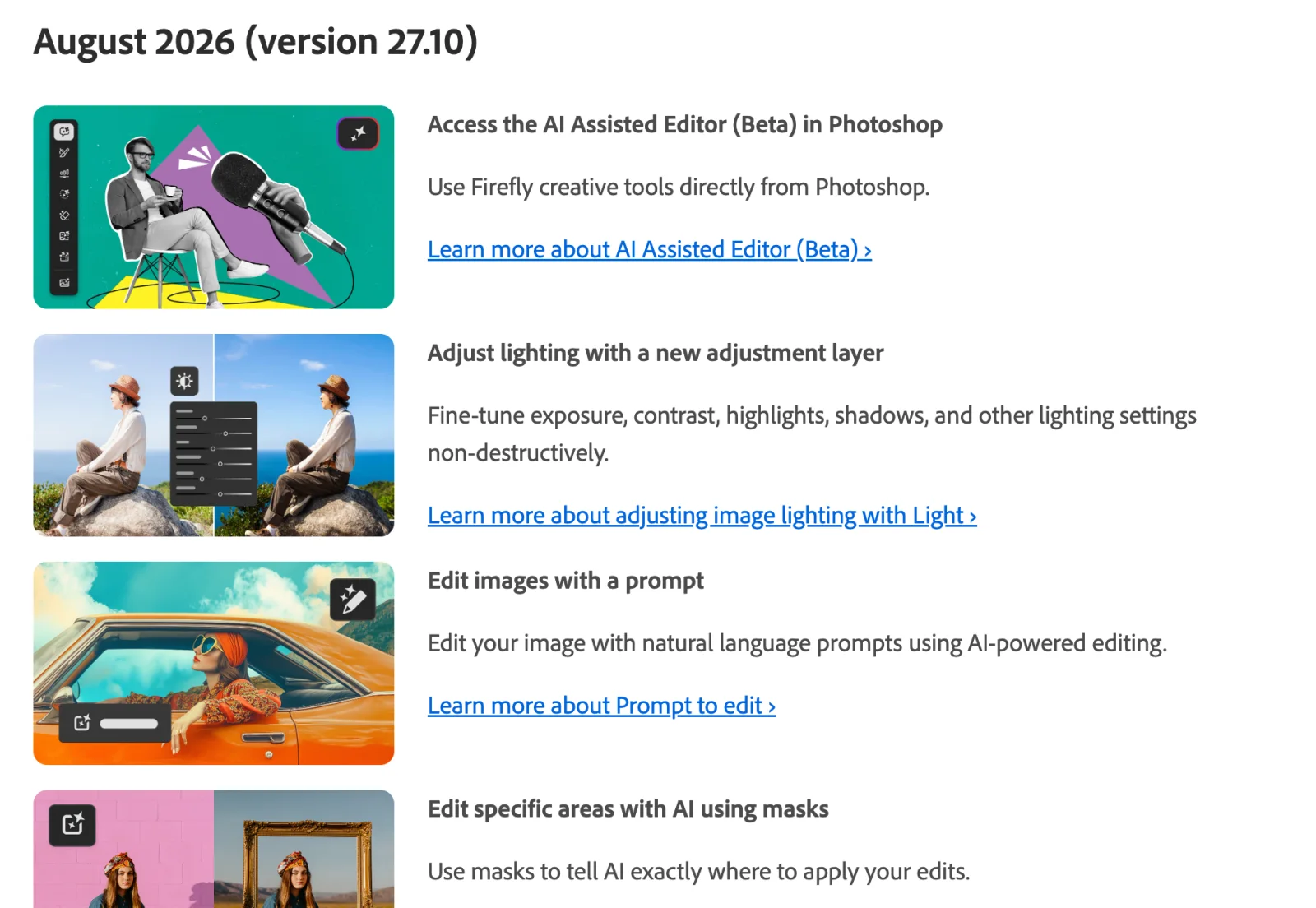
Adobe's What's new page lists August 2026 (version 27.10) as the latest desktop release, updated 28 August 2026 (What's new in Photoshop on desktop). The 27.x line runs from 27.0 in October 2025 through 27.3 (January 2026), 27.6 (April), 27.7 (May), 27.8 (June), 27.9.1 (July) and 27.10 (August), with 26.11.7 as the long-term-support build (release notes). The Generative Fill page, dated 15 September 2026, already refers to "the September 2026 build (v27.11)" as the build that removes Google's Gemini 2.5 (Generative Fill), but no 27.11 release notes existed on the day of writing. Camera Raw numbers separately; 18.6 is current (What's new in Camera Raw, 27 August 2026).
The master table
Credits follow Adobe's classes: free means the feature is on Adobe's list of features that do not consume credits, standard means one credit per generation with the Firefly models unless noted, premium means more. "Cloud" means Adobe's FAQ answer applies: "in order to use generative AI in Photoshop at this time, you need to be connected to the internet" (Photoshop generative AI FAQ, 23 February 2026). "Arrived" is the version or date Adobe's pages give.
| Feature | What it does | Surface | Credits | Runs | Model | Arrived |
|---|---|---|---|---|---|---|
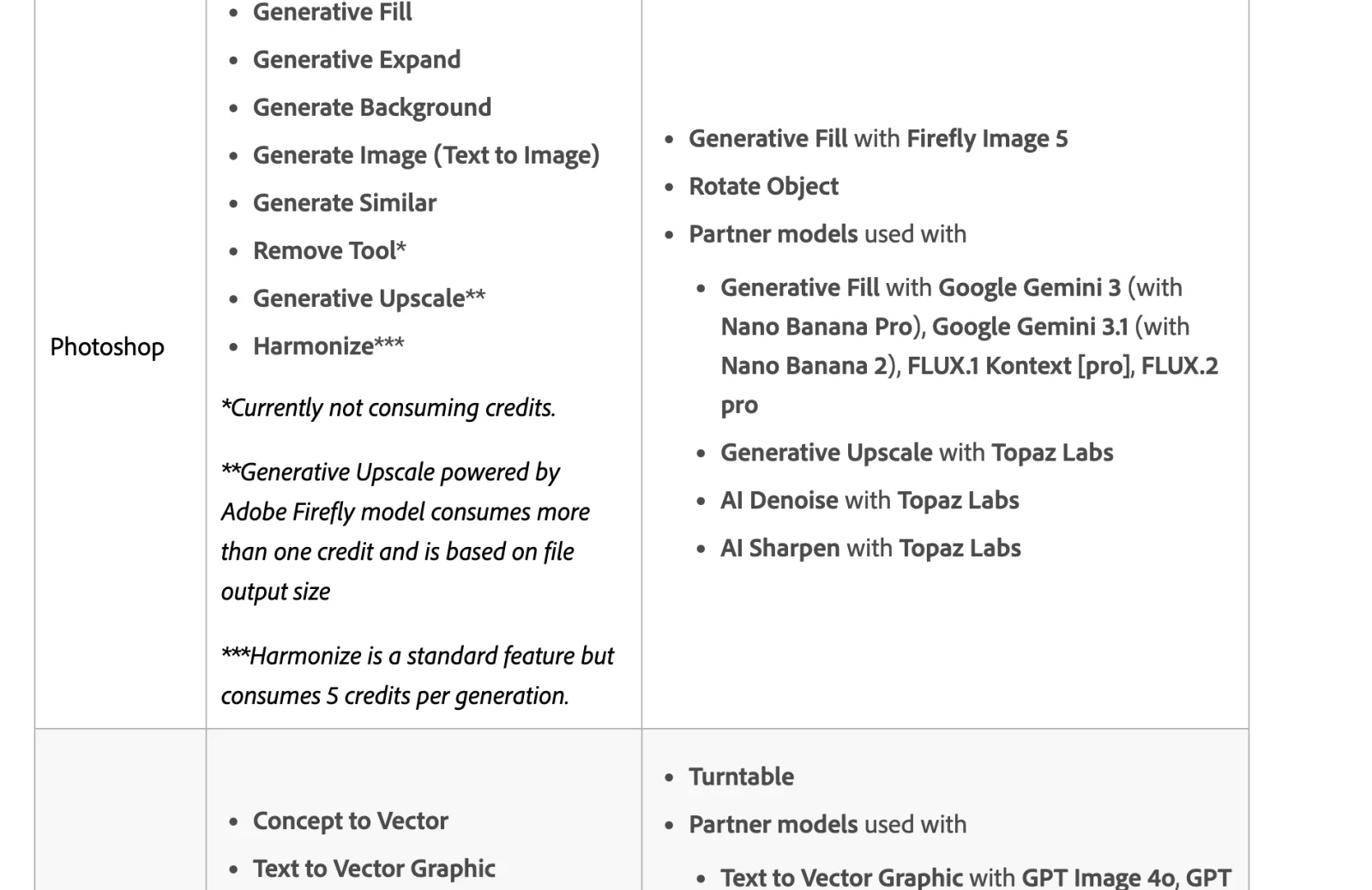
| Generative Fill | Fills or replaces a selection from a prompt, or from surrounding pixels with a blank prompt | Desktop, web, iPad, phone | Standard (1) with Firefly Fill & Expand or Image 1; premium (10) with Firefly Image 5; premium (10 to 40) with partner models | Cloud | Firefly Fill & Expand, Firefly Image 5, Firefly Image 1; FLUX.2 pro, FLUX Kontext pro, Gemini 3.1, Gemini 3 (desktop only) | Beta May 2023, general release 13 September 2023; partner models 27.0, October 2025 |
| Generative Expand | Extends the canvas from the Crop tool | Desktop, web, iPad | Standard (1) | Cloud | Firefly Fill & Expand, Firefly Image 1 (Image 3 retired August 2026) | Beta July 2023, general release 13 September 2023 |
| Generate Image | Text to image in a new document | Desktop, web, phone | Standard (1) with Firefly; premium with partner models | Cloud | Firefly Image 5, Firefly Image 3; Gemini 3.1, Gemini 3, FLUX.2 pro (desktop) | Before 27.0; model picker 27.8, June 2026 |
| Generate Background | Replaces the background behind a subject after Remove Background | Desktop, web, phone | Standard (1) | Cloud | Firefly | General release 14 October 2024 |
| Generate Similar | New variations of a chosen result | Desktop, web | Standard (1) | Cloud | Firefly Fill & Expand | General release 14 October 2024 |
| Reference Image | Guides a generation with an uploaded image | Desktop, web | No separate charge listed | Cloud | Firefly Fill & Expand; up to 3 images for FLUX, 8 for Gemini | 27.3, January 2026; multiple references 27.6 |
| Prompt to edit | Edits the whole image from a prompt, no selection | Desktop | Rate of the chosen model | Cloud | Firefly Image 5, Gemini models | 27.10, August 2026 |
| Markup | Draw or annotate on the canvas to steer an edit | Desktop; web as AI markup (beta) | Rate of the chosen model | Cloud | Gemini models (desktop) | Web beta March 2026; desktop 27.10, August 2026 |
| Mask-targeted edits | Firefly Image 5 treats a selection as a mask with context outside it | Desktop | Premium (10) | Cloud | Firefly Image 5 | 27.10, August 2026 |
| Harmonize | Matches a pasted object's color, light and shadows to the background | Desktop, web, phone | Standard, 5 credits | Cloud | Firefly | 27.0, October 2025 |
| Rotate Object | Turns a pixel layer into a rotatable object | Desktop | Premium, 20 per object, first rotation only | Not stated | Firefly | 27.6, April 2026 |
| Generative Upscale | 2x or 4x upscale into a new document | Desktop, web | Standard, more than 1 by output size (Firefly); premium 10 or 20 (Topaz Gigapixel), 35 (Topaz Bloom) | Cloud | Firefly Upscaler, Topaz Gigapixel, Topaz Bloom | 27.0, October 2025 |
| AI Sharpen, AI Denoise | Filter-menu sharpening and noise reduction | Desktop | Premium, 10 up to 25 MP, 20 up to 56 MP | Cloud | Topaz Sharpen, Topaz Denoise | 27.0, October 2025 |
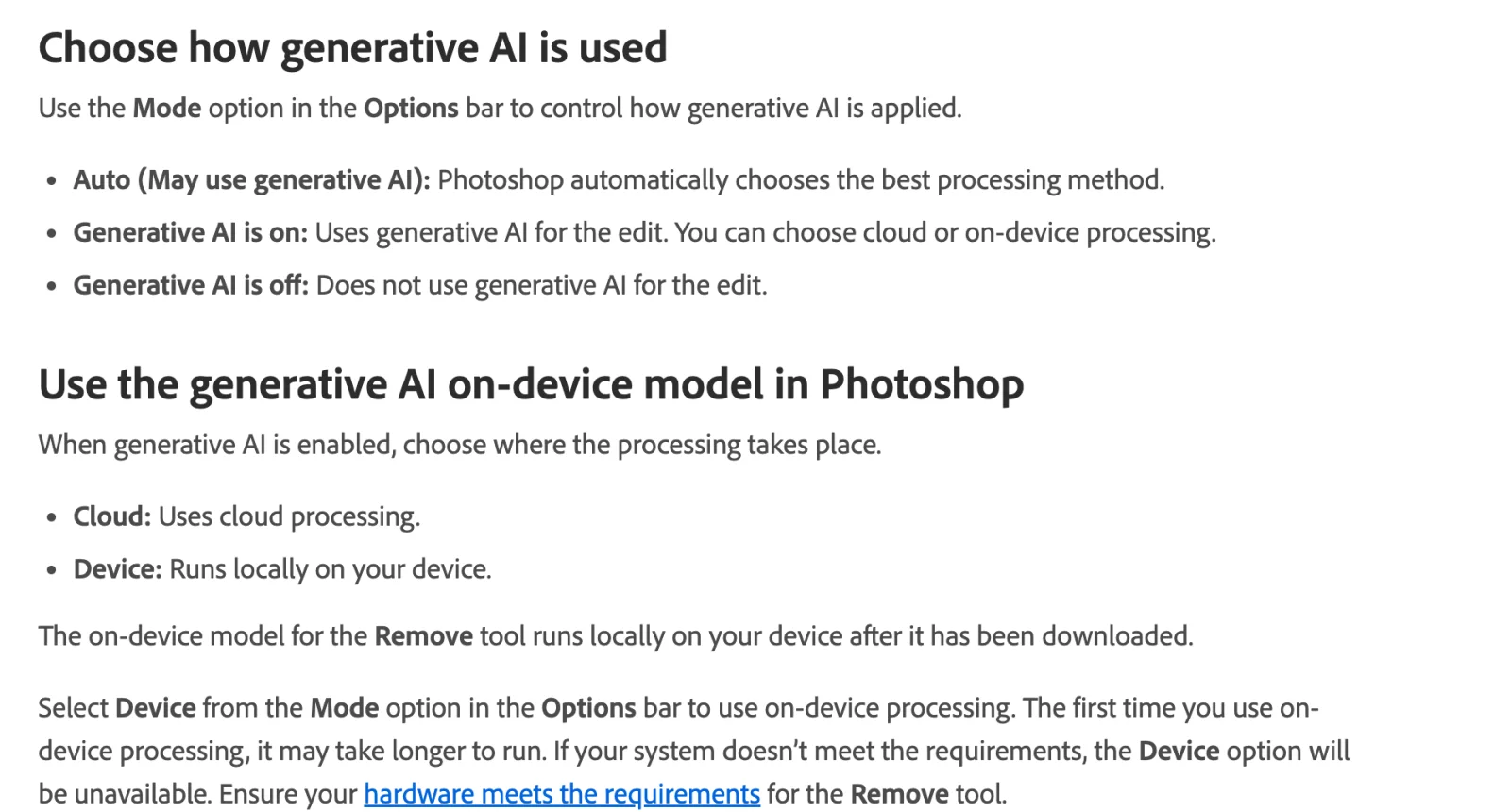
| Remove tool | Brush over an object to remove it; Auto, generative on, or generative off | Desktop, web, phone | Free ("currently not consuming credits") | Cloud, or on-device with a downloaded model | Adobe, unnamed | Before 26.0; on-device option 27.7, May 2026 |
| Distraction Removal (Find distractions) | Detects and removes wires and cables, people, or general distractions | Desktop, web | Free | Cloud | Adobe, unnamed | Wires and people 14 October 2024; general distractions 27.6, April 2026 |
| Reflection Removal | Removes full-image glass reflections from the Edit menu | Desktop | Not on Adobe's credit list | Not stated | Adobe, unnamed | 27.6, April 2026 |
| Layer Cleanup | Deletes empty layers and renames layers by content | Desktop | Not on Adobe's credit list | Not stated | Adobe, "AI-powered" | 27.6, April 2026 |
| Actions panel suggestions | Natural-language search and actions suggested for the open image | Desktop | None | Not stated | Adobe, unnamed | 27.6, April 2026 |
| Select Subject, Object Selection, Remove Background | One-click and hover selections | Desktop, web, phone | Free | On-device by default, cloud optional | Adobe Sensei | Before 22.0; Device and Cloud choice 27.0 |
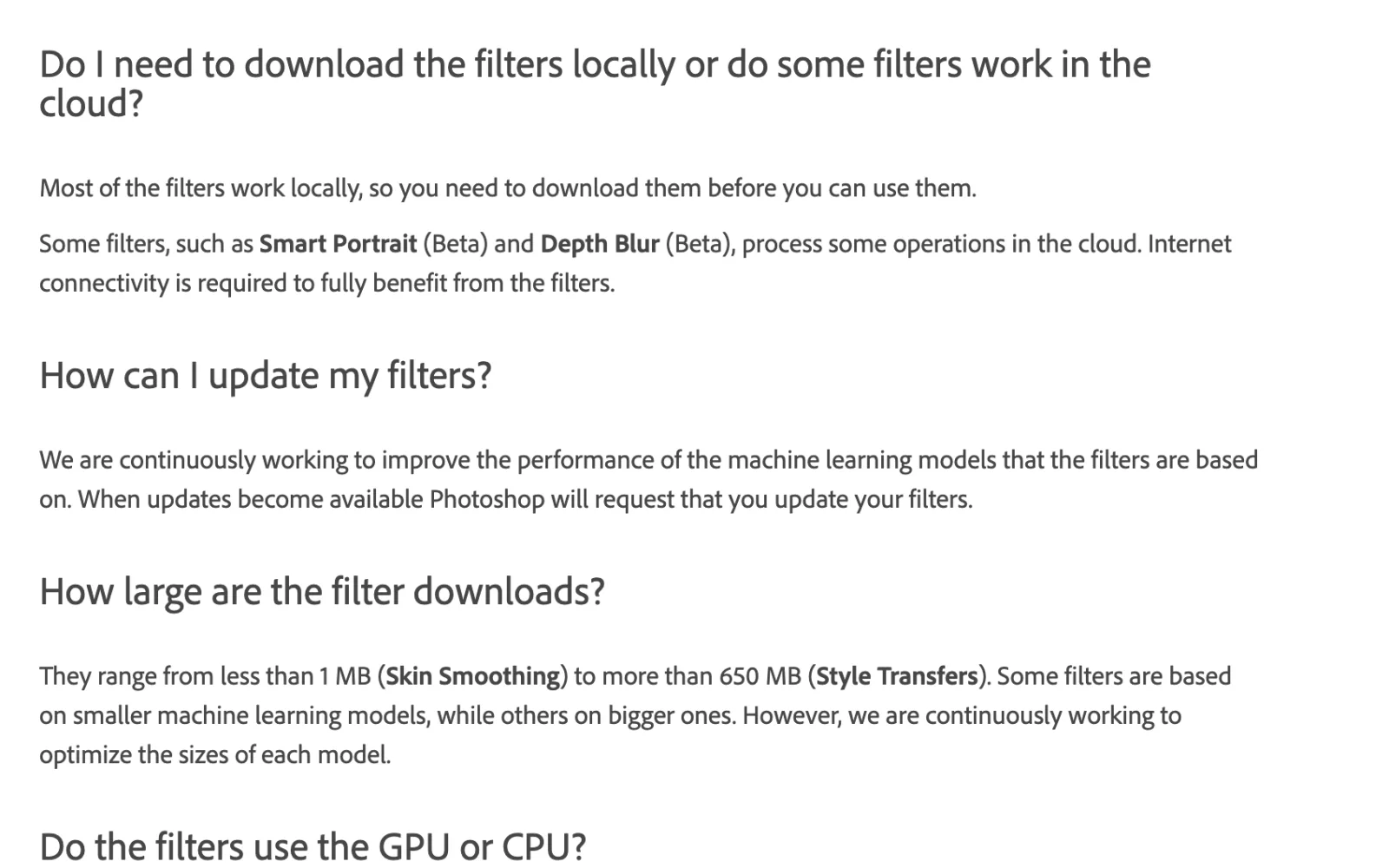
| Neural Filters | Twelve machine-learning filters in a gallery | Desktop only | Free | Mostly local after download; Smart Portrait and Depth Blur partly cloud | Adobe Sensei | 22.0, October 2020 |
| Sky Replacement | Swaps the sky and relights the foreground | Desktop | Free | Local | Adobe does not name one | 22.0, October 2020 |
| Preserve Details 2.0 | Upscaling in the Image Size dialog | Desktop | Free | Local | Adobe, "artificial intelligence-assisted" | Technology preview, on by default |
| Content-Aware Fill | Fills a selection from sampled pixels | Desktop, phone | Free | Local | None; not a model | Long before any of the above |
| AI Assisted Editor (Beta) | A simplified prompt-first mode with seven tools | Desktop | Per feature used | Cloud | Various | 27.10, August 2026 |
| AI Assistant | A chat panel that runs multi-step edits | Web and phone (public beta); desktop beta app (early beta) | Generative steps spend credits | Cloud | Adobe's creative agent | Web and phone March 2026; desktop beta June 2026 |
| Image to video | Turns a still into a short clip | Web only | Not stated on the page | Cloud | Not named on the page | Web, August 2026 |
| Camera Raw AI (Denoise, masking, Lens Blur, Reflection Removal, Generative Remove, Generative Expand) | See the Camera Raw section | Desktop, via Camera Raw and the Camera Raw Filter | Free except the generative pair | Local GPU for Denoise; cloud for the generative pair; not stated for the rest | Adobe; Firefly for the generative pair | Denoise April 2023, Lens Blur October 2023, Reflection Removal December 2024 |
Sources for every row are linked below. The surface column follows Adobe's web and desktop comparison (28 October 2025), the iPad Generative Fill and Expand pages (17 June 2025) and the mobile What's new (18 June 2026). "Not on Adobe's credit list" means absent from the Creative Cloud generative AI features page (10 September 2026).
Generative Fill and Generative Expand
Generative Fill takes a selection and a prompt and returns variations on a generative layer with a mask; a blank prompt fills from the surrounding pixels. Adobe's page, dated 15 September 2026, lists Firefly Fill & Expand, Firefly Image 5 and Firefly Image 1, plus FLUX.2 pro, FLUX Kontext pro, Gemini 3.1 (with Nano Banana 2) and Gemini 3 (with Nano Banana Pro) (Generative Fill). Firefly Fill & Expand was a beta in October 2025, became the default in 27.3, and replaced Firefly Image 3, which left the picker in 27.6 on 28 April 2026 and was switched off in August (beta What's new, Firefly Image 3 retirement). Generative Expand is the same engine reached through the Crop tool and lists Adobe models only (Generative Expand, 23 February 2026).
Both entered the beta in 2023, Fill in May and Expand in July, and became "generally available to all Creative Cloud subscribers" on 13 September 2023 (Adobe blog, 27 July 2023, Adobe blog, 13 September 2023). Partner models arrived in 27.0 with Gemini 2.5 Flash Image and FLUX.1 Kontext, then FLUX.2 pro in 27.2 and Gemini 3.1 in 27.6 (release notes, Adobe news, 28 October 2025); Adobe's retirement page names ten models deprecated between April and September 2026 (model retirement).
The limit is resolution. Adobe's FAQ says "the Firefly model currently returns output of 1024x1024 pixels to Photoshop on the desktop and the web" (Photoshop generative AI FAQ), while its October 2025 press release has Firefly Image 5 generating "in native 4MP resolution" (Adobe news); the two are not reconciled on one page. Enhance Detail re-renders a variation more sharply, and "only variations that are larger than 1024 pixels can be enhanced" (Enhance Detail).
Generate Image, Generate Background and Generate Similar
Generate Image is text to image in a new document; its page, dated 10 September 2026, lists Firefly Image 5 and Image 3 plus Gemini 3.1, Gemini 3 and FLUX.2 pro (Generate Image). Image 3 "will still be available in the Generate Image for now" despite its retirement elsewhere, and the picker came with 27.8 (Firefly Image 3 retirement, release notes). Adobe's table of which button appears when (Generate Image on an empty layer, Prompt to edit on a whole image, Generative Fill on a selection) is on the Prompt to edit page.
Generate Background follows Remove Background in the Contextual Task Bar with a prompt, an imported image or a flat color, "powered by the latest Adobe Firefly Image Model" (Generate Background, 23 February 2026). It and Generate Similar became generally available on 14 October 2024 (Adobe news, 14 October 2024); on the web it "deducts one standard generative credit per generation" (Generate background on the web). Generate Similar works across Fill, Expand, Background and Generate Image, uses Firefly Fill & Expand since 27.4, and each run is its own credit (Generate Similar).
The Remove tool and Distraction Removal
There is no Generative Remove in Photoshop; that name belongs to Lightroom and Camera Raw. Photoshop's Remove tool is on Adobe's list of features that do not consume credits, with "currently" attached (generative credits FAQ, 10 September 2026). Its Mode option offers "Auto (May use generative AI)", "Generative AI is on" and "Generative AI is off", and when on, Cloud or Device processing (Remove tool, 18 August 2026). Device mode, from 27.7, downloads a roughly 5 GB model and runs it locally, "ideal when internet connections are unreliable or when cloud processing isn't preferred" (on-device model announcement). The floor is an NVIDIA RTX 30-series with 14 GB of VRAM, an Intel Arc with 12 GB, an AMD RDNA2 card with 23 GB, or integrated graphics with 32 GB (Intel) or 64 GB (AMD) of system memory; on a Mac, an M1 Max with 24 GB and macOS 26 (hardware requirements, 18 August 2026). Fall short and Device is grayed out.
Distraction Removal is a Find distractions dropdown in the same tool with Wires and cables, People and General distractions detectors (Remove wires, people, and distractions, 18 August 2026). Wires and people arrived in October 2024, when Adobe said it "automatically detects and removes wires and people and replaces the background with generated content"; the general detector came in 27.6 and the controls moved into the Contextual Task Bar in 27.9.1 (Adobe blog, 14 October 2024, release notes). Detection is a proposal: Adobe's steps end with "review and refine the detected areas by brushing on-screen".
Harmonize, Reference Image and Rotate Object
Harmonize adjusts "the color, lighting, shadows, and tone" of a subject on its own pixel layer to match the layer beneath; it does not work on Smart Objects, text or adjustment layers (Harmonize, 20 May 2026). It shipped in 27.0 on desktop, web and phone after a July 2025 phone beta and is standard at 5 credits (mobile What's new, Creative Cloud generative AI features); the older Harmonization Neural Filter still exists as a free beta.
Reference Image attaches an image to a Generative Fill. With Firefly Fill & Expand you choose object or whole image and swap or place; with partner models you prompt first and can upload up to three images for FLUX or eight for Gemini (Reference Image, 18 August 2026). It appears in the 27.3 What's new, multiple references in 27.6, with no separate charge.
Rotate Object, from 27.6, turns a pixel layer or Smart Object into something you can drag in three dimensions, previewing at low resolution and rendering at full resolution on Done (Rotate Object, 18 August 2026). It is premium at "20 credits per object, only applied on first rotation for each" (generative credits FAQ); Adobe does not say where the rendering happens.
Prompt to edit, Markup and mask-targeted edits (27.10)
Prompt to edit edits the whole image from a sentence, from the Contextual Task Bar with no selection or Edit > Prompt to Edit, with its own model picker (Prompt to edit, 28 August 2026). The 27.10 fixed-issues list mentions Firefly Image 5 in it and the Markup page says Gemini models are selectable there. Adobe's features page does not list it by name, so the cost is the chosen model's: 10 credits for Firefly Image 5, 20 to 40 for Google's (partner models).
Markup adds text notes and brush strokes as instructions, "for best results, use colors like red (#FF0000) and electric blue (#00FFFF)", and works only with a Gemini model selected (Markup, 1 September 2026). The web equivalent, AI markup (beta), has been public since March 2026 (AI markup on the web, Adobe blog, 10 March 2026).
Mask-targeted edits are Generative Fill with Firefly Image 5, whose "native mask support" uses "surrounding context to preserve details outside the selected area, including image structure, identity, and other unchanged elements" (Use selections for generative edits, 28 August 2026). It costs Image 5's 10 credits.
Generative Upscale, AI Sharpen and AI Denoise
Generative Upscale (Image > Generative Upscale) offers 2x or 4x into a new document with three engines: Firefly Upscaler, which "restores low-resolution images (up to 6144 px × 6144 px)"; Topaz Gigapixel, which "preserves existing detail" up to 56 megapixels; and Topaz Bloom, which "adds new, creative detail" up to 9 megapixels (Generative Upscale, 20 May 2026). Firefly upscaling "consumes more than one credit and is based on file output size", a scale Adobe does not publish; Gigapixel is 10 credits up to 25 megapixels and 20 up to 56; Bloom is 35 (Creative Cloud generative AI features, partner models). AI Sharpen and AI Denoise, in the Filter menu, are "powered by a partner AI model from Topaz Labs", accept files up to 56 megapixels, cost 10 or 20 credits by the same split, and update the current layer in place: "no new layer is created" (AI Sharpen and AI Denoise, 23 February 2026).
Neural Filters
Neural Filters launched with Photoshop 22.0 on 20 October 2020 as "part of a new machine learning platform" (Adobe blog, 20 October 2020). Adobe's current page says they use "Adobe Sensei's machine learning technology" and that "some filters require an internet connection for processing" (Apply Neural Filters, 23 February 2026). The list has not changed since 24 May 2023: featured are Smart Portrait, Skin Smoothing, Super Zoom, JPEG Artifacts Removal, Colorize, Style Transfer and Makeup Transfer; beta are Photo Restoration, Harmonization, Landscape Mixer, Depth Blur and Color Transfer (Neural Filters list and FAQ). "Most of the filters work locally, so you need to download them before you can use them", while "some filters, such as Smart Portrait (Beta) and Depth Blur (Beta), process some operations in the cloud"; downloads range "from less than 1 MB (Skin Smoothing) to more than 650 MB (Style Transfers)", and none appears on the credit tables. Adobe publishes no list of retired filters, so none is claimed here; the known-issues page is also dated May 2023 (Neural Filters known issues). They are desktop only.
Select Subject, Object Selection, Sky Replacement and Preserve Details
These predate generative AI and cost nothing. Adobe's Photoshop AI page lists Object Selection, and Select Subject with Remove Background, among its "AI-powered tools", so calling them AI is Adobe's usage (Photoshop AI features). Object Selection highlights an object on hover and selects it on click (Object Selection tool, 23 February 2026); Remove Background is a Quick Action in the Discover panel and the Contextual Task Bar (Remove Background); 22.0 added "Refine Hair" and an "Object Aware Refine Mode" (Adobe blog, 20 October 2020). Since 27.0, Preferences > Image Processing offers Device or Cloud, and "by default, Photoshop uses Device processing to refine selections" (Improve Select Subject and Remove Background, 23 February 2026). A Generative Fill is only as good as the selection it is given.
Sky Replacement (Edit > Sky Replacement) also arrived in 22.0. Adobe's page describes sky presets, blending sliders and an Edge Lighting group of adjustment layers, its 2020 post spoke of "cutting-edge algorithms", and neither names Sensei or Firefly (Sky Replacement, 2 July 2026). Preserve Details 2.0, in Image > Image Size, is a technology preview shipped on by default that Adobe calls "artificial intelligence-assisted upscaling"; it runs locally and is the free alternative to Generative Upscale (technology preview features, 23 February 2026).
Content-Aware Fill is not generative
Content-Aware Fill recombines pixels sampled from a region of the same image that you paint in its workspace; there is no model, prompt, credit or network (Content-Aware Fill, 2 June 2026). It copies texture that exists, so it suits grass, sky, walls and water and fails where the fill must invent structure; Generative Fill with a blank prompt does the inventing and costs a credit, and the Remove tool with generative AI off sits closer to Content-Aware Fill. Phones have a "Content aware fill" entry as well (mobile help).
Camera Raw's AI
Camera Raw opens raw files inside Photoshop and is also Filter > Camera Raw Filter. Its AI Edit Status button lists Adobe's recommended order: HDR, Denoise, Reflection Removal, People Removal, Blemish Removal, Dust Removal, Generative Expand, Generative Remove, Lens Blur, then masking (AI Edit Status, 27 August 2026).
- Denoise, Raw Details and Super Resolution live in the Enhance dialog. Denoise applies only to raw files, runs on your GPU and writes a new DNG; Super Resolution "is not accessible in Photoshop when you select Filter > Camera Raw Filter" (Enhance, 14 October 2024). Denoise arrived in April 2023 (Adobe blog, 18 April 2023). None spends credits.
- Masking offers AI masks for Subject, Sky, Background, Objects, People with per-person parts, and Landscape with eight categories (Masking, 18 June 2026).
- Lens Blur builds a depth map and applies an optical blur with selectable bokeh; Subject Focus uses "AI-powered subject detection" (Lens Blur, 12 December 2024). Early access began in October 2023 (Adobe blog, 10 October 2023).
- Reflection Removal sits under Distraction Removal with Preview, Standard and Best quality, supports raw and non-raw files, and is unavailable on Windows on ARM (Reflection Removal in Camera Raw, 18 August 2025), after a raw-only technology preview in December 2024 (Adobe blog, 12 December 2024). Photoshop's own Reflection Removal, in the Edit menu since 27.6, applies the same idea to a layer (Reflection Removal in Photoshop, 18 August 2026).
- People, Dust and Blemish removal are the other detectors; Blemishes, new in 18.5, has a Refine brush to restore a mole the model took out (Blemish Removal, 4 August 2026).
- Generative Remove and Generative Expand are the Firefly pair. Generative Remove is "powered by Adobe Firefly generative AI", needs an internet connection and returns three variations (Generative Remove, 27 October 2025); Generative Expand is still labeled a technology preview (Generative Expand in Camera Raw). Adobe's credit exceptions list names "Lightroom: Generative Remove" as free and does not list Camera Raw separately (generative credits FAQ). Since 18.5 a preference can switch the generative features off (What's new in Camera Raw).
The AI Assisted Editor and the AI Assistant
Adobe's FAQ separates the two: "AI Assisted Editor is a simplified, AI-first workspace where users can make edits using natural language. AI Assistant is a tool that can perform multi-step edits on the user's behalf or provide guidance" (AI Assisted Editor FAQ, 28 August 2026).
The AI Assisted Editor (Beta) shipped in 27.10, "available to all current Photoshop subscribers who have updated to the latest build on August 19". A toggle swaps the full interface for a canvas, a prompt bar and seven tools: Prompt, Markup, Fill, Remove, Crop and expand, Upscale, and Remove background. Switching in flattens a copy of the document; switching back pastes the result as a new generative layer. Uploads are JPG, PNG and WebP, downloads JPG and PNG, new users land in it by default, and credits are "varying amounts depending on the feature" (AI Assisted Editor, Adobe blog, 27 August 2026).
The AI Assistant is the agent. Adobe showed it for Photoshop on the web at MAX on 28 October 2025 as "powered by agentic AI" (Adobe news, 28 October 2025), took it to public beta on web and phone on 10 March 2026 (Adobe blog, 10 March 2026), and on 18 June 2026 announced AI Assistants "powered by Adobe's creative agent" across Premiere, Photoshop, Illustrator, InDesign and Frame.io, the Photoshop one executing a described outcome "across the entire composite", such as swapping a background, resizing for every platform or organizing layers (Adobe news, 18 June 2026). On desktop it is "currently in early beta" and "to access AI Assistant in Photoshop, download and open the Photoshop (Beta) on desktop app" (AI Assistant overview, 23 June 2026); it is absent from the 27.10 release notes, so the release build has the AI Assisted Editor but not the AI Assistant. Its generative steps "use generative credits, the same as elsewhere in Photoshop" (Photoshop beta announcement), and Adobe does not name the language model behind it.
Actions panel suggestions, Layer Cleanup and Firefly Boards
The Actions panel was redesigned in 27.6 with "natural language search, suggested actions based on your image, and live canvas previews", an Essentials tab in six categories, and Apply on subject and Apply on background options; Adobe does not say what produces the suggestions, and no credit applies (release notes, Apply actions, 18 August 2026). Layer Cleanup, also 27.6, deletes empty pixel and text layers and "assigns descriptive names to layers based on their content"; the release notes call it "AI-powered", the help page is silent on where it runs, and it is not on the credit tables (Layer Cleanup, 18 August 2026). Firefly Boards gained hooks into Photoshop across 27.5 to 27.9.1: send a cloud document, a local PSD or selected layers to a board, or open a board's image in Photoshop (Use Firefly Boards with Photoshop, 18 August 2026).
Firefly video, where it touches Photoshop
Photoshop does not generate video on the desktop; 27.0 added a hand-off, "Send a Photoshop asset to Firefly to kickstart video generation" (What's new). Photoshop on the web added Image to video in August 2026, under Generative in the Tools panel, with a prompt, duration, aspect ratio and resolution, motion and effects, optional audio, and output in the Generation history tab (Image to video on the web, 4 September 2026). The page names neither the model nor the cost; Firefly's own video generation runs 20 to 100 credits per second by resolution, as worked through in the credits post.
Content Credentials, training and commercial safety
Content Credentials are C2PA provenance metadata, in Photoshop a panel at Window > Content Credentials (Beta) with a switch to enable them for saved documents (Content Credentials in Photoshop, 25 August 2026). Separately, Adobe's labeling FAQ says that under laws such as the California AI Transparency Act and the EU AI Act, "C2PA metadata is automatically attached to content when qualifying generative AI tools are used to create or modify content in Adobe apps", that this "applies only to generative AI tools, not traditional AI-powered features", that it "cannot be disabled for qualifying content", and that Adobe "does not automatically add visible AI labels" (AI content labeling FAQ, 25 August 2026). A Generative Fill carries an invisible record even with the panel off; a Neural Filter or Select Subject does not.
Adobe's Firefly FAQ says the models "were trained on a dataset of licensed content, such as Adobe Stock, along with public domain content" and that "we don't train on any Creative Cloud subscribers' personal content" (Firefly FAQ); for partner models, content is never used to train partner or Adobe models (partner models). Adobe's IP indemnity for eligible business customers excludes anything "denoted in the user interface as being powered or provided by non-Adobe trained models" and anything labeled beta (Adobe Firefly product description, 27 August 2026), which read literally leaves out the partner models, the AI Assisted Editor and the AI Assistant while they carry the beta label.
What is web only, phone only, or desktop only
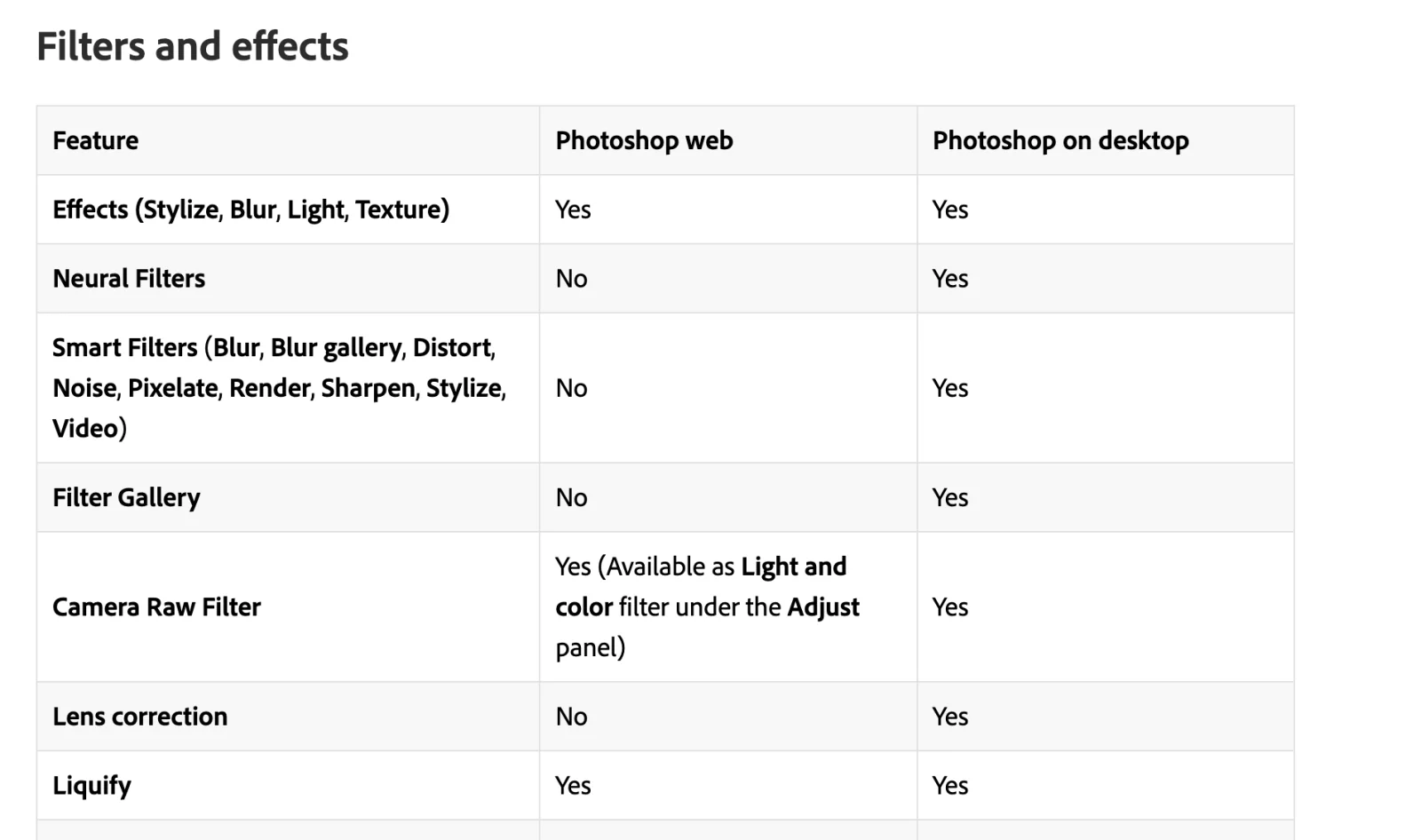
Adobe's comparison page, dated 28 October 2025, marks Generative fill, Generative expand, Harmonize, Generative upscale, Generate image, Reference image and Generate similar as available on both web and desktop, and Neural Filters, Smart Filters, the Filter Gallery, Actions and Lens Correction as desktop only (web and desktop comparison). Since then: the AI Assistant and Photoshop for ChatGPT (December 2025) are on web and phone but not the release desktop app; Image to video, AI markup (beta), Generation history, Select Details in Object Selection and Composition Reference are web only; voice prompts, Effects and "adjustments to facial features" are phone only (web What's new, 5 August 2026; mobile What's new; mobile AI Assistant). The iPad pages, dated 17 June 2025, document Generative Fill and Expand at one credit each with Firefly only (iPad Generative Fill). Desktop only: the partner model picker, Prompt to edit, Markup, Rotate Object, AI Sharpen and AI Denoise, Reflection Removal, Layer Cleanup, Neural Filters, Sky Replacement, the on-device Remove tool, Camera Raw and the AI Assisted Editor. On the web and phones Generative Fill offers one prompt box and one Firefly model (Generative fill on the web).
What is not AI
Content-Aware Fill, the Healing Brush, the Spot Healing Brush, the Patch tool and the Clone Stamp are pixel sampling. The Light adjustment layer (27.10), Color and vibrance (27.0), Clarity and dehaze and Grain (27.3) are ordinary non-destructive adjustments that shipped beside generative features; Adobe's blog calls Light "professional-grade lighting controls", not AI (Light, Adobe blog, 27 August 2026). Dynamic Text, the Stock panel, Projects and cloud file search are workflow features; the search accepts "natural language keywords", which is search, not editing (release notes). Sky Replacement and Preserve Details 2.0 are borderline and are listed above with Adobe's exact wording. And generative credits are not a feature: if a menu item is not in the Photoshop row of Adobe's features table, it does not spend them.
Frequently asked questions
Is Photoshop's AI free? Some of it. Neural Filters, Select Subject, Object Selection, Remove Background, Sky Replacement, Content-Aware Fill, the Remove tool and Camera Raw's Denoise and masking spend no credits. Generative Fill, Expand, Generate Image, Generate Background, Harmonize, Generative Upscale, Prompt to edit and anything using a partner model spend generative credits, of which the single-app plan includes 25 a month (generative credits FAQ); per-plan numbers are in the credits post.
Does Photoshop AI work offline? The generative features do not (Photoshop generative AI FAQ). The exceptions are the Remove tool in Device mode on qualifying hardware, Select Subject and Remove Background in Device mode, most Neural Filters after download, Preserve Details 2.0, Content-Aware Fill and Camera Raw's Denoise.
Is there an AI assistant in Photoshop? Two things by that name. The AI Assisted Editor (Beta), a prompt-first mode, is in the 27.10 release for all subscribers. The AI Assistant, the agent, is in public beta on the web and phones and in early beta only in the Photoshop (Beta) desktop app (AI Assistant overview).
Are Neural Filters still supported? They are in 27.x on desktop with the twelve filters Adobe listed in May 2023, the page on applying them was updated in February 2026, no retirements are announced, and they are not on the web (Neural Filters list, web and desktop comparison).
Can I turn off AI in Photoshop? Not globally on desktop. You can leave the AI Assisted Editor, set the Remove tool to "Generative AI is off", set Select Subject to Device, and in Camera Raw 18.5 or later switch generative features off in preferences (Remove tool, What's new in Camera Raw); the Firefly entitlement itself cannot be removed from a plan (Firefly FAQ).
Does Photoshop label AI-generated images? Invisibly, yes. C2PA metadata is attached automatically when a generative feature creates or modifies content and cannot be turned off; Adobe adds no visible watermark, and whether a label shows is up to the platform the image is posted to (AI content labeling FAQ).
Make your next project in Voyager
Create an account, download Voyager, and start making.
