
There is no Photoshop for Linux. Adobe's technical requirements page for Photoshop 27.x, updated 9 September 2026, has a Windows tab and a macOS tab and nothing else (Photoshop technical requirements). That has been true for every version, and nothing on Adobe's plan or requirements pages on 21 September 2026 suggests it is about to change.
What exists instead is a set of routes, each of which gets you some of Photoshop, or all of it under conditions: Photoshop on the web inside a Linux browser, the Windows build under Wine, a Windows virtual machine, a remote Windows desktop, and the native Linux editors that cover most of what people open Photoshop for. Each section says what works, what breaks, and what it costs, with the source and the date it was read. Nothing here is a benchmark, and where a route rests on community reports they are labeled as reports.
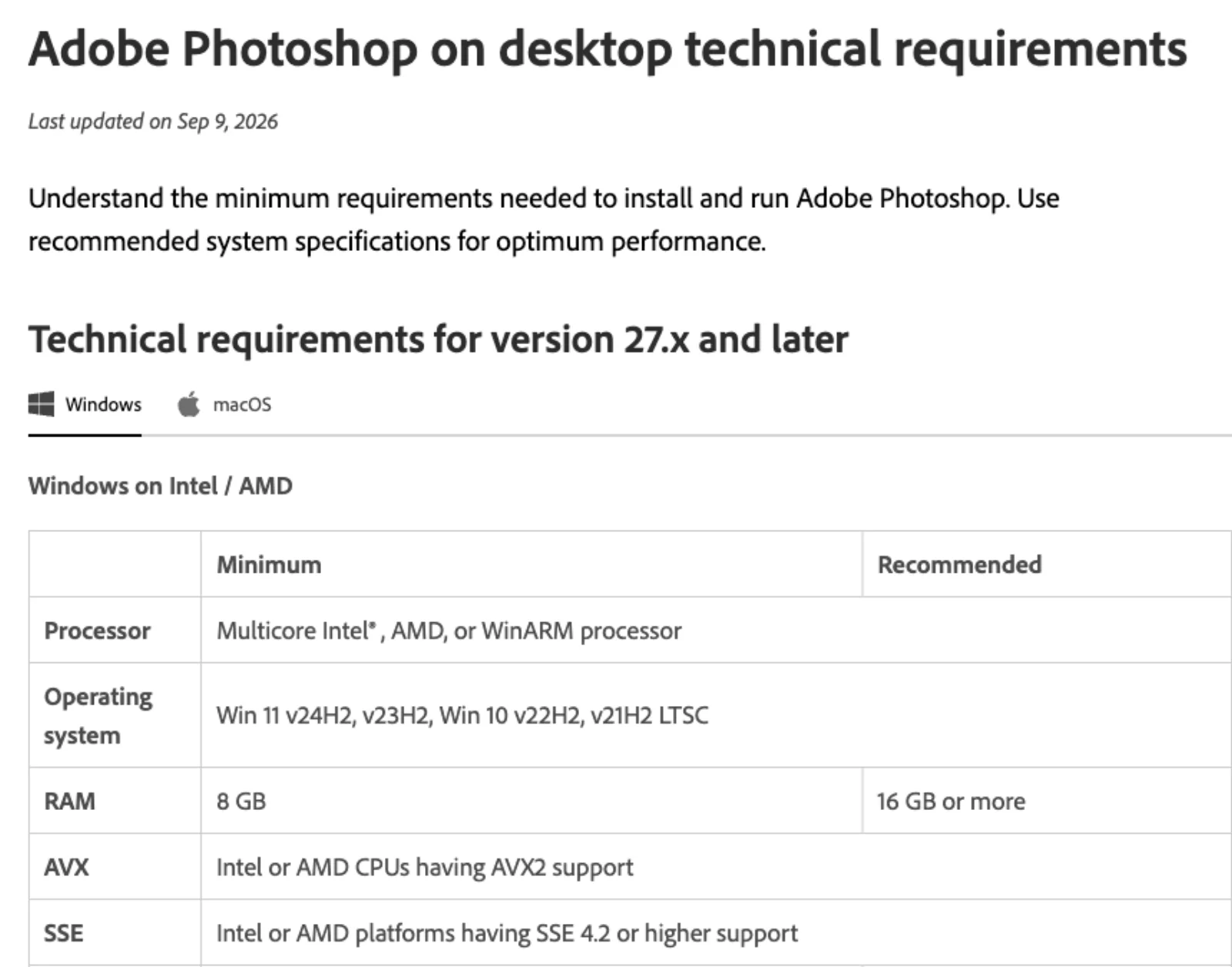
The short version: if the job fits inside Photoshop's browser version and you are willing to keep your files as Adobe cloud documents, that is the cheapest legitimate way to get the Adobe tools on a Linux desktop, with the caveat that Adobe's support list for it does not name Linux either. If you need the full desktop application, a Windows virtual machine or a remote Windows desktop is the route Adobe's own policies permit, and Wine is the route the community keeps alive with mixed, version-specific results. If the job is retouching, compositing, raw development or vector work rather than "Photoshop specifically", the native editors are further along than their reputation, and the GIMP vs Photoshop and Photopea vs Photoshop comparisons go job by job.
Route 1: Photoshop on the web in a Linux browser
Photoshop on the web is a real Adobe product that runs in a desktop browser, and it "is included in all Photoshop plans" (Photoshop on the web FAQ, updated 24 June 2026). There is no free tier: the same FAQ says "There isn't a free version of Photoshop on the web", and every plan has a seven-day trial.
The supported-platform question is the first thing a Linux user should read carefully. Adobe's technical requirements for the web version, updated 27 March 2025, list the browsers as "Google Chrome, Microsoft Edge version 102 and above (64-bit), Safari on Mac version 18.3 and above (beta), and Mozilla Firefox version 111 and above on desktop", and the operating systems as "Windows 10 (64-bit) and later", "macOS 10.15 and later" and "ChromeOS 102 and later" (web technical requirements). Linux is not on the list. Chrome and Firefox on Linux are the same browser engines Adobe supports elsewhere, and the page does not say what happens on an operating system it does not name, but this article did not test it and Adobe's support commitment stops at the three systems listed. Treat Linux as unsupported rather than blocked, and run the trial before paying.
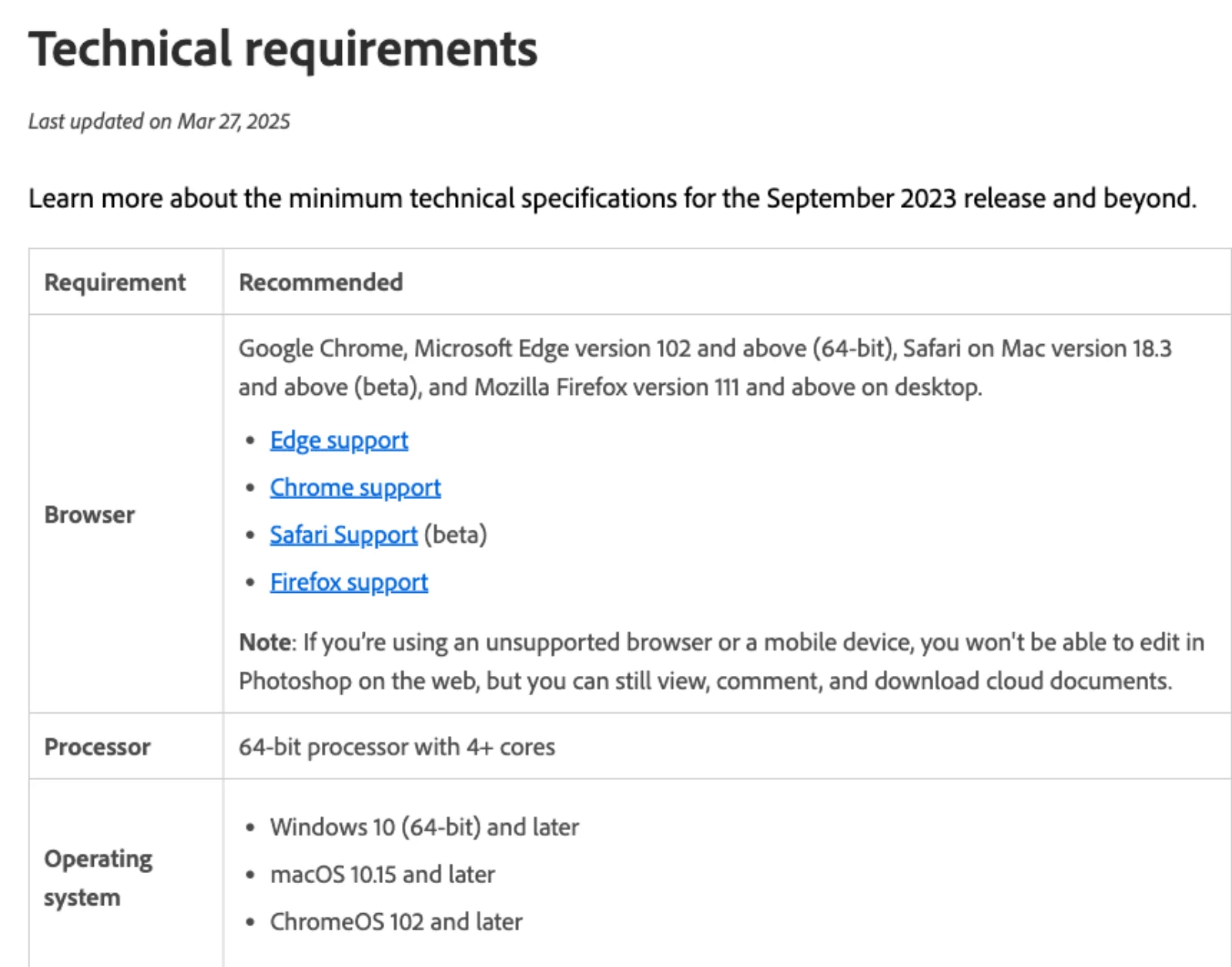
The other requirements are modest: a 64-bit processor with four or more cores, 8 GB of RAM, 6 GB of free disk space, and a browser that is allowed to store data on the device. Adobe warns that Chrome's "Delete data when you close all windows" setting, incognito mode and enterprise storage quotas can each stop the app from working (web technical requirements).
What you get is a subset of the desktop application. Adobe's own comparison table, updated 28 October 2025, marks these as "No" on the web: Warp and Puppet Warp, Polygon lasso, Magic wand, Pencil, Pen, History brush, Frame, Vertical Type, right-to-left text, text on a path, Glyphs, Actions, Blur tool, Patch tool, Timeline, Neural Filters, Smart Filters, Filter Gallery, Lens correction, and the Custom, High pass, HSB/HSL, Maximum, Minimum and Offset filters. Smart objects are "Yes (Limited functionality)" and Levels and Curves "work with limited functionality" (Compare Photoshop web and desktop features). The generative tools are all there: Generative Fill, Generative Expand, Harmonize, Generative Upscale, Generate Image, Reference Image and Generate Similar are "Yes" on both surfaces. File formats are narrow: import "PSD, PSDC, PNG, JPEG, TIFF, HEIC, PSB, RAW, and WebP", export "PSD, PNG, JPEG, TIFF, and WebP", with no PDF, SVG or GIF.
Two structural points matter more than any single missing tool. First, documents "are stored as cloud documents" on Adobe's servers; you can download them as files, but the working copy lives with Adobe (web FAQ). Second, no Actions and no scripting means nothing repeatable; every batch job has to happen somewhere else.
Cost, on Adobe's US plan page on 21 September 2026, all annual plans billed monthly (Photoshop plans):
| Plan | Price | What a Linux user can actually run | Generative credits |
|---|---|---|---|
| Photoshop | US$22.99/mo | Web and mobile; the desktop app is Windows and macOS only | 25 a month |
| Firefly Pro | US$19.99/mo | Web and mobile only, by design | 4,000 a month |
| Photography | US$19.99/mo | Web and mobile, plus Lightroom, which is also Windows and macOS on the desktop | 1,000 a month |
| Creative Cloud Pro | US$69.99/mo, US$34.99 for the first three months for new subscribers | Web and mobile versions of the suite | 4,000 a month |
On a Linux desktop the Photoshop single-app plan and Firefly Pro deliver the same surfaces, and Firefly Pro is cheaper with far more generative credits, so it is the plan to price first. Adobe also announced a "Photoshop Mobile and Web plan at $7.99/month or $69.99/annually" with the free mobile app in February 2025 (Adobe news, 25 February 2025); it was not on the US plan comparison page on 21 September 2026, so check whether it is still offered in your region before assuming it.
Choose this route if your work is retouching, compositing, selections, type without paths, and the generative tools, and you can live with cloud documents and no automation. Skip it if you need Actions, the Pen tool, Smart Filters, print output, or files that must stay on your own disk.
Route 2: the Windows build under Wine, Bottles or Lutris
Wine is a compatibility layer that runs Windows programs on Unix-like systems by reimplementing the Windows APIs; the current stable release is 11.0, from January 2026 (Wine). Bottles is a Flatpak-only front end that manages Wine prefixes and offers several "runners", its own Caffe and Vaniglia builds, the Lutris build and Proton-GE (Bottles installation, Bottles runners). Lutris is a game launcher with community installer scripts. None of the three documents Photoshop as a supported application; the Bottles docs do not mention it, and Lutris's public installer list for its "Adobe Photoshop CC" entry returned no installers on 21 September 2026, though the entry itself reports 279 users (Lutris, Lutris installers API).
The primary record of what runs is the WineHQ Application Database. On 21 September 2026 its Photoshop entry listed these recent versions (WineHQ AppDB: Adobe Photoshop):
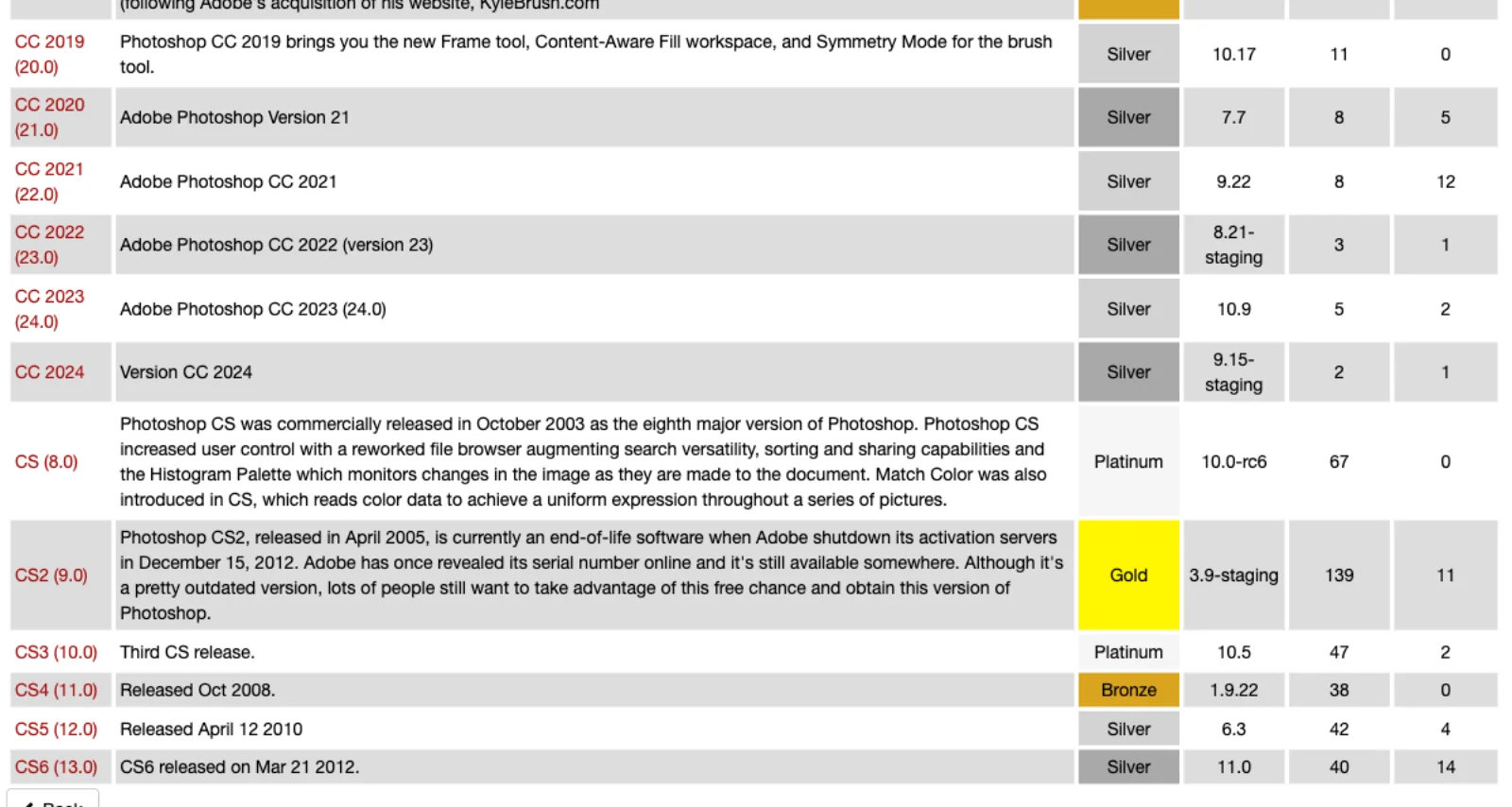
| Version | AppDB rating | Latest Wine tested | Latest test date |
|---|---|---|---|
| CC 2024 (25.x) | Silver | 9.15-staging | 10 September 2024 |
| CC 2023 (24.x) | Silver | 10.9 | 25 June 2025 |
| CC 2022 (23.x) | Silver | 8.21-staging | not shown on the summary page |
| CC 2021 (22.x) | Silver | 9.22 | 16 January 2025 |
| 2025 (26.x), 2026 (27.x) | no entry |
Sources: the CC 2024, CC 2023 and CC 2021 version pages, read 21 September 2026. Silver on WineHQ's scale means "Works excellently for normal use, but has some problems for which there are no workarounds" (AppDB rating definitions); every one of these pages also carries WineHQ's banner that "the test results for this version are very old" and may not represent current Wine.
The details in those reports are what a Linux user needs to know, and they are reports, not verified behavior. For CC 2024, a September 2024 tester wrote that basic editing, saving, exporting and drag and drop worked with version 25.9, that version 25.11 did not run, that "GPU support is a no go, no matter the steps taken", and that the Remove tool failed with a message that required components were still downloading; Firefly and Neural Filters were not tested. For CC 2023, a June 2025 tester on Wine 10.9 reported "most photoediting-related functionality" working and "GPU-dependent features error out", with the installer needing a silent-mode flag. The CC 2021 page's most recent report, from January 2025, lists actions, bulk saving and shortcuts working but the installer "stuck on loading screen".
That installer is the recurring obstacle. Photoshop is delivered through the Creative Cloud desktop installer, which for years did not run under Wine, so the AppDB workarounds involve either running Adobe's installer with a silent flag or installing on a real Windows system and copying the Adobe program folders into the Wine prefix. In January 2026 a developer published Wine patches for the MSHTML and MSXML3 components the Creative Cloud installer depends on and reported Photoshop 2021 and 2025 installing with them (Phoronix, 16 January 2026). The merge request against upstream Wine was opened and closed on 26 January 2026 without being merged (Wine merge request !9970); the patches live in a separate GitHub fork whose releases in 2026 include a Wine 11.10 build and a Proton 10.0 build described as carrying "fixes for Photoshop 2024" (wine-adobe-installers releases). One community write-up from 25 January 2026 reports Photoshop 2024 and 2025 installing through Adobe's own Creative Cloud setup with that patched build, hardware acceleration working through vkd3d on recent NVIDIA and AMD cards, Camera Raw's AI features failing depending on the driver, and drag-and-drop and cursor problems on Wayland (fr0stb1rd). That GPU claim contradicts the AppDB reports from 2024 and 2025, which is the honest state of things: results depend on the Photoshop build, the Wine build, the graphics driver and the display server, and they change month to month.
Two things do not change. Photoshop's GPU features call DirectX 12 (Photoshop technical requirements), which Wine serves through a translation layer to Vulkan, so anything on Adobe's list of features that "won't work without a GPU", including Perspective Warp, Oil Paint, Scrubby Zoom and smooth brush resizing, or that need one for acceleration, including Camera Raw, Neural Filters, Select and Mask and Smart Sharpen, is at the mercy of that layer (Photoshop GPU FAQ, updated 23 February 2026). And Photoshop has to reach Adobe from inside the prefix: the apps "attempt to validate your software license every 30 days", with 99 days of grace on an annual plan before "one final offline product launch" (offline grace period, updated 16 February 2026), and the generative tools, the Remove tool's downloadable components and cloud documents all need the Creative Cloud service working.
On licensing: Adobe's requirements name Windows and macOS, so a Wine installation is outside support. Adobe's General Terms of Use, effective 3 October 2025, require that each license "be used by only one (1) person", prohibit reverse engineering, and prohibit circumventing "any access or use restrictions put into place to prevent certain uses of the Services and Software" (Adobe General Terms of Use). Wine does not modify Photoshop or remove its licensing; it reimplements Windows. Whether your own subscription used through it is compliant is a legal question this article cannot settle. Anything built on a cracked installer or a pre-activated copy is plainly outside the terms, and this article does not describe those routes.
Cost: the Photoshop subscription, a Windows machine or virtual machine if the installer fails and you need to copy files, and the hours. Choose this route if your GPU and driver are well reported, you do not depend on the generative or GPU-only features, and you are prepared to pin a Photoshop version that works and stop updating it. Skip it if you need Adobe's support, the current release, or predictable behavior after each Creative Cloud update.
Route 3: a Windows virtual machine
A virtual machine runs the real Windows Photoshop on Linux without touching compatibility layers. It is also the route Adobe's own policy contemplates: "Creative Cloud products are permitted in virtualized environments", named-user licensing "works on dedicated virtual desktops (also known as VMs) because this is similar to deploying on a local machine", and support is "on a best-effort basis" (technical support boundaries for virtualized environments, updated 2 June 2025, written for enterprise and teams customers).
The three common hypervisors on Linux:
- VirtualBox, open source, 7.2.18 released 15 September 2026 (virtualbox.org). Its manual describes 3D acceleration for guests through OpenGL and Direct3D 8 and 9 and says "3D support is still experimental at this time, it is disabled by default" (VirtualBox manual).
- VMware Workstation Pro, free for "Commercial, Educational, and Personal users" since 11 November 2024, from version 17.5.2 onward (Broadcom knowledge base). Its guest graphics go up to DirectX 11 on virtual hardware version 18 or later (VMware Workstation Pro 26H1 docs).
- GNOME Boxes on QEMU and KVM, whose 3D acceleration uses Virgil and, per its help, "Currently only Linux guests support 3D acceleration" (GNOME Boxes help).
Set those against Photoshop's minimum of a GPU "with DirectX 12 (feature level 12_0 or later)" and 1.5 GB of GPU memory. None of the three virtual graphics adapters meets it. Photoshop will still install and run, but the GPU-mode features in Adobe's FAQ are off or degraded, and the features on its "won't work without a GPU" list are gone (Photoshop GPU FAQ). For retouching, layout and type at moderate resolutions that is workable; for Neural Filters, Camera Raw at speed, or large documents, it is not.
The way around it is PCI passthrough on KVM: handing a physical GPU to the Windows guest. The prerequisites are a CPU and motherboard with IOMMU support (Intel VT-d or AMD-Vi), a GPU whose firmware supports UEFI, and, in practice, a second GPU for the host plus a monitor input for the passed-through card, since the guest GPU no longer serves the host (Arch wiki: PCI passthrough via OVMF). That is a desktop with two graphics cards, not a laptop, and a weekend of configuration; once it works, the guest sees a real DirectX 12 GPU and Photoshop's requirements are met.
Costs: Windows 11 Home was US$139.00 and Windows 11 Pro US$199.99 on Microsoft's US store on 21 September 2026 (Windows 11 Home, Windows 11 Pro), the Photoshop subscription, and RAM: Photoshop wants 8 GB minimum and 16 GB recommended inside the guest, on top of whatever the Linux host keeps. The guest also needs to reach Adobe for the 30-day validation.
Choose this route if you need the real desktop application, its plugins, Actions and scripting, and your work is not GPU-bound, or you have the hardware for passthrough. Skip it on a laptop with one GPU if your work depends on Camera Raw, Neural Filters or generative fill at any volume.
Route 4: a remote or cloud Windows desktop
If the Windows machine can be somewhere else, Linux only has to display it. Adobe's virtualization policy covers this the same way it covers a local VM: permitted with named-user licensing, best-effort support.
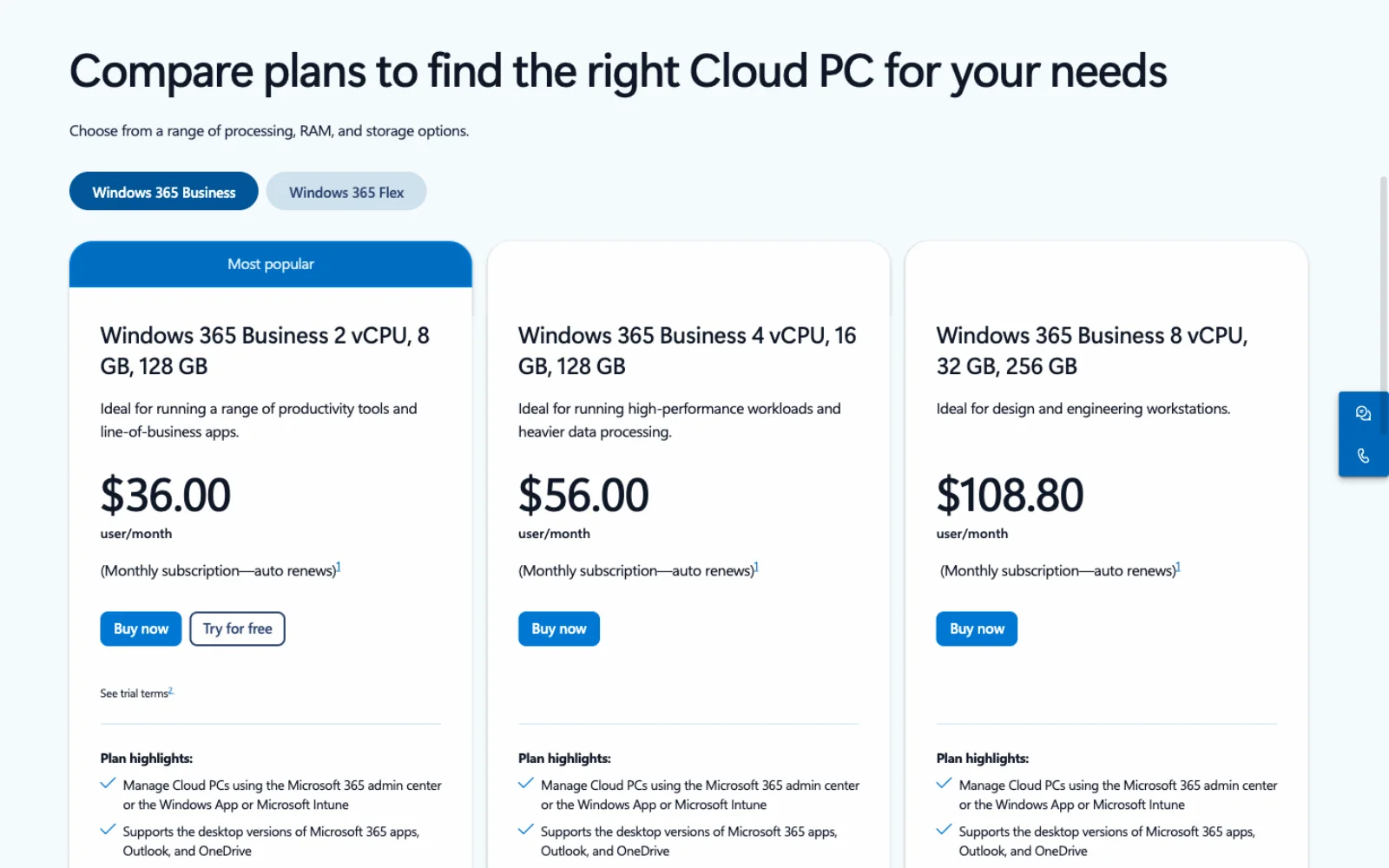
Windows 365 is Microsoft's rented Windows PC. Business plans on 21 September 2026 were US$36.00 a user a month for 2 vCPU, 8 GB and 128 GB; US$56.00 for 4 vCPU, 16 GB and 128 GB; and US$108.80 for 8 vCPU, 32 GB and 256 GB, the last one pitched as "ideal for design and engineering workstations", with a 30-day trial of the smallest size (Windows 365 Business pricing). None of the Business sizes has a GPU. GPU-enabled Cloud PCs exist in four sizes, from 4 GB to 16 GB of vRAM, but only on Windows 365 Enterprise and Flex, and "GPU offerings aren't available from the web direct channel", so an individual cannot buy one (GPU Cloud PCs, 19 May 2026). The Linux side is straightforward: Microsoft's web client at windows.cloud.microsoft lists Linux among its supported operating systems, in Edge, Chrome or Firefox (Accessing Cloud PCs, 9 July 2026).
Shadow rents a Windows PC with a dedicated GPU and streams it. Its US offers page on 21 September 2026 listed Shadow PC Lite at US$29.99 a month, Shadow PC at US$37.99, Shadow PC Pro at US$54.99 with 28 GB of RAM and 20 GB of video memory, and professional plans Neo Pro at US$44.99 and Power Pro at US$59.99, with an Ubuntu client among the apps (Shadow offers). The plans are GPU machines by design, which is the thing Windows 365 Business cannot sell you, at the price of a video stream between you and every brush stroke.
A Windows box you own, reached from Linux with a remote desktop client, is the third option and often the cheapest over a year: one Windows license, the hardware, no monthly fee beyond Adobe's, and files on hardware you control. The compromise is the same as with any remote desktop: a compressed stream is not a color-managed display, so proof color locally, and tablet input arrives however the remote protocol carries it.
Choose a cloud desktop if you need Photoshop occasionally, or for a project, and want a supported Windows environment without owning one. Choose Shadow over Windows 365 Business when the GPU matters, and your own box when the need is permanent. Skip all three if your work is color-critical on the display or your connection is unreliable.
Route 5: the native editors, one job each
Most people who search for Photoshop on Linux do not need Photoshop; they need one of its jobs done. These programs cover them, and every one has a Linux build.
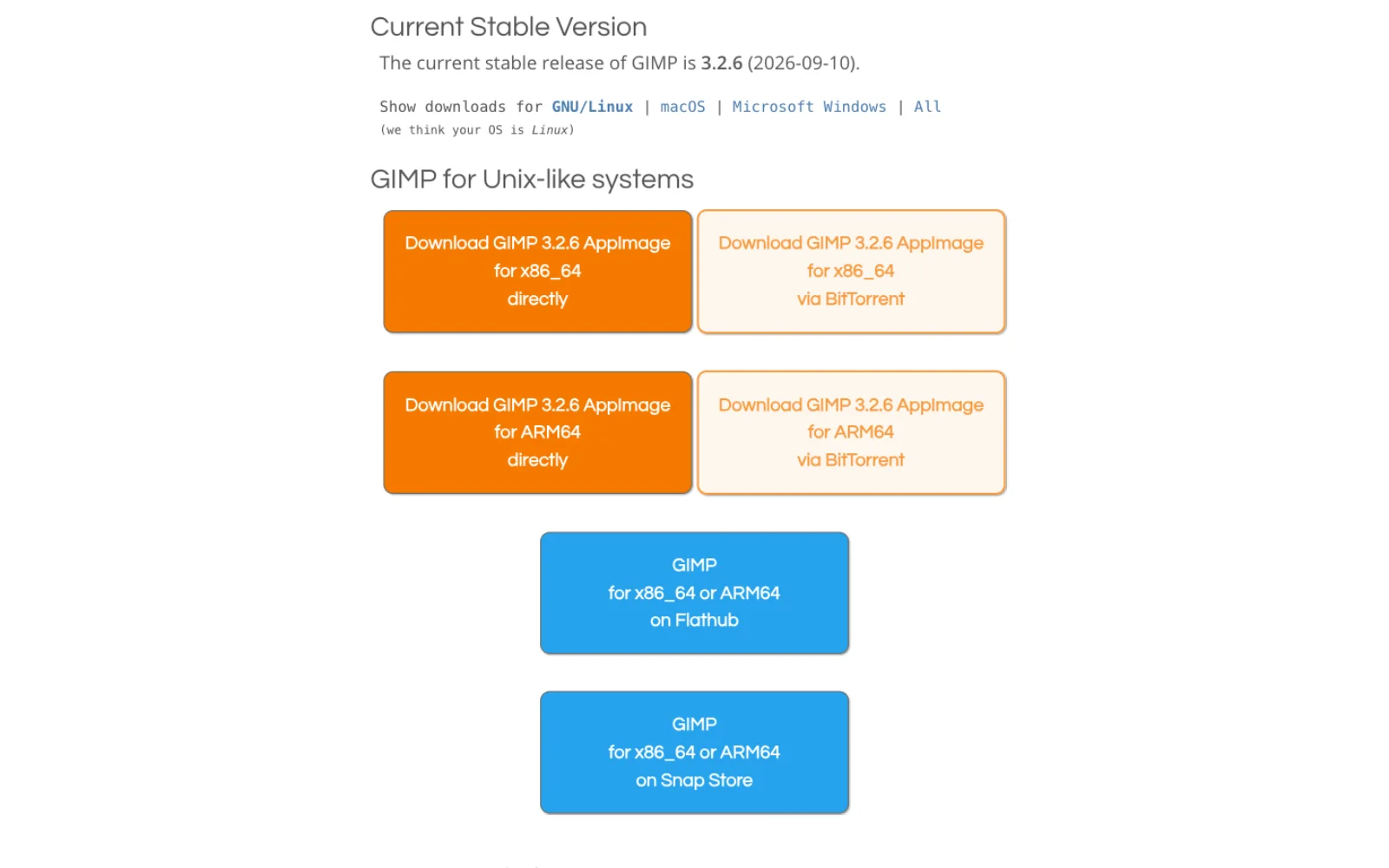
GIMP 3.2 is the general raster editor. The stable release on 21 September 2026 was 3.2.6, dated 10 September 2026, shipped as AppImage, Flatpak and Snap for x86_64 and ARM64 (GIMP downloads). It covers retouching, compositing, non-destructive filters, text, vector and link layers, PSD and PSB import and export, and scripting in Python 3. It does not have adjustment layers as a layer type, a native CMYK mode, a built-in raw developer or generative tools. GIMP vs Photoshop has the verdict per job.
Krita is the painting and illustration editor. Version 5.3.4, released 15 September 2026, is free software under the GPL v3 and ships as an AppImage with community-maintained Flatpak and Snap builds (Krita downloads). It opens and saves PSD, describes itself as the only painting application that authors HDR and scene-referred images, and animates (Krita features). Its own manual steers print work toward painting in RGB and converting to the printer's CMYK profile at the end rather than working in CMYK (Krita color management). Pick it over GIMP when the job is brushes, and over Photoshop when the job is painting rather than photo editing.
Photopea is the Photoshop-shaped editor in a browser tab, and the closest thing on Linux to Photoshop's own panel layout, shortcuts and PSD handling. It "runs completely in your device", keeps working after you disconnect, and "does not upload any of your files to the internet" (Photopea). It is free with ads, and its Premium tier is a prepaid period rather than a subscription. Photopea vs Photoshop covers formats, CMYK, its AI features and the tab's memory ceiling.
darktable and RawTherapee are the raw developers, the job Photoshop does through Camera Raw. darktable 5.6.1 shipped 27 August 2026 under the GPL 3.0, as distribution packages, AppImage and Flatpak (darktable, darktable install, darktable news); RawTherapee 5.13 shipped 26 July 2026 under the GPLv3 for Linux, macOS and Windows on x86_64 and ARM64 (RawTherapee). GIMP hands raw files to either one, so the pair replaces Camera Raw plus Photoshop for a photography workflow, at the cost of two applications instead of one.
Inkscape is the vector editor, for the logo, icon and layout work that people do in Photoshop because it is open. Version 1.4.4 was released 6 May 2026 under the GPL (Inkscape). GIMP 3.2's link layers update live when an SVG is edited in Inkscape, which is the nearest Linux equivalent to a linked smart object.
One product that is not on this list: Affinity. The unified Affinity app is free for individuals, but its site offers Mac and Windows builds, lists iPad as "Coming soon", and does not mention Linux (Affinity, read 21 September 2026). Affinity on Linux is a Wine question, with the same caveats as above.
Which route for which job
| Job | Best route on Linux | Verdict |
|---|---|---|
| Photo retouching | GIMP, or Photoshop on the web for the Remove tool and Generative Fill | Native tools cover manual retouching; the web app adds Adobe's model-driven tools with cloud documents attached |
| Compositing with layers and masks | GIMP, Krita or Photopea | All three have layers, masks, groups and blend modes; Photopea also has adjustment layers and smart objects |
| Raw development | darktable or RawTherapee | Full raw pipelines, free; Photoshop on the web opens raw but is not a raw workflow |
| CMYK print production | Windows VM or remote Windows desktop running Photoshop desktop | Neither the web app nor the native editors hold a CMYK document the way Photoshop does; Photopea's CMYK mode is a preview and conversion |
| PSD exchange with clients | Photopea for round-trips, Photoshop desktop in a VM when fidelity is contractual | Photopea and GIMP open PSD; adjustment layers and layer styles survive best in Photoshop itself |
| Generative AI inside the document | Photoshop on the web on the Firefly Pro plan | The only route that runs Adobe's generative tools without Windows; GIMP's options are local plugins |
| A workflow that depends on an Adobe plugin, Action or script | Windows VM, or remote Windows desktop | Only the desktop app runs UXP plugins and Actions; the web version has neither |
| Painting and illustration | Krita | Purpose-built, free, native |
| Vector artwork | Inkscape | Native, free; not a Photoshop job to begin with |
| Occasional access to the full desktop app | Windows 365 Business or a self-hosted Windows box | Supported by Adobe's virtualization policy; no GPU on Windows 365 Business |
| Full desktop Photoshop with GPU features, every day | Windows VM with GPU passthrough, or Shadow | The only routes that give Photoshop a DirectX 12 GPU from a Linux desktop |
| Full desktop Photoshop with no Windows license at all | Wine, with a pinned version | Silver on WineHQ for 2019 to 2024, reports mixed on GPU and installer, unsupported by Adobe |
Frequently asked questions
Is there an official Photoshop for Linux? No. Adobe's technical requirements for Photoshop 27.x list Windows 11 and 10 and macOS only, and the plan page sells the desktop app for those two systems (Photoshop technical requirements, Photoshop plans). The web and mobile versions are the surfaces Adobe offers beyond those.
Does Photoshop on the web work on Linux? Adobe's requirements name Chrome, Edge and Firefox as supported browsers and Windows, macOS and ChromeOS as supported operating systems; Linux is not listed (web technical requirements). This article did not test it. Use the seven-day trial on your own machine before subscribing, and expect no support from Adobe if something fails.
Can I run Photoshop with Wine? WineHQ's database rates Photoshop CC 2019 through CC 2024 as Silver, its rating for software that works for normal use but has problems with no workaround, with the most recent reports dated between September 2024 and June 2025 and no entry for the 2025 or 2026 releases (WineHQ AppDB). Reported problems center on the Creative Cloud installer and on GPU features. Community patches from January 2026 address the installer but have not been merged into Wine (Wine merge request !9970).
Is running Photoshop under Wine allowed? Adobe does not support it; its requirements list Windows and macOS. Its terms prohibit reverse engineering the software and circumventing access restrictions, and require one license per person (Adobe General Terms of Use). Wine does not alter Photoshop, and this article cannot give a legal opinion on whether your own subscription used through it is compliant. Cracked or pre-activated copies are outside the terms regardless.
Which is cheaper, a Windows VM or a cloud PC? Over a year, a VM costs a Windows license (US$139 for Home, US$199.99 for Pro on 21 September 2026) plus the RAM to run it; Windows 365 Business starts at US$36 a month, or US$432 a year, without a GPU; Shadow starts at US$29.99 a month with one (Windows 11 Home, Windows 365 Business, Shadow). The Photoshop subscription is on top of all of them.
What is the closest free Photoshop replacement on Linux? For photo editing, GIMP 3.2.6; for a Photoshop-style interface and PSD round-trips, Photopea in a browser; for painting, Krita 5.3.4; for raw, darktable or RawTherapee. Which one is "closest" depends on the job, which is what the GIMP vs Photoshop and Photopea vs Photoshop comparisons work through.
Does Affinity run on Linux? Affinity's site lists Mac and Windows, with iPad coming, and does not mention Linux (Affinity). On Linux it is a Wine project, with no vendor support.
Make your next project in Voyager
Create an account, download Voyager, and start making.
