
GIMP can replace Photoshop for a lot of real work, and the list got longer in 2025 and 2026. GIMP 3.0 shipped in March 2025 with filters that stay editable after you apply them, and 3.2 followed in March 2026 with link layers, vector layers and PSB export (GIMP 3.0 release, GIMP 3.2 release). The stable release on the day this was written is 3.2.6, dated 10 September 2026 (GIMP downloads). What GIMP still does not have is a native CMYK document mode, adjustment layers in the Photoshop sense, a built-in raw developer, and any generative AI without a third-party plugin.
The short version: pick GIMP for retouching, compositing, web and screen graphics, scripting, and any machine that runs Linux or cannot justify a subscription. Pick Photoshop for print production in CMYK, for raw photography inside one application, for generative fill and the model picker around it, and for files that other people will open in Photoshop and expect to find intact. The sections below go job by job. Every price and version was read from the vendors' own pages on 21 September 2026.
What each program is, in one paragraph each
GIMP is the GNU Image Manipulation Program, free software under the GPL version 3 or later, developed by volunteers and available for Linux, macOS and Windows on both x86_64 and ARM64 (GIMP FAQ, downloads). Its developers say plainly that they are not building "a Photoshop killer app" but "a high-end image manipulation application that is free to use and modify by everyone" (GIMP FAQ). The 3.0 release ended a seven-year gap after 2.10, and the project now plans feature releases roughly yearly, with 3.4 already on a public roadmap (GIMP 3.0 release, GIMP roadmap).
Photoshop is Adobe's subscription raster editor, at version 27.x in 2026, sold on its own or inside Creative Cloud, and it runs on Windows and macOS on the desktop with companion apps on the web, iPad and phones (Photoshop technical requirements, Photoshop plans). The 2026 builds bundle Adobe's Firefly image models and a set of partner models from Black Forest Labs and Google into Generative Fill, metered by generative credits (Generative Fill).
The comparison at a glance
| Job | GIMP 3.2.6 | Photoshop 27.x | Edge |
|---|---|---|---|
| Photo retouching | Heal, clone, paint tools; non-destructive filters since 3.0; Resynthesizer plugin for content-aware fill | Remove tool (no credits), content-aware fill, Neural Filters, Generative Fill | Photoshop for speed, GIMP for cost |
| Layers, masks, compositing | Layer groups, masks, filters on layers, groups and channels | Layers, groups, masks, clipping masks, smart objects, layer comps | Roughly even for manual compositing |
| Non-destructive editing | Editable filters on layers; adjustment-layer workflow via a pass-through group; link, vector and text layers stay editable | Adjustment layers, smart objects, smart filters, layer styles | Photoshop, by depth and habit |
| Raw workflow | Hands off to darktable, RawTherapee or ART | Camera Raw built in | Photoshop |
| Text and typography | Fonts, size, spacing, justification, box modes, outlines | Character and paragraph styles, full type engine | Photoshop |
| CMYK and print | Import, export, soft-proof and pick in CMYK; no native CMYK mode | Native CMYK and Lab modes | Photoshop |
| PSD round-trip | Import and export PSD and PSB; three imported layer styles; adjustment layers not yet | Native | Photoshop, obviously; GIMP is workable |
| Scripting | Python 3, Script-Fu (Scheme), JavaScript, Lua, Vala, C; no macro recorder | Actions, batch, JavaScript (UXP and .jsx), AppleScript and COM | Different strengths |
| Generative AI | None built in; plugins such as Intel's OpenVINO suite | Firefly plus FLUX and Gemini models, credit-metered | Photoshop |
| Linux | Native, with AppImage, Flatpak and Snap | Not offered | GIMP |
| Price | Free, GPLv3 | US$22.99 a month on an annual plan, more on other terms | GIMP |
Sources for each row are linked in the sections that follow.
Photo retouching
Both programs have the manual toolkit: healing, cloning, dodge and burn, curves, levels, sharpening. The differences are in what does the tedious part for you.
Photoshop's Remove tool is the everyday object-removal brush, and it is one of the features Adobe lists as consuming no generative credits (generative credits FAQ). Above it sit Generative Fill, which does draw credits, and Neural Filters for skin smoothing, colorizing and JPEG artifact removal, some of which "require an internet connection for processing" (Neural Filters).
GIMP's equivalent of content-aware fill is the Resynthesizer plugin, a separate GPLv3 project whose 3.0.1 release "is compatible with GIMP 3.0 or later" (Resynthesizer). It is an installation step rather than a menu item, and it does texture synthesis rather than anything learned from a model, so it is at its best on textures and backgrounds and at its worst on faces and hands. GIMP 3.2 also added a Vibrance filter that protects skin tones while saturating the rest of the frame (GIMP 3.2 release notes).
Choose GIMP if your retouching is curves, cloning and healing on a modest number of frames and you are comfortable installing one plugin. Choose Photoshop if you retouch volume work under time pressure, or if your removals are the kind that need a model rather than a texture.
Layers, masks and compositing
For manual compositing the two are closer than their reputations suggest. GIMP has layer groups, layer masks, a full set of blend modes, and, since 3.2, filters applied non-destructively to channels as well as to layers and groups (GIMP 3.2 release notes). The paint tools can grow a layer as you paint past its edge, which removes one of the oldest GIMP annoyances (GIMP 3.0 release notes).
Photoshop's compositing advantage is not any one tool but the accumulated set: smart objects that hold Illustrator artwork editable, clipping masks, layer comps, and the pattern of stacking adjustment layers with masks that most tutorials assume (smart objects).
Choose GIMP if your composites are your own and you are the only person opening the file. Choose Photoshop if the composite is a shared working document that colleagues will pick up with their own habits and actions.
Non-destructive editing
This is where the last two GIMP releases matter most, and where the terminology trips people up.
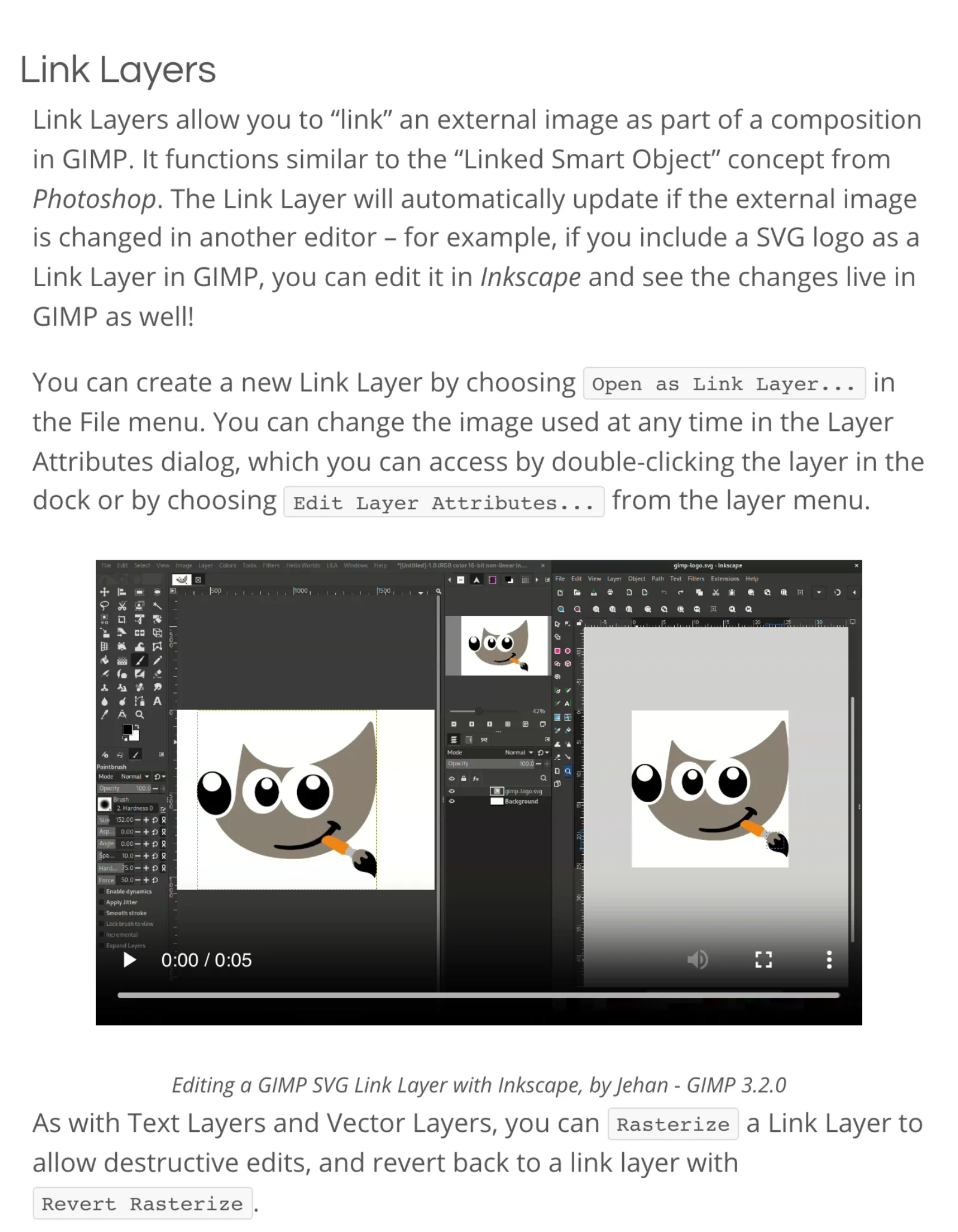
GIMP 3.0 made GEGL filters stay live after you apply them: you can reopen, reorder, toggle or delete them from the layer's Fx list, and they "can also be saved to XCF and reloaded for further editing" (GIMP 3.0 release notes). GIMP 3.2 extended that to channels, and added two new non-destructive layer types beside text layers: link layers and vector layers. Every one of the three now needs an explicit Rasterize before a destructive edit, and Revert Rasterize brings it back (GIMP 3.2 release notes).
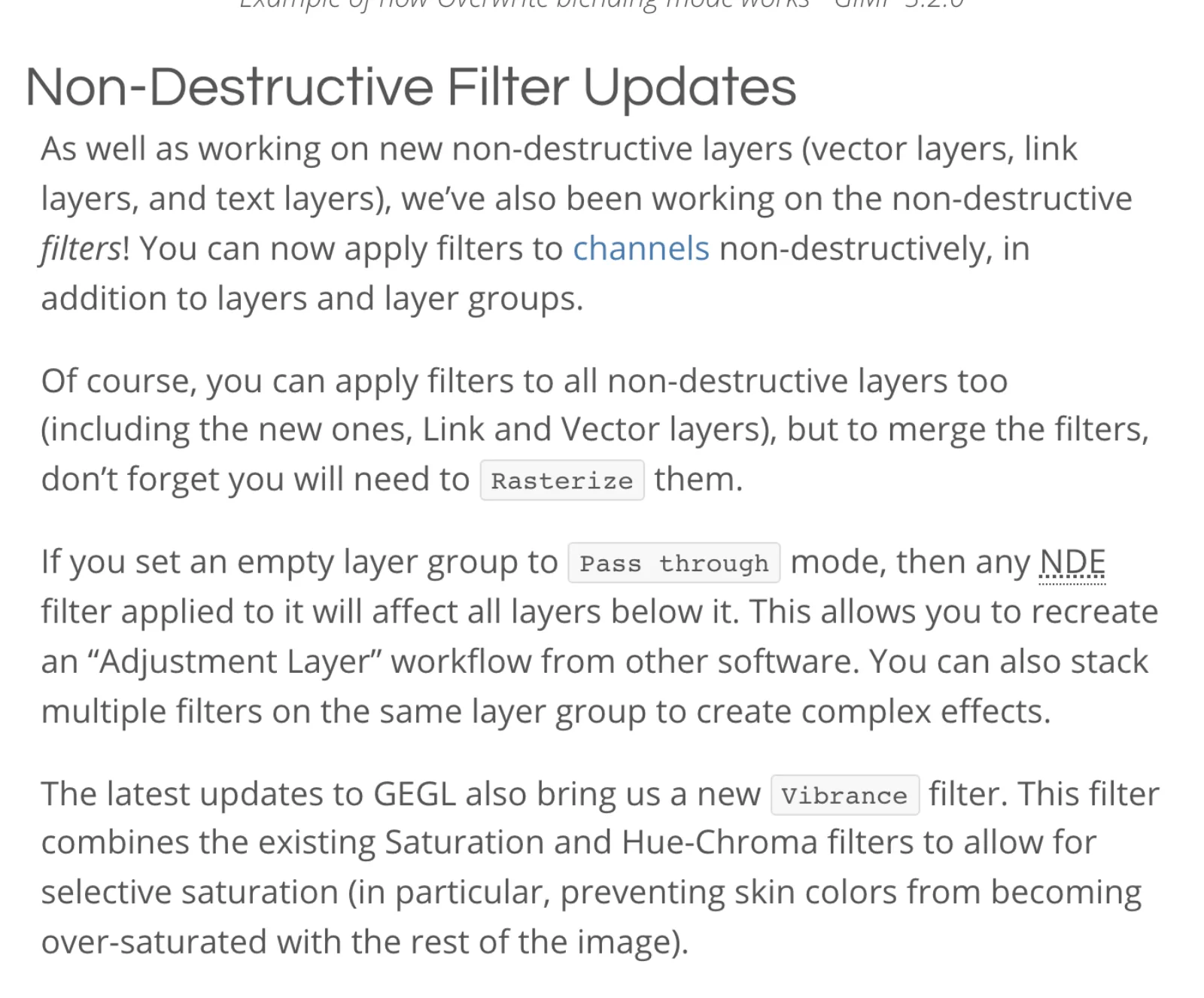
There are still no adjustment layers as a layer type. What GIMP offers instead is a documented workaround: "If you set an empty layer group to Pass through mode, then any NDE filter applied to it will affect all layers below it. This allows you to recreate an 'Adjustment Layer' workflow from other software" (GIMP 3.2 release notes). It works, and the group can hold a stack of filters, but it is a convention you have to know rather than a button in the layers panel, and the roadmap still lists a "Better GUI for layer effects" as specified but not built (GIMP roadmap).
Photoshop's model is older and deeper: adjustment layers and fill layers as first-class layers, smart objects whose contents open in their own document and update every instance on save, smart filters on top of them, and layer styles (smart objects). Neural Filters and Generative Fill both output to new layers or smart filters, so the AI features are non-destructive too (Neural Filters, Generative Fill).
Choose GIMP if you want editable filters and editable text, vector and linked layers, and you are happy to build adjustment stacks with pass-through groups. Choose Photoshop if your work depends on adjustment layers with masks as the primary way of grading, or on smart objects as containers for other applications' files.
Raw workflow
GIMP does not develop raw files itself. It "features plug-ins for using darktable and RawTherapee to process raw images, as well as a preference for a default raw processing plug-in", and 3.2 added ART as a third option (GIMP FAQ, GIMP 3.2 release notes). Opening a raw file hands it to that external program and brings the developed result back. All three developers are free software and any of them is a serious raw tool, but you are running two applications and the raw settings live in the developer, not in the XCF.
Photoshop ships Adobe Camera Raw, which opens raw files directly and is the same processing engine as Lightroom (Adobe Camera Raw). The Photography plan bundles Lightroom with Photoshop for less than Photoshop alone (Photoshop plans).
Choose GIMP plus darktable or RawTherapee if you already develop in one of them and only want an editor for the finishing pass. Choose Photoshop if you want raw development, local adjustments and pixel editing in one application with one set of settings.
Text and typography
GIMP's text tool covers fonts, size in any unit, antialiasing, hinting, four justification modes, line and letter spacing, dynamic or fixed text boxes, and non-destructive outlines with inner, centered and outer directions since 3.2 (text tool documentation, GIMP 3.2 release notes). The 3.2 on-canvas editor gained drag-to-move and the usual bold and italic shortcuts. The project's own roadmap says the tool "deserves a big rewrite of interaction" and lists that work as in progress (GIMP roadmap).
Photoshop has character styles and paragraph styles as panels, with a hierarchy where manual overrides beat character styles, which beat paragraph styles (format characters, format paragraphs). For anything with more than a caption's worth of type, that is the difference between setting text and designing it.
Choose GIMP if text on your images is labels, titles and watermarks. Choose Photoshop if you set multi-paragraph type, need styles that update across layers, or produce typographic mockups.
CMYK and print
Photoshop has native color modes for RGB, CMYK, Lab, indexed, grayscale and bitmap, and its help describes the standard print workflow: edit in RGB, soft-proof with Proof Setup, convert to CMYK at the end (color modes).
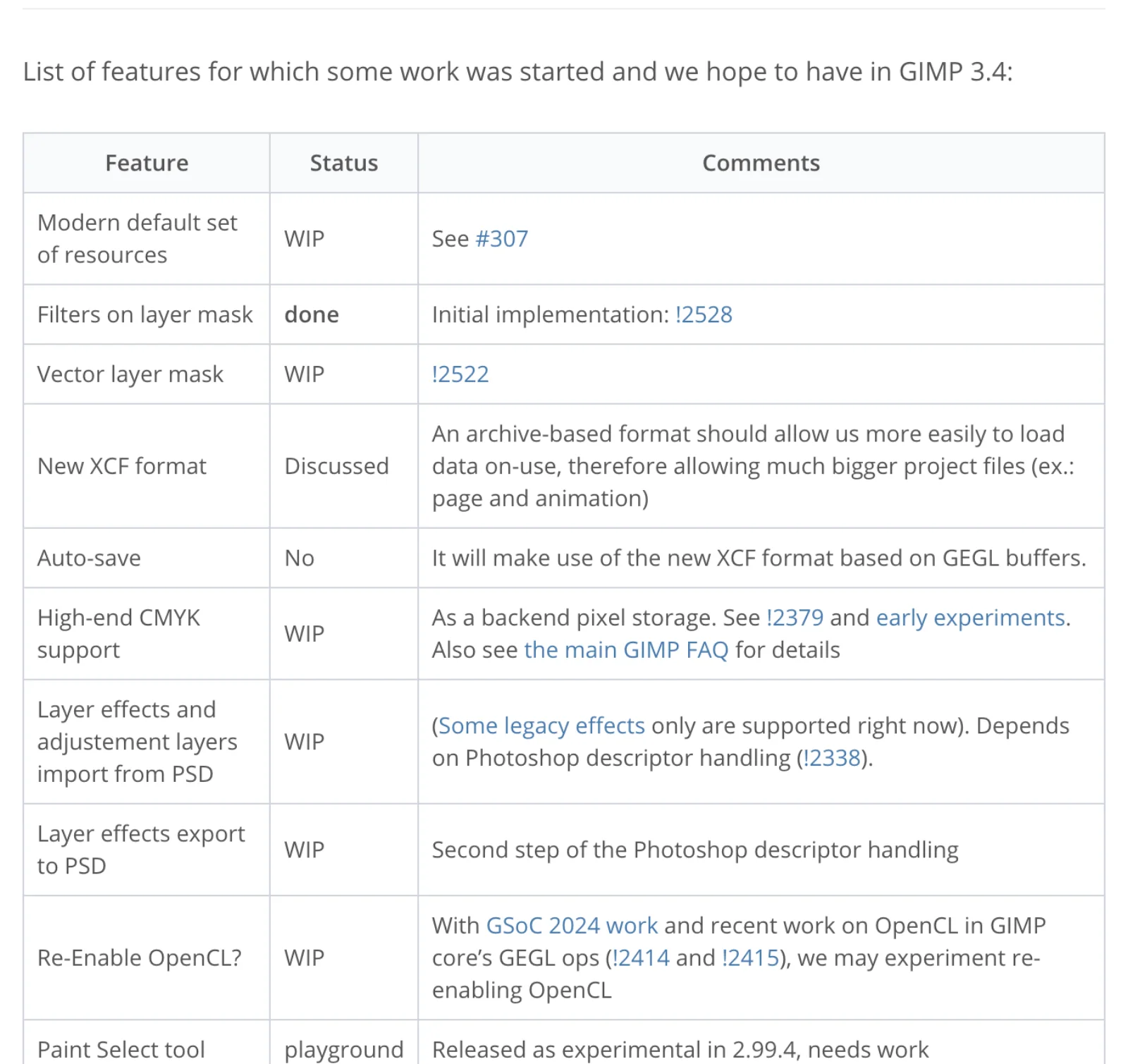
GIMP's position is more nuanced than "no CMYK". Since 3.0 it imports and exports CMYK JPEGs, TIFFs, PSDs and JPEG XL, keeps a CMYK profile attached to the image, soft-proofs from a pop-over in the status bar, and exports PSDs with clipping paths and CMYK profiles (GIMP 3.0 release notes). 3.2 added a Total Ink Coverage readout in the CMYK color selector (GIMP 3.2 release notes). What it cannot do is hold the image as CMYK pixels while you edit. The developers describe what exists as "CMYK to RGB roundtrips, which is nice but not enough", and list "High-end CMYK support" as work in progress for 3.4 (GIMP roadmap). The FAQ adds that making CMYK a core format has no timeline (GIMP FAQ).
Choose GIMP if your print work is RGB to the printer, or a CMYK file you open, adjust and re-export with the profile intact. Choose Photoshop if you separate to CMYK yourself, work with spot channels, or your printer's proofing process assumes a Photoshop file.
PSD round-tripping, and what breaks
GIMP 3.0 improved PSD import and export and added a PSD export dialog with clipping paths, CMYK profiles and metadata; 3.2 added PSB export to match the PSB import that arrived in 3.0, and can now import three Photoshop layer styles, Drop Shadow, Inner Shadow and Outer Glow (GIMP 3.0 release notes, GIMP 3.2 release notes). It also reads Photoshop's .acv curves and .alv levels presets and .pat pattern files.
What does not survive is anything GIMP has no native equivalent for. Adjustment layers and the remaining layer styles are the big ones: the roadmap entry "Layer effects and adjustment layers import from PSD" is marked in progress with the note "Some legacy effects only are supported right now", and "Layer effects export to PSD" is a second step behind it (GIMP roadmap). Smart objects have no counterpart in the importer; GIMP's link layers are a similar idea but there is no documented mapping between the two. Expect flattened or missing content for those layers, and expect text layers to need checking.
Choose GIMP if PSD is an exchange format you use occasionally and you can flatten adjustments before you hand a file over. Choose Photoshop if PSD is your working format and other Photoshop users open your files.
Scripting and automation
The two programs automate in different directions.
GIMP 3 is a scripting platform first. Plug-ins are written in Python 3 against a GObject Introspection API, replacing 2.10's Python-fu, with Script-Fu's Scheme still there and JavaScript, Lua (marked experimental) and Vala supported on platforms built for them (GIMP 3.0 release notes, Python plug-in tutorial, Script-Fu). Every non-destructive filter is scriptable through the same DrawableFilter API, 3.2 added a GEGL Filter Browser to look up filter names and parameters, and 111 new libgimp functions landed in 3.2 alone (GIMP 3.2 release notes). What GIMP lacks is a macro recorder: the roadmap's "Macros (script recording)" section is mostly marked "No" and unfunded (GIMP roadmap). If you want to automate, you write code. One caution for anyone with a library of 2.10 scripts: the Python-fu API they were written against is gone, so they need porting.
Photoshop is a recording platform first. Actions capture a sequence of steps, including tool strokes with tool recording on, and play back with a function key or in a batch over a folder (record an action). Scripting sits above that: JavaScript through UXP or the older .jsx files under File > Scripts, VBScript and COM automation on Windows, AppleScript on macOS, and a Script Events Manager that runs a script or action on open, save or export (scripting in Photoshop). Driving Photoshop from a coding agent goes through the same scripting routes; Photoshop MCP covers the bridges that exist for that.
Choose GIMP if you would rather write a Python plug-in than record an action, or want to run image processing headless on a server. Choose Photoshop if your automation is batch actions built by non-programmers, or depends on scripts and panels that only exist for Photoshop.
AI features
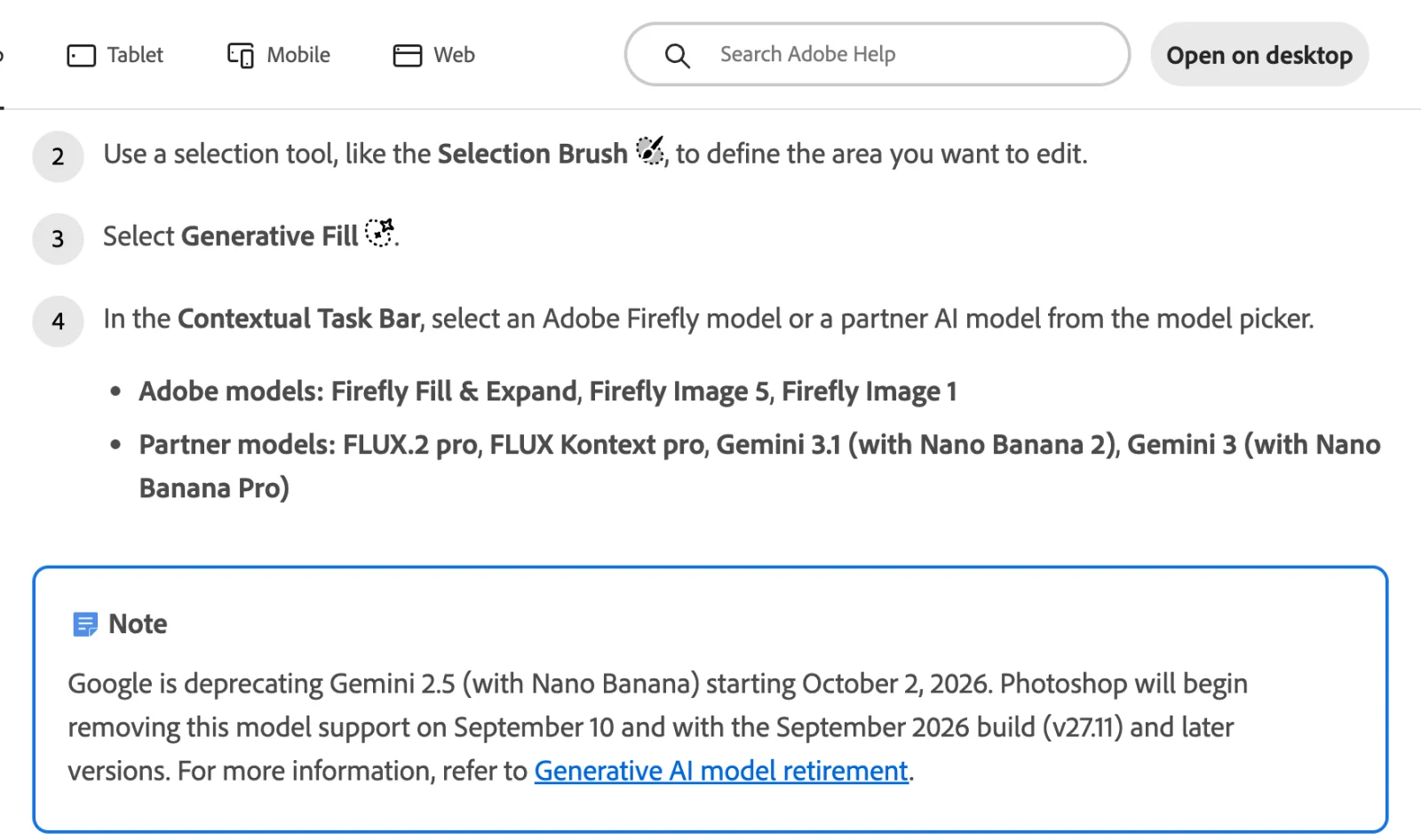
Photoshop's generative tools are the clearest gap. Generative Fill lets you pick a model per generation: Adobe's Firefly Fill & Expand, Firefly Image 5 and Firefly Image 1, or partner models FLUX.2 pro, FLUX Kontext pro, Gemini 3.1 with Nano Banana 2 and Gemini 3 with Nano Banana Pro (Generative Fill). Adobe's page notes that Gemini 2.5 support is being removed from the September 2026 build (v27.11) as Google retires it, which is a reminder that the partner list is a moving target.
The metering matters as much as the models. Standard features such as Generative Fill with Firefly cost one credit per generation, credits reset monthly and do not roll over, and the Photoshop single-app plan includes 25 of them a month against 1,000 on the Photography plan and 4,000 on Creative Cloud Pro (generative credits FAQ, Photoshop plans). Partner models and premium Firefly models cost more per generation. Twenty-five fills a month is a trial allowance, not a workflow, so anyone who buys Photoshop for Generative Fill should price the Photography plan or Creative Cloud Pro instead.
GIMP has no generative features and no plans for any in the published roadmap. Third-party plug-ins fill some of the gap. Intel's OpenVINO AI plug-ins are "Dedicated for GIMP 3, Python 3 and OpenVINO" and provide Stable Diffusion text-to-image, inpainting, super-resolution and semantic segmentation running locally on Intel CPUs, GPUs and NPUs (openvino-ai-plugins-gimp). Other community bridges exist on GitHub; Stable Boy describes itself as bringing Stable Diffusion to GIMP 2.10 through the Automatic1111 web UI API, and stable-gimpfusion also calls a local Automatic1111 server (stable-gimpfusion, gimp-stable-boy). None of these is as integrated as a selection, a prompt and a Generate button.
Choose GIMP if you want AI features to run locally on your own hardware, or you do not want them at all. Choose Photoshop if generative fill and expand are part of the job, and budget for a plan with enough credits.
Plugins and ecosystem
GIMP's ecosystem is smaller than Photoshop's but the important pieces made the jump to 3.x. G'MIC-Qt, the filter collection with "more than 640 filters", ships builds for GIMP 3 (against 3.2.4 at G'MIC 4.0.5) and 2.10 (G'MIC, G'MIC downloads). Resynthesizer has a GIMP 3 branch (Resynthesizer). GIMP 3 also has an extension format (.gex) with themes, icons, brushes and plug-ins installable from a file, though the remote repository and in-app browser are still listed as early work (GIMP roadmap). Anything written for 2.10's Python-fu will not load until its author ports it.
Photoshop's ecosystem is the larger commercial one: UXP plug-ins in Adobe's marketplace, the panels and actions sold by retouchers and photographers, and integrations from camera and tablet vendors. The tradeoff is that it is tied to a subscription and to Adobe's platform decisions, as the ongoing move from .jsx to UXP shows.
Performance, platforms and hardware
GIMP 3 runs natively on Wayland as well as X11, scales properly on HiDPI displays, and ships ARM64 builds for all three desktop platforms (GIMP 3.0 release notes, downloads). Its stated OS floors are Windows 10 1903 or newer for the installer, Windows 11 or Server 2022 for the Microsoft Store build, macOS 11 Big Sur or newer, and a Debian 13 or newer distribution for the AppImage, with Flatpak and Snap as alternatives (downloads). 3.2.0 was the last 32-bit Windows build, and it took the old TWAIN scanning plug-in with it (GIMP 3.2 release notes). GIMP publishes no minimum RAM or GPU figures. GPU acceleration is the honest weak spot: OpenCL has been disabled by default since 2.10.22 and re-enabling it is a roadmap item, not a feature (GIMP 3.0 release notes, GIMP roadmap). The 3.2.6 notes say font loading is faster but "some lag remains and will likely require us to update to GTK4" (GIMP 3.2.6 release).
Photoshop 27.x on Windows wants Windows 11 24H2 or 23H2, Windows 10 22H2, or 21H2 LTSC; 8 GB of RAM minimum and 16 GB recommended; a DirectX 12 GPU with 1.5 GB of memory minimum and 4 GB for 4K displays; 10 GB of disk minimum and 100 GB recommended with a separate scratch drive; and an internet connection for activation and subscription validation (Photoshop technical requirements). Windows on ARM is supported with 4 GB of GPU memory. There is a macOS tab on the same page and no Linux tab; Adobe does not offer Photoshop for Linux.
Choose GIMP if you run Linux, an older or lower-powered machine, or a locked-down one with no internet access. Choose Photoshop if you rely on GPU-accelerated filters and neural features on current hardware.
Learning curve and interface
GIMP 3 moved to GTK3, which brought CSS theming, better tablet support, dark and light system theme matching, and, in 3.2.6, a rebuilt macOS package with native menu behavior (GIMP 3.0 release notes, GIMP 3.2.6 release). Its terminology still differs from Photoshop's: filters instead of adjustments, Fx lists instead of adjustment layers, XCF instead of PSD, export instead of save for anything that is not XCF. Someone fluent in Photoshop will spend the first week translating.
Photoshop's interface is the one every tutorial, course and colleague assumes, and that is a real advantage that has nothing to do with the software's quality. It also carries thirty years of accumulated panels, and the contextual task bar and AI features have added surface rather than removed it.
Choose GIMP if you are learning from scratch or already work in free software tools such as Inkscape and darktable. Choose Photoshop if your team, clients or courses assume it.
Licensing and cost
GIMP is free to download, use and modify under the GPL version 3 or later, on as many machines as you like, forever (GIMP FAQ).
Photoshop is a subscription. On Adobe's US plans page on 21 September 2026: Photoshop alone is US$22.99 a month on an annual plan billed monthly, with 100 GB of storage and 25 generative credits; the Photography plan with Lightroom is US$19.99 a month with 1 TB and 1,000 credits; Creative Cloud Pro with 20-plus apps and 4,000 credits is US$69.99 a month, discounted to US$34.99 for the first three months for new subscribers; and Firefly Pro at US$19.99 covers Photoshop on web and mobile only (Photoshop plans). All four have a seven-day trial. Adobe's page shows the annual-billed-monthly price by default; month-to-month and prepaid annual terms are priced differently at checkout, so read the terms before choosing.
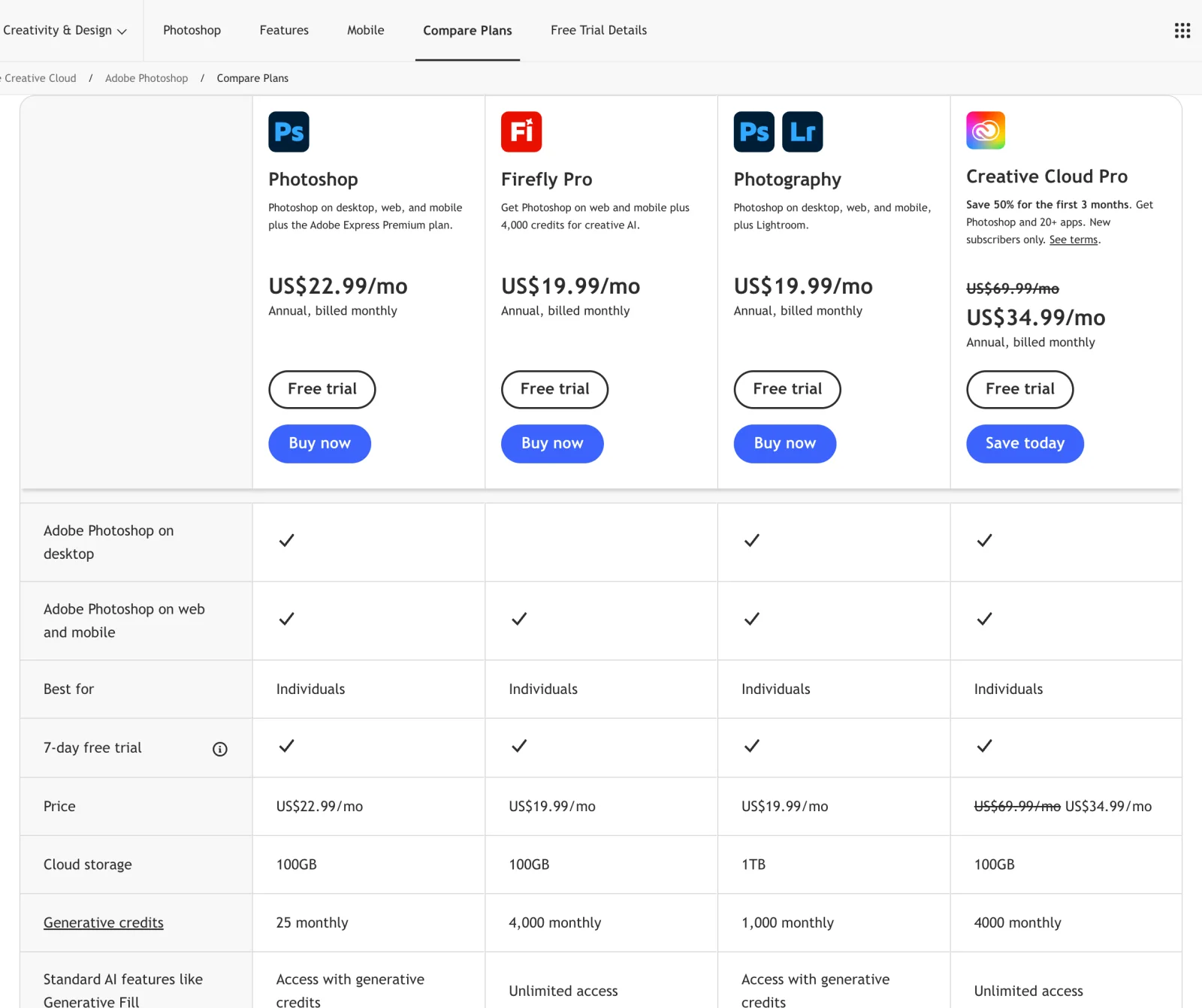
The cost question is rarely the subscription itself. It is whether the jobs in the sections above justify it. At US$22.99 a month, Photoshop costs US$275.88 a year; a user who needs native CMYK or Camera Raw will earn that back in an afternoon, and a user who needs neither is paying for habit.
Verdict by job
| If your work is mostly | Choose | Because |
|---|---|---|
| Web and screen graphics, social images, thumbnails | GIMP | Everything needed is native, filters are editable, and the file is yours |
| Portrait and product retouching at volume | Photoshop | Remove tool, Generative Fill and Neural Filters against manual healing plus Resynthesizer |
| Compositing for your own output | Either | GIMP's layers, masks and non-destructive filters cover it; Photoshop's adjustment layers and smart objects are deeper |
| Raw photography end to end | Photoshop, or GIMP plus darktable | Camera Raw in one app, or two free apps and a hand-off |
| Print production in CMYK | Photoshop | Native CMYK mode; GIMP round-trips CMYK but edits in RGB |
| Files exchanged with Photoshop users | Photoshop | Adjustment layers and most layer styles do not survive GIMP's PSD importer yet |
| Batch automation by non-programmers | Photoshop | Actions and batch; GIMP has no recorder |
| Scripted or headless image processing | GIMP | Python 3, Script-Fu, JavaScript and Lua against a public API, no license server |
| Generative fill as part of the job | Photoshop, on a plan with credits | Firefly plus FLUX and Gemini; GIMP's options are local plug-ins |
| Linux desktop, or no internet | GIMP | Photoshop is Windows and macOS only and needs activation online |
| Learning image editing with no budget | GIMP | Free and complete; the concepts transfer |
Frequently asked questions
Is GIMP as good as Photoshop? For manual editing, compositing and scripting, GIMP 3.2 is a capable peer with a different vocabulary. For native CMYK, built-in raw development, adjustment layers as a layer type, typographic styles and generative AI, Photoshop does things GIMP does not. Whether that makes Photoshop "better" depends entirely on whether your work touches those five areas.
Can GIMP open Photoshop files? Yes. GIMP imports and exports PSD and, since 3.2, PSB, and it reads CMYK PSDs, clipping paths, and three imported layer styles (GIMP 3.2 release notes). Adjustment layers, most layer styles and smart objects do not come across as editable objects; GIMP's roadmap lists that work as in progress (GIMP roadmap).
Does GIMP have adjustment layers? Not as a layer type. GIMP 3.x has non-destructive filters on layers, groups and channels, and the release notes describe recreating an adjustment-layer workflow by putting filters on an empty pass-through layer group (GIMP 3.2 release notes).
Does GIMP support CMYK? Partly. It imports and exports CMYK JPEG, TIFF, PSD and JPEG XL, soft-proofs with a CMYK profile, and shows total ink coverage in its color selector, but it stores and edits the image in RGB. Native CMYK is listed as work in progress on the 3.4 roadmap (GIMP 3.0 release notes, GIMP roadmap).
Does GIMP have generative fill? No, not built in. Intel's OpenVINO plug-ins add local Stable Diffusion inpainting for GIMP 3 on Intel hardware, and older community plug-ins bridge to a self-hosted Stable Diffusion server (openvino-ai-plugins-gimp). Photoshop's Generative Fill offers Firefly, FLUX and Gemini models and is metered by generative credits (Generative Fill).
How much does Photoshop cost compared with GIMP? GIMP is free under the GPL. On 21 September 2026 Photoshop alone was US$22.99 a month on an annual plan billed monthly, the Photography plan with Lightroom was US$19.99, and Creative Cloud Pro was US$69.99, discounted to US$34.99 for the first three months (Photoshop plans).
Does Photoshop run on Linux? Adobe's technical requirements list Windows and macOS only (Photoshop technical requirements). GIMP ships Linux builds as AppImage, Flatpak and Snap for x86_64 and ARM64 (GIMP downloads).
Make your next project in Voyager
Create an account, download Voyager, and start making.
