
Krita and Photoshop are not two versions of the same tool at different prices. Krita is a painting and animation application that can also edit photos; Photoshop is a photo editor and compositing tool that can also paint. Krita's own FAQ lists its supported fields as "illustrations, concept art, matte painting, textures, comics and animations" (Krita FAQ), and photography is not on the list. Adobe introduces Photoshop with "Edit, retouch, and transform photos" (Adobe). Each program can do the other's job; neither does it as well.
The short version: choose Krita if your work is drawn or painted, if you animate frame by frame, if you make comics, or if you need a serious painting program on Linux, a Chromebook or an Android tablet. Choose Photoshop if your work starts from a photograph, needs Camera Raw, adjustment layers as the main way of grading, native CMYK output, generative fill, or files that other Photoshop users will open. The stable Krita on the day of writing is 5.3.4, released 15 September 2026, alongside an experimental Qt6 build numbered 6.0.4 (Krita 5.3.4 release); Photoshop is at version 27.x (Adobe). Every price and version below was read from the vendors' own pages on 21 September 2026.
What each program is, in one paragraph each
Krita is free software under the GPL version 3, developed within the KDE community and backed by the Krita Foundation, a non-profit in Deventer, the Netherlands (license, Krita Foundation). It runs on Windows, macOS and Linux, with a production build for ChromeOS and a beta for Android tablets, and there is no iPad version (download, Krita 6.0 beta announcement). Krita 5.3.0 shipped on 24 March 2026 with a rewritten text tool; the same source built against Qt6 is Krita 6.0, which the project calls "early access" (Krita 5.3 release notes). The developers say 5.3.4 is "suitable for productive work" while 6.0.4 is "more experimental" (Krita 5.3.4 release).
Photoshop is Adobe's subscription raster editor for Windows and macOS, with companion apps on the web, iPad and phones. Adobe's plan page answers "Can I buy Photoshop outright?" with "No. Photoshop is available only through a Creative Cloud subscription" (Adobe plans). Its 2026 builds bundle Adobe's Firefly models and partner models from Black Forest Labs and Google into Generative Fill, metered by generative credits (Generative Fill).
The comparison at a glance
| Job | Krita 5.3.4 | Photoshop 27.x | Edge |
|---|---|---|---|
| Painting and brushes | 18 brush engines, four smoothing modes, 12 drawing assistants | One brush engine with a deep settings panel, ten symmetry modes | Krita for painting range, Photoshop for retouch brushes |
| Tablet and pen | WinTab and Windows Ink, global pressure curve, tilt offset | Pressure, angle, rotation and stylus wheel in Brush Settings | Even |
| Animation | Frame-by-frame timeline, onion skins, animation curves, storyboard docker, video export | Frame animation and a keyframe timeline, tweening, GIF and video export | Krita |
| Comics | Comic panel tool, comics project manager with CBZ, ACBF and EPUB export | Layers and shapes; no multipage project tooling | Krita |
| Photo retouching | Clone brush engine, smart patch tool, filter layers and masks | Remove tool, healing tools, adjustment layers, Neural Filters, Generative Fill | Photoshop |
| Raw files | Basic import through a KDcraw plugin | Camera Raw built in | Photoshop |
| Text | Rewritten in 5.3: on-canvas editing, OpenType, wrapping, text on path, style presets | Character and paragraph styles, type on path, OpenType SVG | Photoshop, by depth |
| Color and CMYK | RGB, CMYK, Gray, Lab, XYZ, YCbCr documents at 8 to 32 bits; painting in CMYK is discouraged | RGB, CMYK, Lab, Duotone, Index and Bitmap modes; standard print workflow | Photoshop for print |
| PSD | Opens and saves layers, styles, masks, shapes and text; reverse-engineered | Native | Photoshop |
| Scripting | Python 3 with PyQt, brushstroke API since 5.3; no macro recorder | Actions, batch, JavaScript, AppleScript and COM | Different strengths |
| Generative AI | None built in; the Krita team "doesn't support AI in its current state"; third-party plugin | Firefly plus FLUX and Gemini models, credit-metered | Photoshop, if you want it |
| Platforms | Windows, macOS, Linux, ChromeOS, Android tablets (beta) | Windows, macOS, iPad, web, phones | Depends on the device |
| Price | Free download; US$9.99 on Steam and US$12.99 on the Mac App Store as optional paid builds | US$22.99 a month on an annual plan | Krita |
Sources for each row are linked in the sections that follow.
Brush engines and painting feel
This is Krita's home ground. The manual lists 18 brush engines, each a different way of putting paint down: Pixel, Color Smudge, Bristle, Chalk, Clone, Curve, Deform, Dyna, Filter, Grid, Hatching, MyPaint, Particle, Quick, Shape, Sketch, Spray and Tangent Normal (brush engines), with "Over 100 professionally made brushes that come preloaded" (Krita features). Stroke smoothing has four modes, None, Basic, Weighted and Stabilizer, where Stabilizer "averages all inputs from the tablet" with a configurable dead zone (freehand brush tool). Krita 5.3 added speed-based smoothing, on the reasoning that "most jitters happen when drawing slowly", and a pixel art smoothing mode (Krita 5.3 release notes).
Twelve assistants, from Ellipse and Parallel Ruler to Vanishing Point, Fish Eye Point, 2 Point Perspective and, new in 5.3, Curvilinear Perspective, snap strokes to guides (painting with assistants). Wrap-around mode tiles the canvas for seamless textures (Krita features).
Photoshop has one brush engine with a deep Brush Settings panel for dynamics, texture and airbrush behavior, and a Define Brush Preset command that turns any selection up to 2,500 by 2,500 pixels into a grayscale tip (painting tools, create a brush tip). Symmetry mode offers Vertical, Horizontal, Dual Axis, Diagonal, Wavy, Circle, Spiral, Parallel Lines, Radial and Mandala, though it "doesn't support Live Brush Tips (airbrush, bristle tips, erodible)" (paint symmetry). It has no perspective assistant that snaps strokes and nothing like Krita's Color Smudge or MyPaint engines.
Choose Krita if painting is the job. Choose Photoshop if your painting is retouching, texture work on photographs, or brushwork over a photographic composite.
Tablet and pen support
Krita's FAQ is direct: "Krita isn't much fun without a pressure sensitive tablet." On Windows it supports both WinTab drivers and the Windows 8+ Pointer Input (Windows Ink) route, with a global pressure curve, brush speed smoothing added in 5.1, and a pen tilt direction offset added in 5.3 for left- and right-handed users (Krita FAQ, tablet settings). Photoshop reads "pen pressure, angle, rotation, or a stylus wheel" through the Brush Settings panel, with pressure buttons that override opacity and size (painting tools). Neither publishes a list of supported tablets; both defer to the driver.
Choose either. The difference is in what the pen drives, not whether it works.
Animation
Krita does "frame-by-frame raster animation" with a Timeline docker, onion skins, color-labeled frames, and clone frames that share image data so one edit propagates to all (animation, animation timeline). The Animation Curves docker tweens "a layer's opacity and, with the help of a Transform Mask, its position, rotation, scale and shear" (animation curves). A Storyboard docker plans shots, the features page claims "1,000s of frames on timeline" with audio, and since 5.2 Krita bundles enough of FFmpeg to render WebM, Matroska and OGG with AV1, VP9, VP8, H.264 and Theora; MP4 and GIF still want an external FFmpeg (Krita features, render animation). Two limits: "Krita currently does not support rendering video with transparent elements", and one second of 4K at 25 frames per second needs about 800 MiB of cache (render animation, performance settings). Video export reached Android in 5.3.4 (Krita 5.3.4 release).
Photoshop's Timeline panel has two modes. Frame animation builds "a sequence of frames, with each frame representing a different configuration of your layers", tweens between them, and in Adobe's words "is best suited for simple animations with distinct states rather than complex, fluid movements" (frame animations). Timeline mode keyframes layer position, opacity and style, plays video layers, and has onion skins (video and animation overview). It is not built for drawing 24 frames a second.
Choose Krita for hand-drawn animation and animatics. Choose Photoshop for animated GIFs from existing layers, or animation over a video clip.
Comics and illustration workflow
Krita ships a Comics Project Management Tools plugin that organizes pages, edits metadata, batch-resizes, and exports "with a single click" to CBZ, ACBF and EPUB (plugin README); 5.3.4 fixed memory leaks in it and improved EPUB export (Krita 5.3.4 release). Krita 5.3 added a Comic Panel Editing tool that slices vector shapes with a gutter between them or merges them back (comic panel editing tool), and the vector library includes word balloon templates (Krita features). A Krita document is still one page; multipage is a plugin convention, not a document type.
Photoshop has no multipage tooling and no comics-specific tools. What it has is the layer and shape system many letterers and colorists already use, and a text engine Krita's rewrite has only begun to approach.
Choose Krita if you draw, ink and color comics and want page management and CBZ or EPUB output in one program. Choose Photoshop if your comics work is coloring or lettering files that arrive and leave as PSDs.
Photo retouching, adjustment layers, filter layers and masks
Krita's non-destructive toolkit is real but shaped differently from Photoshop's. Filter layers "show whatever layers are underneath them, but with a filter such as Layer Styles, Blur, Levels, Brightness / Contrast", and filter masks do the same for one layer's area; both stay editable, and only Krita's internal filters can be used this way, not G'MIC (filter layers, filter masks). Transform masks move and scale a layer non-destructively, clone layers keep "an up-to-date copy of another layer", and file layers "are references to files outside of the document: If the referenced document updates, the file layer will update" (clone layers, file layers). The Adjust menu has Levels, Color Adjustment Curves, Cross-channel adjustment, Color Balance, HSV/HSL, Desaturate, Threshold and an ASC-CDL Slope, Offset, Power filter (adjust filters). For removal there is the Smart Patch tool, "a smarter version of the clone brush" that fills a painted area from surrounding patterns (smart patch).
Photoshop is deeper in every retouching direction: adjustment layers as a first-class layer type, smart objects and smart filters, the Remove tool and healing brushes, Neural Filters, and Generative Fill (Neural Filters). Adobe's credits FAQ lists the Remove tool among features that do not consume generative credits (generative credits FAQ). The GIMP comparison covers this ground in more detail; Krita sits roughly where GIMP does, with stronger clone and smudge tools and weaker healing.
Choose Krita if your photo work is grading and compositing painted or scanned art, or the occasional cleanup. Choose Photoshop if you retouch photographs for a living.
Color management and CMYK
Both programs are fully color managed. Krita uses LittleCMS for ICC profiles and OpenColorIO for LUT workflows, supports RGB, Grayscale, CMYK, YCrCb, XYZ and L*a*b* documents at 8-bit and 16-bit integer and 16-bit and 32-bit float, and calls itself the "only painting application that lets you open, save, edit and author HDR and scene-referred images" (color managed workflow, color models, Krita features). Krita 5.3 overhauled soft proofing with black point compensation on both transforms (Krita 5.3 release notes).
You can paint in a CMYK document in Krita, but the manual advises against it: "it's still recommended to use an RGB working space profile to do your editing in. Afterwards, you can convert it to your printer's CMYK profile." The reason is practical, that a perfect RGB black converts "in a funny manner, giving a yellow look to the strokes" (color models). Photoshop's advice for its own CMYK mode is the same: "it's best to edit first in RGB and then convert to CMYK at the end", using Proof Setup to preview (color modes). The difference is what happens at the end. Photoshop has Duotone mode, DCS output and the color settings that prepress workflows are built around. Krita converts and exports.
Choose Krita if you paint in RGB and hand a converted CMYK TIFF or PSD to a printer. Choose Photoshop if you separate, proof and deliver print files yourself.
RAW files
Krita's raw support is an import plugin built on KDcraw, the KDE wrapper around LibRaw, which lives in Krita's source tree at plugins/impex/raw (Krita source). It is a demosaic-and-open step, not a developer. Photoshop ships Camera Raw, and the Photography plan bundles Lightroom for less than Photoshop alone (Adobe plans).
Choose Photoshop, or a free developer such as darktable or RawTherapee feeding Krita, if raw photographs are your source material.
Text and typography
Text was Krita's weakest area for years, and 5.3 is the release that changed it. The text tool "has been fully overhauled": text is edited on canvas with IME support, wraps inside shapes and follows paths, a Text Properties docker exposes "50+ editable properties", a glyph palette picks alternates, variable fonts work "all axes included", fonts are taggable resources, and a Type Setting Mode adjusts size, baseline shift and line height on canvas (Krita 5.3 release notes, font families). Vertical and bidirectional text are supported, and style presets "store prefered text properties into a resource" (text tool, style presets).
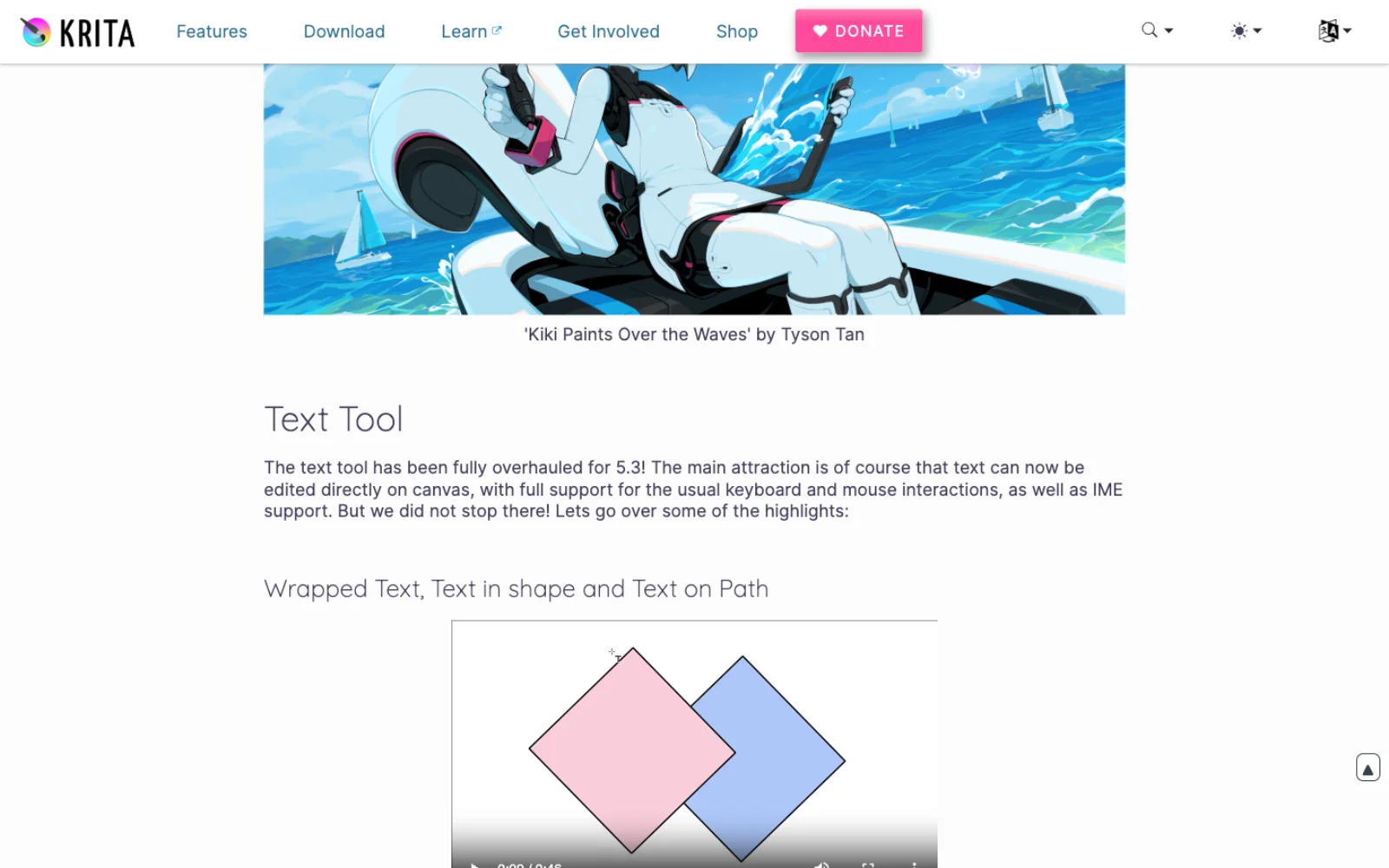
What remains is the gap between a good SVG text tool and a page layout engine. Krita's text is a vector object whose fill and stroke are set with the shape tools rather than in the text docker (text properties docker). Photoshop has Character Styles and Paragraph Styles panels with a hierarchy where "manual overrides supersede any applied character styles, which in turn replace applied paragraph styles", plus vertical type with left and right underlines for Asian text and OpenType SVG fonts (format characters).
Choose Krita if your text is titles, lettering and captions on artwork. Choose Photoshop if you set paragraphs, need styles that update across layers, or produce typographic mockups.
PSD compatibility
Krita reads and writes PSD with "raster layers, blending modes, layer styles, vector shapes, text layers, layer groups, and transparency masks", and 5.3 added shapes, vector masks, guides, and text loading with "text on path and open type features" (PSD format, Krita 5.3 release notes). Layer styles were built to "mirror what that application supports", and Krita opens Adobe's ASL style libraries and ABR brush files, the latter "limited to basic features" (layer styles, Krita FAQ). The caveats are Krita's own: the format is reverse-engineered, so "it is impossible to have any program outside it support it 100%"; saving text to PSD is "more limited"; and the manual recommends "any other file format instead of PSD if possible, with a strong preference towards .ora or .tiff" (PSD format). Krita has no adjustment layers or smart objects to map Photoshop's onto.
Choose Krita if PSD is how you receive line art or deliver simply layered files. Choose Photoshop if PSD is the working format a team edits in.
Resource sharing: brushes and bundles
Krita's sharing unit is the resource bundle, "a compressed file containing all the resources together": brush presets, brush tips, patterns, gradients, workspaces, SeExpr scripts and, now that fonts are resources, font families and style presets, with a 5.3 bundle creator that carries tags (resource management, Krita 5.3 release notes). Photoshop shares brushes as ABR files and settings as tool presets, and syncs presets between devices through Creative Cloud (painting tools). The commercial brush market is larger for Photoshop; Krita imports those ABR files, but only their basic properties.
Scripting and automation
Krita's automation is Python. Scripts run in an interactive Scripter console, plugins live in a pykrita folder, and the API reaches most of Qt, so "you can build entire windows with buttons and forms this way, using the very same tools that Krita is using" (Python scripting, plugin how-to). Krita 5.3 added "an API for painting brushstrokes" (Krita 5.3 release notes). What Krita lacks is a recorder: "Macro recording and playing is disabled since 3.0 due to unmaintained code and buggy behaviour" (tools menu). Any Krita plugin you distribute must also be GPL (license).
Photoshop records. Actions capture steps including brush strokes with tool recording, play back from a function key, and batch over folders; JavaScript runs on both platforms through File > Scripts and UXP, with VBScript and COM on Windows and AppleScript on macOS, and a Script Events Manager triggers scripts on open, save or export (record an action, scripting). The Photoshop MCP post covers driving those surfaces from an agent.
Choose Krita if you would rather write Python than record an action. Choose Photoshop if your automation is recorded by non-programmers or depends on scripts written for Photoshop.
AI features
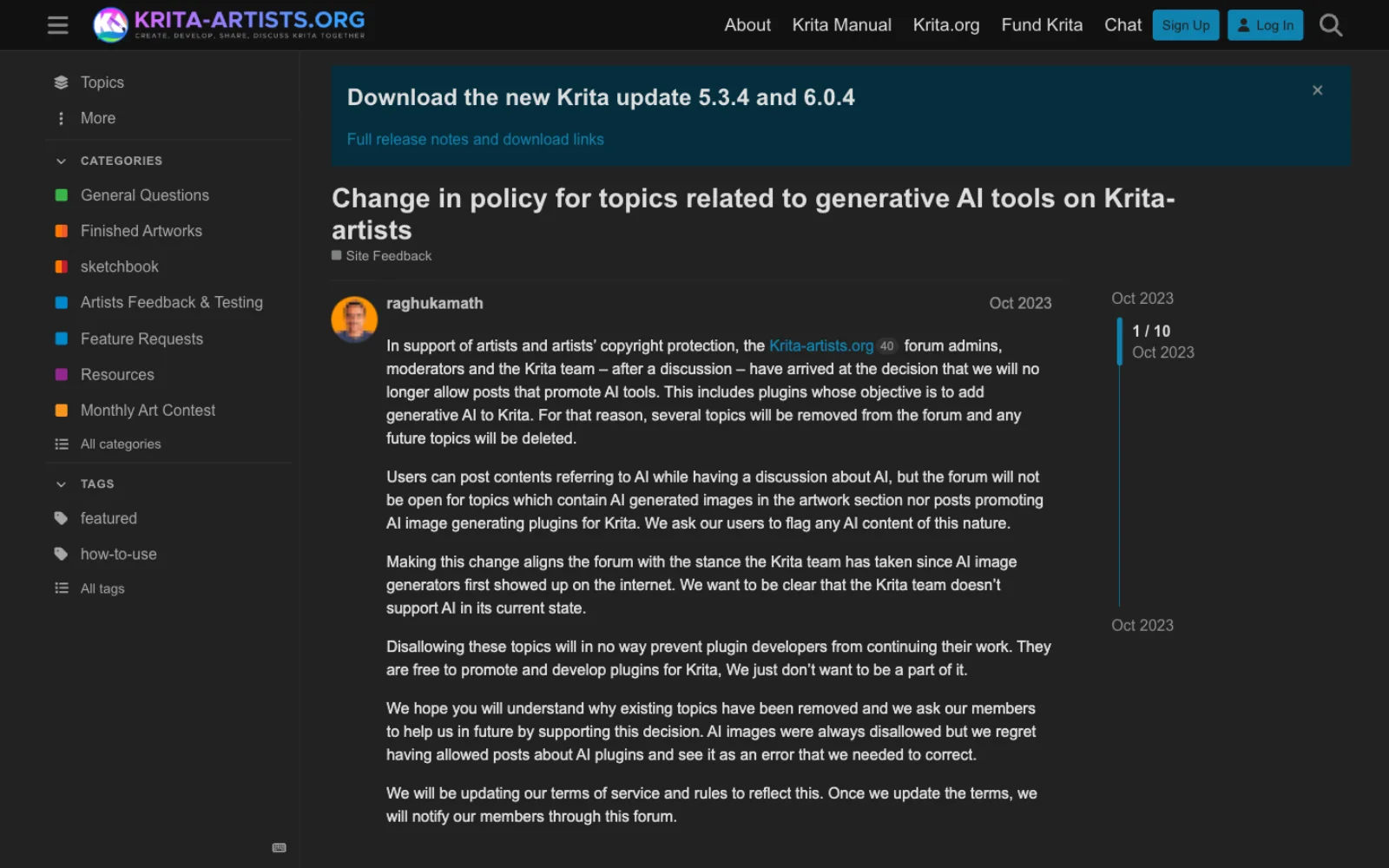
The two projects have taken opposite positions. Krita ships no generative feature. In October 2023 the krita-artists.org forum, run with the Krita team, banned posts promoting AI plugins with the statement: "We want to be clear that the Krita team doesn't support AI in its current state." The same post adds that this "will in no way prevent plugin developers from continuing their work" (krita-artists.org).
The plugin that policy refers to is active. krita-ai-diffusion is a GPL-3.0 plugin for inpainting, outpainting and upscaling through a ComfyUI backend, on your own GPU or a cloud option, with models including "Flux 2, Z-Image, Stable Diffusion 1.5, XL, Illustrious" plus ControlNet and IP-Adapter; it requires Krita 5.2 or newer and its latest release was 1.53.0 on 22 August 2026 (krita-ai-diffusion, releases). It is not endorsed by Krita.
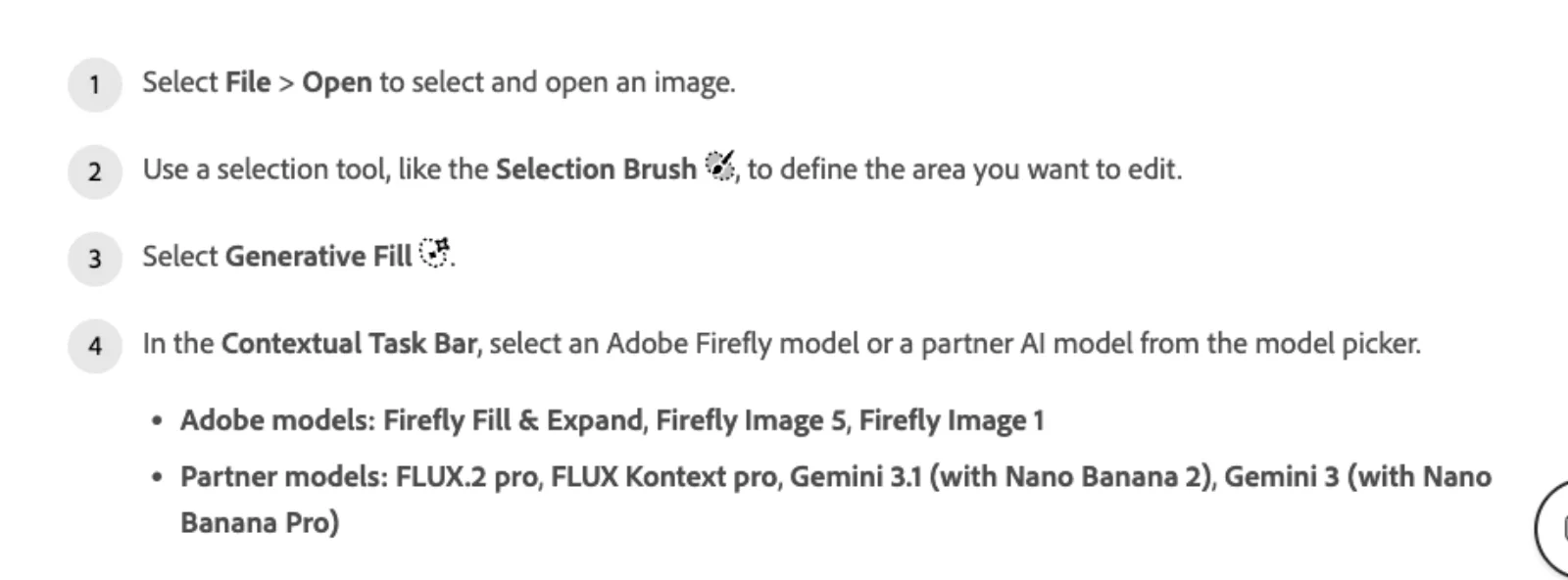
Photoshop's Generative Fill offers a model picker: Adobe's Firefly Fill & Expand, Firefly Image 5 and Firefly Image 1, or partner models FLUX.2 pro, FLUX Kontext pro, Gemini 3.1 with Nano Banana 2 and Gemini 3 with Nano Banana Pro, with Gemini 2.5 being removed from the September 2026 build (Generative Fill).
The metering matters. Standard features such as Generative Fill with Firefly "use 1 credit per generation", credits "do not roll over", partner models are premium and cost more, and the Photoshop single-app plan includes 25 credits a month against 1,000 on the Photography plan (generative credits FAQ, Adobe plans).
Choose Krita if you do not want generative tools in your painting program, or want them only as an opt-in plugin on your own hardware. Choose Photoshop if generative fill and expand are part of the job, and price a plan with enough credits.
Performance and large canvases
Krita's stated floor is 4 GB of RAM with 16 GB recommended, a GPU with OpenGL 3.0 or Direct3D 11, and Windows 8.1, macOS 10.15 or Linux (download). Its performance settings expose a memory limit, undo swapping, a swap file size limit, a CPU core limit and animation cache controls (performance settings). The FAQ gives the arithmetic, width times height times channels times channel size, times the number of layers plus two, and warns that when a file is too large "Krita is not so much crashing as that the operating system is shutting it down" (Krita FAQ). Krita publishes no maximum document size; region-based updates for large images are on the 2026 roadmap (Krita 2026 roadmap).
Photoshop 27.x wants 8 GB of RAM minimum and 16 GB recommended, a DirectX 12 GPU with 1.5 GB of memory, 10 GB of disk minimum and 100 GB recommended with a separate scratch drive, and an internet connection for activation (Adobe). Its documented ceiling is 30,000 pixels a side in PSD and 300,000 in PSB (PSD file format). No timing comparison was run for this article.
Choose Krita on a modest machine. Choose Photoshop when a scratch-disk workflow on very large layered files is routine.
Platforms: Linux, ChromeOS, Android, iPad
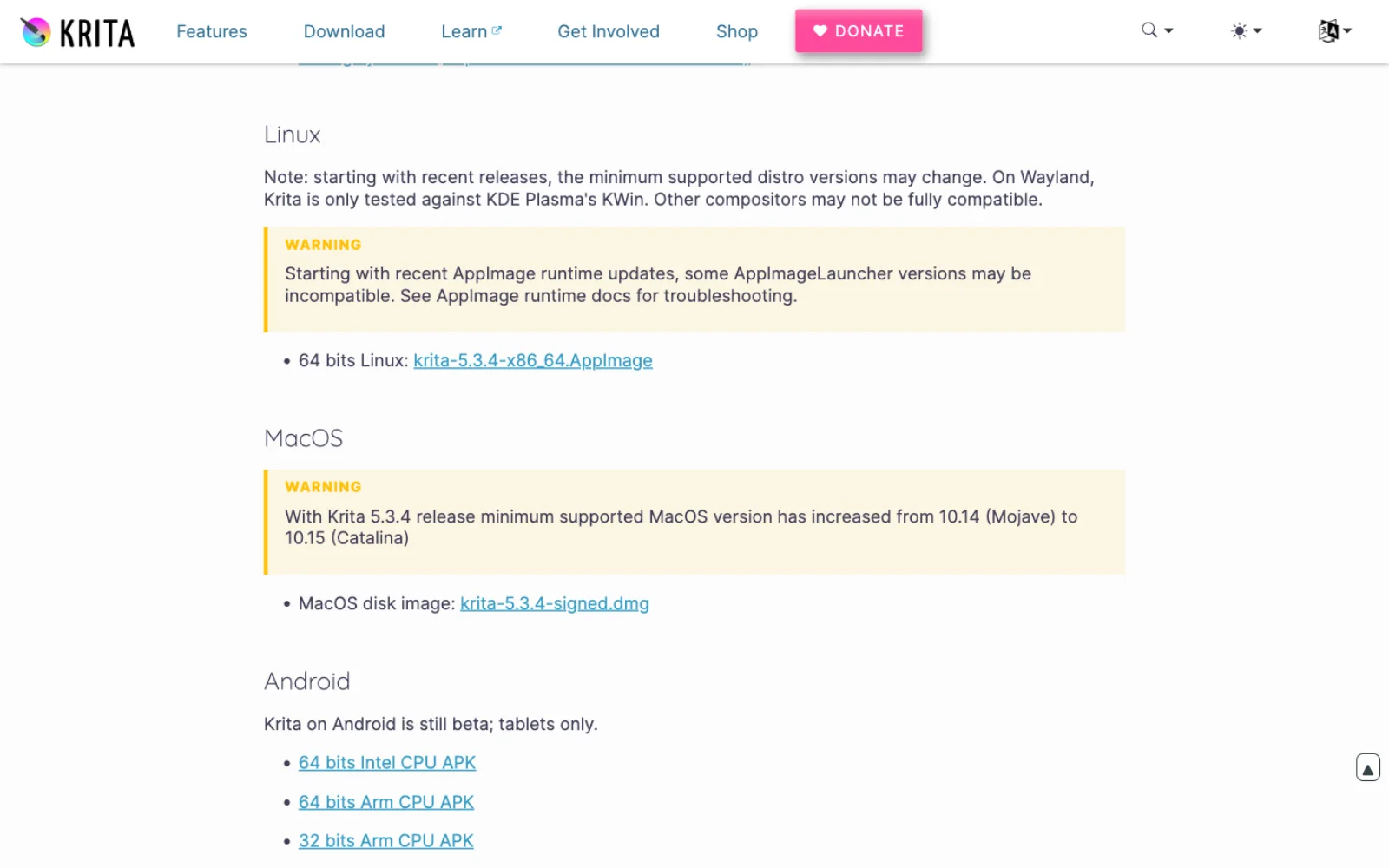
Krita runs natively on Linux, as an AppImage from krita.org and as community Flatpak and Snap packages; Krita 6 adds Wayland support with color management and HDR, tested against KDE's KWin 6.4.4 or newer (download, Krita 5.3 release notes). The Google Play build serves two platforms: the 6.0 beta announcement calls "Krita on ChromeOS as ready for production" while "Krita on Android is still beta", and it is "not available for Android phones, only for tablets" (Krita 6.0 beta announcement). It is the desktop interface, which Krita describes as "not optimized for touch devices" (Krita for Android update), and Krita 6 is not on either platform because "Qt6 is unstable on those platforms". There is no iPad version, which the FAQ attributes to "problems in any case with putting an application licensed under the GNU Public License V3 in the iOS App Store" (Krita FAQ).
Photoshop's technical requirements page has Windows and macOS tabs and no Linux tab (Adobe). Its tablet story is the iPad app; the browser version is covered in the Photopea comparison.
Choose Krita on Linux, ChromeOS or an Android tablet. Choose Photoshop on an iPad.
Learning curve
Krita ships keyboard and canvas shortcut schemes for Photoshop and Paint Tool SAI, so a Photoshop user can keep muscle memory, provided the same scheme is loaded for both keyboard and canvas (shortcut settings, Krita FAQ). The concepts differ more than the keys: every Krita layer has an alpha channel, there is no clipping mask but an "inherit alpha" toggle, filter layers stand in for adjustment layers, and the native format is .kra (Krita FAQ). Photoshop's interface is the one every course and colleague assumes, a genuine advantage that has nothing to do with the software; it also carries decades of panels a painter never opens.
Choose Krita if you are learning to paint digitally. Choose Photoshop if your team or course assumes it.
Licensing, cost and how Krita is funded
Krita is GPL version 3: "You are free to use Krita for any purpose, including the creation of commercial work", and what you create "is your sole property" (license). The download page offers free installers for Windows, macOS and Linux, then a "Store version" with paid builds on the Microsoft Store, Steam, Epic Games Store and Mac App Store that add automatic updates: "After deduction of the Store fee, the money will support Krita development" (download). On 21 September 2026 Steam listed Krita at US$9.99 and the Mac App Store at US$12.99 (Steam, Mac App Store); Krita's October 2023 pricing post set the other stores at US$9.99 too (Krita in stores). The Android build is free with an optional supporter subscription; "no features are locked behind a paywall" (Krita 5.3.3 release).
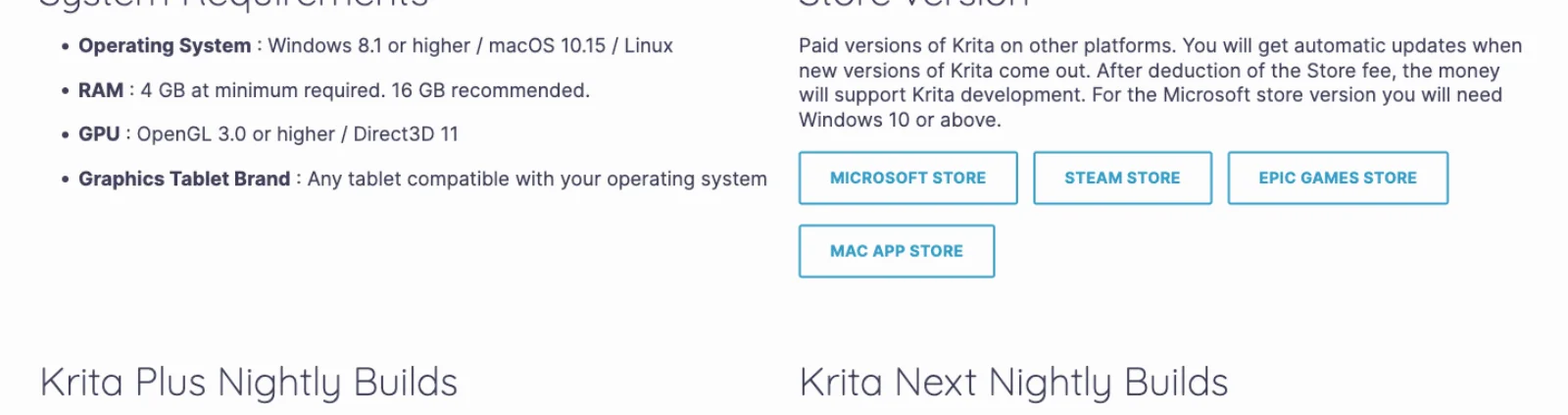
That price is how Krita is paid for. The FAQ states that "the income from Steam and the Windows Store currently pays for the full-time involvement with Krita of four developers", and the Foundation page names them: Dmitry Kazakov, Halla Rempt, Agata Cacko and Ivan Yossi (Krita FAQ, Krita Foundation). The other leg is the Krita Development Fund, a membership from US$5.80 to US$290 a month, which on 21 September 2026 showed 245 individual members, no corporate members and US$2,871 a month (Krita Fund). Four paid developers plus volunteers is the scale of the project, which explains a cadence of 5.2 in October 2023 and 5.3 in March 2026 (release history).
Photoshop's US plans on the same day: Photoshop alone at US$22.99 a month on an annual plan billed monthly with 25 generative credits; the Photography plan with Lightroom at US$19.99 with 1,000 credits; Firefly Pro at US$19.99 for Photoshop on web and mobile only; and Creative Cloud Pro at US$69.99, discounted to US$34.99 for the first three months for new subscribers. All have a seven-day trial (Adobe plans).
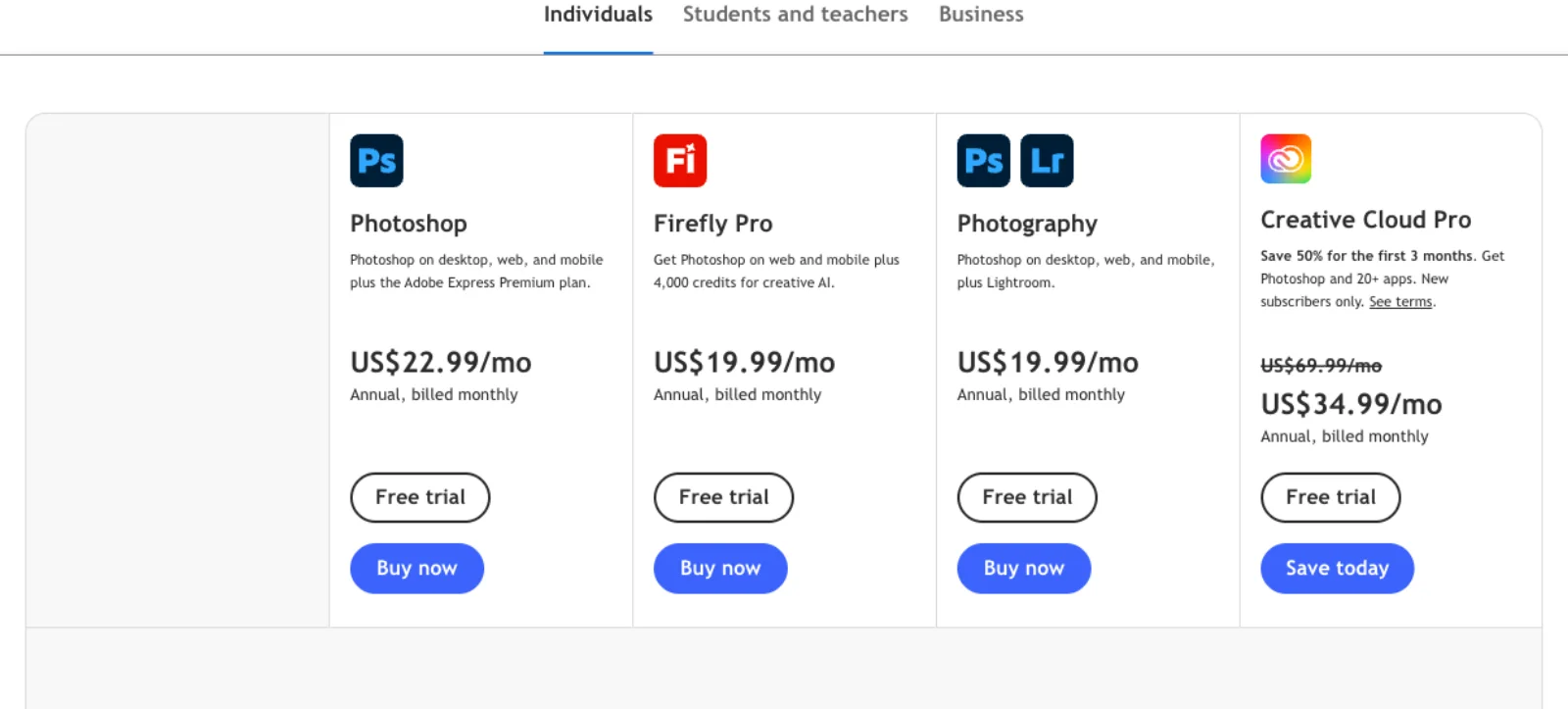
Over a year, Photoshop alone is US$275.88; Krita is US$9.99 once, or nothing. For a painter, the saving also buys the better painting program; for a photographer, it costs Camera Raw and adjustment layers.
Verdict by job
| If your work is mostly | Choose | Because |
|---|---|---|
| Digital painting, concept art, illustration | Krita | 18 brush engines, stabilizers, assistants and wrap-around, built for the pen |
| Hand-drawn animation and animatics | Krita | Frame-by-frame timeline, onion skins, curves, storyboards, video export |
| Comics from pencils to CBZ or EPUB | Krita | Panel tool, word balloons, comics project manager |
| Photo retouching and compositing | Photoshop | Adjustment layers, smart objects, Remove tool, Neural Filters |
| Raw photography end to end | Photoshop | Camera Raw; Krita only imports |
| Print production in CMYK | Photoshop | Native CMYK workflow and prepress output; Krita converts at export |
| Multi-paragraph type and typographic mockups | Photoshop | Character and paragraph styles; Krita 5.3's text tool is good but younger |
| Files exchanged with Photoshop users | Photoshop | Krita's PSD is reverse-engineered and has no adjustment layers or smart objects |
| Generative fill as part of the job | Photoshop, on a plan with credits | Firefly plus FLUX and Gemini; Krita's only route is an unendorsed plugin |
| Scripted pipelines in Python | Krita | Full PyQt API, brushstroke API, no license server |
| Batch actions by non-programmers | Photoshop | Actions and batch; Krita's recorder has been disabled since 3.0 |
| Linux, ChromeOS or an Android tablet | Krita | Photoshop does not run on any of them |
| iPad | Photoshop | Krita has no iOS build |
| Learning to paint on no budget | Krita | Free, complete, and the manual is part of the product |
Frequently asked questions
Is Krita a good photo editor? It is a capable one for grading and compositing, with filter layers and masks that stay editable, curves, levels, color balance and a smart patch tool. It is not a photographer's editor: raw support is a basic import, there is no healing brush or content-aware fill in the Photoshop sense, and the project's own list of supported fields does not include photography (Krita FAQ).
Can Krita open Photoshop files? Yes. Krita reads and writes PSD with raster layers, blend modes, layer styles, vector shapes, text, groups and transparency masks, and 5.3 added shapes, vector masks, guides and richer text import (PSD format, Krita 5.3 release notes). Adjustment layers and smart objects have no Krita equivalent, and the manual recommends .kra, .ora or .tiff for anything you will keep editing.
Does Krita have adjustment layers? Not by that name. Filter layers apply a filter such as Levels or Curves to everything beneath them, filter masks apply one to a single layer, and both stay editable (filter layers). Only Krita's internal filters work this way.
Does Krita support CMYK? Yes, as a document color model at 8 to 32 bits, with ICC profiles, soft proofing and export to CMYK PSD and TIFF. The manual recommends painting in RGB and converting to the printer's profile at the end (color models). Photoshop gives the same advice for its own CMYK mode, but adds Duotone and prepress output formats.
Does Krita have generative fill or AI features? No, and the Krita team has said it "doesn't support AI in its current state" (krita-artists.org). A third-party GPL plugin, krita-ai-diffusion, adds inpainting and generation through a ComfyUI backend on your own GPU or a cloud service (krita-ai-diffusion). Photoshop's Generative Fill is built in and metered by credits.
Is Krita really free, and why does it cost money on Steam? The download from krita.org is free under the GPL. The Steam, Microsoft Store, Epic and Mac App Store builds are the same software with automatic updates and a price, and "the income from Steam and the Windows Store currently pays for the full-time involvement with Krita of four developers" (Krita FAQ). On 21 September 2026 Steam listed it at US$9.99 (Steam).
Does Krita run on Android, ChromeOS or iPad? ChromeOS is "ready for production", Android is beta and tablets only, and there is no iPad version (Krita 6.0 beta announcement, Krita FAQ). Krita 6, the Qt6 build, is not yet on Android or ChromeOS.
How much does Photoshop cost compared with Krita? On 21 September 2026 Photoshop alone was US$22.99 a month on an annual plan billed monthly, the Photography plan with Lightroom was US$19.99, and Creative Cloud Pro was US$69.99, discounted to US$34.99 for the first three months (Adobe plans). Krita is free, or a one-time store purchase.
Make your next project in Voyager
Create an account, download Voyager, and start making.
