
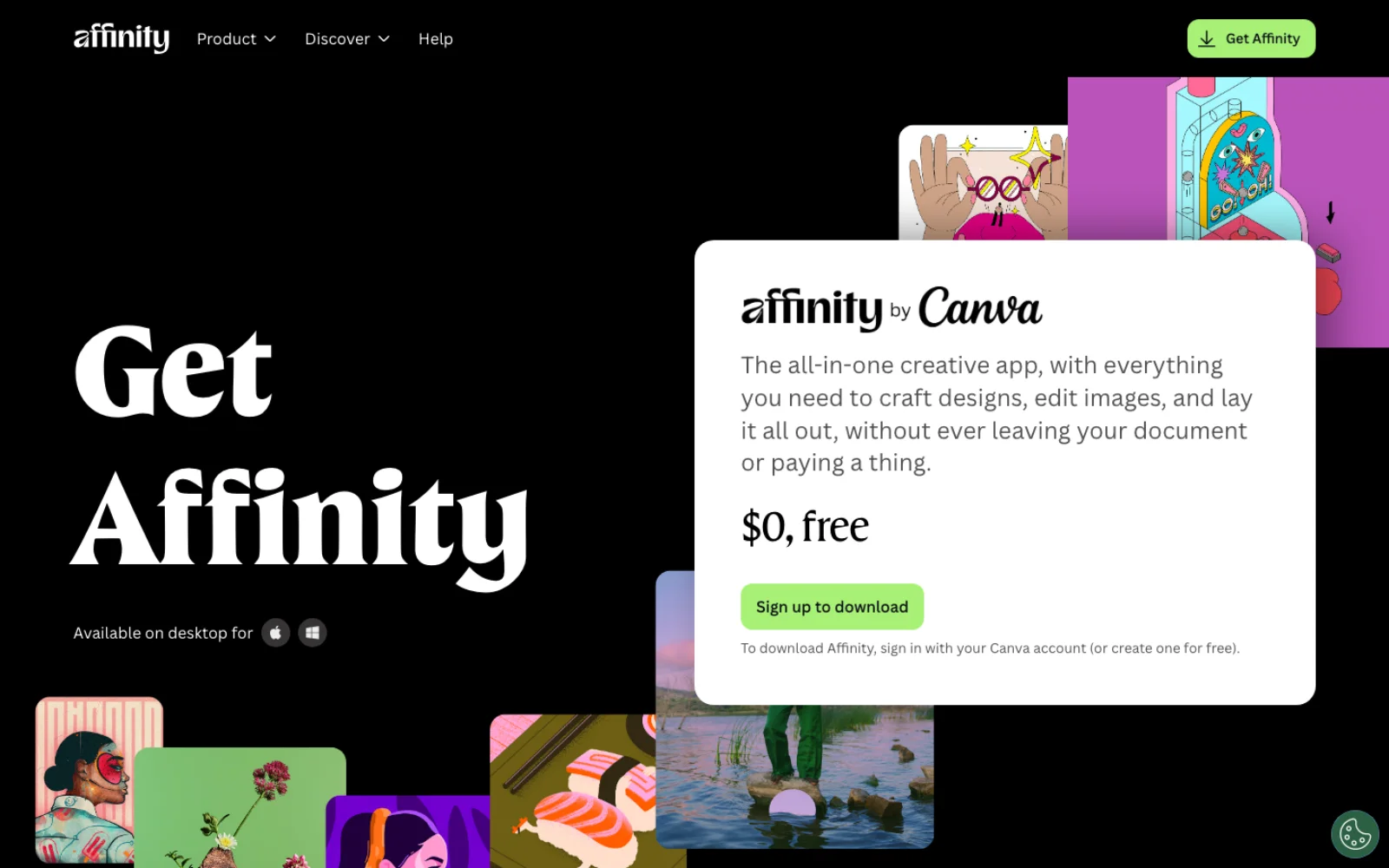
Affinity Photo no longer exists as a product you buy. Since 30 October 2025 it is the Pixel Studio inside a single Affinity app that also holds the old Designer and Publisher, and that app is free for individuals (Affinity, Wikipedia). Canva, which bought Serif in March 2024, pays for it by selling the AI tools inside it as part of a Canva subscription. Photoshop has gone the other way: it is subscription only, and Adobe's plan page answers "Can I buy Photoshop outright?" with a flat "No" (Adobe).
So the comparison is no longer a one-time license against a monthly one. It is a free editor with paid AI against a paid editor with metered AI, and the right answer depends on which of the jobs below you do most. Everything here was read from the vendors' own pages on 21 September 2026; the current builds are Affinity 3.3 (build 4850, the September 2026 update) and Photoshop 27.10 (Affinity release notes, Adobe Community).
What is actually free, and what needs a Canva account
The core app costs nothing. Affinity's own wording: "you can use every tool in the Pixel, Vector, and Layout studios, plus all of the customization and export features, as much as you want, with no restrictions or payment needed", and the app "will also receive free updates" (Affinity). That covers RAW development, retouching, HDR and focus merging, panoramas, macros, batch jobs, CMYK export and PSD import. There is no watermark, no trial clock and no feature gate on the editing tools.
Three conditions apply.
A Canva account is required. "To download Affinity, sign in with your Canva account (or create one for free)" (Affinity). Canva's help page says you "must log in with your verified Canva account", and first-time setup needs an internet connection; after that the app runs offline (Canva Help). Enterprise and Education accounts can have Affinity switched off by an admin, so check before assuming a work account will do.
AI needs a paid Canva plan. The Canva AI Studio, a fourth workspace next to Pixel, Vector and Layout, "requires a Canva premium plan": Pro, Business, Enterprise or Education (Affinity Help). Canva Pro is US$144 a year for one person and Business is US$250 a year per person on Canva's pricing page (Canva). Canva also offers monthly billing; its pricing page defaults to the yearly view, so check the monthly toggle before quoting a figure.
The old apps are frozen. If you own Affinity Photo 2, "you can still use them, no problem", the license stays valid and Serif keeps the activation servers up, but "these apps won't receive future updates" (Affinity V2). Serif's own history page frames the unified app as the successor to Designer, Photo and Publisher (Affinity Help).
What Photoshop costs, and how its AI is metered
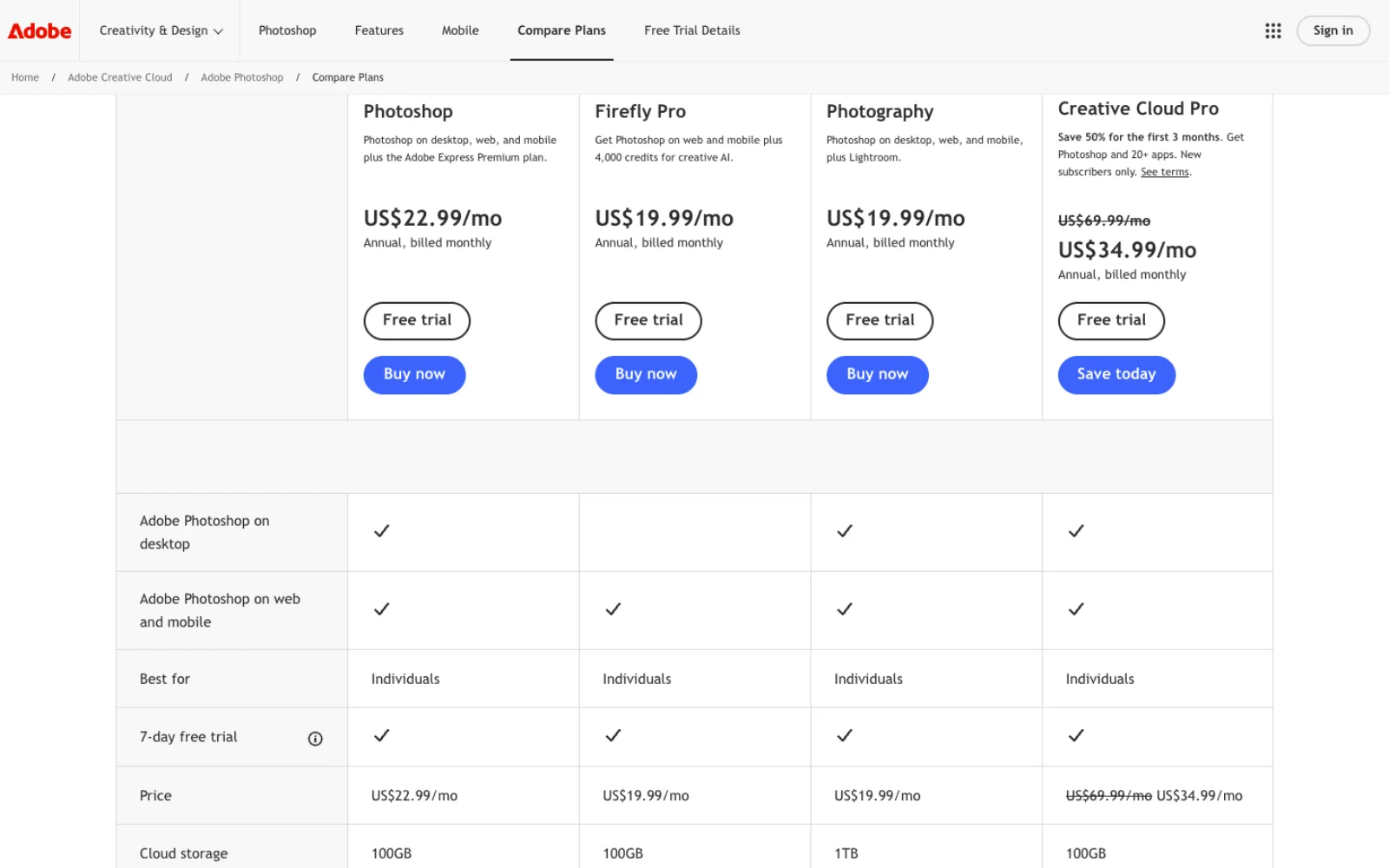
Photoshop's plan page lists four individual routes on 21 September 2026, all "annual, billed monthly" (Adobe):
| Plan | Price | Photoshop on desktop | Generative credits a month |
|---|---|---|---|
| Photoshop single app | US$22.99/mo | Yes | 25 |
| Photography (Photoshop plus Lightroom) | US$19.99/mo | Yes | 1,000 |
| Firefly Pro | US$19.99/mo | No, web and mobile only | 4,000 |
| Creative Cloud Pro (20+ apps) | US$69.99/mo, US$34.99 for the first three months for new subscribers | Yes | 4,000 |
Two facts on that page matter more than the prices. The single-app plan, the one most "Photoshop vs" comparisons quote, is cheaper for Photoshop alone only if you ignore that the Photography plan costs US$3 less, adds Lightroom, 1 TB of storage and forty times the generative credits. And "Standard AI features like Generative Fill" are "access with generative credits" on the single-app and Photography plans, "unlimited access" only on Creative Cloud Pro and Firefly Pro.
A generative credit is Adobe's unit for Firefly and partner-model use. "Most standard generative AI features, like Generative Fill using Adobe Firefly models in Photoshop, use 1 credit per generation"; credits reset monthly and do not roll over; the Remove Tool is on the short list of features that consume none (Adobe Help, generative credits FAQ). Partner models cost more: Gemini 3 with Nano Banana Pro is listed at 40 credits a generation and FLUX.2 at 20, both selectable inside Photoshop's Generative Fill (Adobe Help, partner models). On the 25-credit single-app plan, that is one partner-model fill every two weeks before you are buying more.
The other clause worth reading before subscribing is cancellation. On an annual plan paid monthly, "after 14 days, a cancellation fee (early termination fee) of 50% of the remaining balance of the contract applies" (Adobe Help).
Decide by job
Retouching and healing
Both apps have the classic kit. Affinity's Pixel Studio lists an Inpainting Brush among its five most-used tools, and the photo page adds "spot healing, inpainting, and clone stamp", "dodge and burn with pressure sensitivity", "frequency separation" and a Liquify Studio (Affinity Help, Affinity). Version 3.3 added a Mask Tool that paints a mask as you brush, stroke stabilization for the brush tools and a bone-based Deform Tool for reposing subjects (release notes).
Photoshop's edge is that its removal tools are now model-driven. The Remove Tool runs on "Remove Tool 3", Generative Fill returns 1024 by 1024 pixels per Adobe's current FAQ (Photoshop generative AI FAQ), and Reference Image lets you drop a real object into a scene with "geometry-aware results" (Adobe blog, 27 January 2026). Since 27.10 an AI Assisted Editor in beta takes natural-language prompts and hand-drawn markup (Adobe Community).
Choose Affinity for manual, brush-driven retouching where you want the tools and not a subscription. Choose Photoshop if the Remove Tool and generative fill are how you clean plates, and note the Remove Tool costs no credits, so even the 25-credit plan covers it.
Layers, masks and non-destructive editing
Affinity was built non-destructive by default: adjustment layers, live filter layers for blur, sharpen, noise and distortion that "you are not affecting the original image", clipping, layer masks, and the option to save undo history with the file (Affinity Help, Affinity). The Photoshop equivalent of a live filter is a Smart Filter on a Smart Object; the equivalent of Affinity's embedded document is a Smart Object, which Photoshop offers in embedded and linked forms with packaging and relinking (Adobe Help).
Photoshop's adjustment list has grown this year: Clarity, Dehaze and Grain adjustment layers in 27.3, Light in 27.10 (Adobe blog, Adobe Community). Affinity 3.3 added a spline-based Saturation/Hue Curves adjustment and new color pickers in Curves (release notes).
Either. This is the job where the two are closest. Affinity's model is more consistent (everything is a layer), Photoshop's is more widely documented and matches the files clients send.
RAW development
Affinity opens RAW files in a Develop Studio that can keep "your original RAW image as a non-destructive RAW layer", embedded or linked, with lens correction, noise reduction, masks (object selection, brush, gradient, luminosity, hue range), Adobe LCP lens profiles, focus peaking, and, as of 3.3, presets that apply "to every RAW file processed in a Batch Job, Panorama, Stack or Focus Merge" (Affinity Help, Affinity Help). On a Mac you can swap Affinity's engine for Apple's Core Image RAW; Affinity's blog calls 3.3 "our biggest ever photo editing update" for RAW (Affinity blog).
Photoshop's Camera Raw is a plug-in that shares its engine with Lightroom. Version 18.6 (August 2026) is the current one; 2026 releases added AI Blemishes removal, Generative Expand and Generative Remove inside Camera Raw, subject detection for masks, a Vectorscope, and a preference to switch generative features off (Adobe Help, Camera Raw). Amateur Photographer's review of Affinity 3.0.2 found the same RAW file "looked darker and much lower in contrast" than in Adobe's software and that Camera Raw's AI noise reduction was "significantly superior" at high ISO; the review scored Affinity 4.5 out of 5 regardless (Amateur Photographer, 24 February 2026). Affinity added an ML Noise Reduction tool in 3.3, but it sits behind the Canva plan.
Choose Photoshop, on the Photography plan, if RAW is most of your work: Camera Raw plus Lightroom for US$19.99 a month is the stronger RAW pipeline and the only one of the two with a catalog. Choose Affinity if you develop a few RAW files at a time inside a layered edit and want the RAW layer to stay re-editable.
HDR, focus merge and panoramas
Affinity puts these under File > New Image Process: HDR Merge to 32-bit with ghost removal and a Tone Mapping Studio, Focus Merge with source cloning to fix blend errors, Panorama with a preview and per-image opt-out, plus astrophotography stacking in a dedicated studio since 3.3 (Affinity Help, HDR, focus merging, panoramas). Photoshop has Photomerge with six layout modes, Merge to HDR Pro, and focus stacking through Auto-Align and Auto-Blend Layers with "Stack Images", which Adobe's own steps start from Bridge (Adobe Help, Photomerge, HDR, depth of field).
Choose Affinity. Its merges are first-class dialogs with RAW presets applied on the way in, and 32-bit HDR editing with OpenEXR is free. Photoshop does all three jobs, but focus stacking in particular is a sequence of commands rather than a tool.
Text and typography
Affinity carries a page-layout application inside it, so the Pixel Studio gets artistic, frame, path and shape text with Character and Paragraph panels, and one click switches to the Layout Studio for multi-page work (Affinity Help). Photoshop's text has improved this year with Dynamic Text that reflows along any shape or path, in 27.10 (Adobe Community), but a poster with real typography is still an InDesign or Illustrator job in Adobe's world, and those are on the US$69.99 plan.
Choose Affinity for anything with more than a headline of text.
CMYK, print and soft proofing
Both do it. Affinity has a Soft Proof adjustment layer with rendering intents, black point compensation and a gamut check that grays out RGB colors with no CMYK equivalent; the help page warns that because it is a layer it must be hidden before export (Affinity Help). Photoshop soft-proofs through View > Proof Setup with a custom profile and, uniquely, color-blindness proofs (Adobe Help). Affinity's print strengths are in the Layout Studio: bleed, preflight with custom rules since 3.3, and PDF export (release notes).
Either for a single image; Affinity for the whole printed piece.
PSD import and export, and what breaks
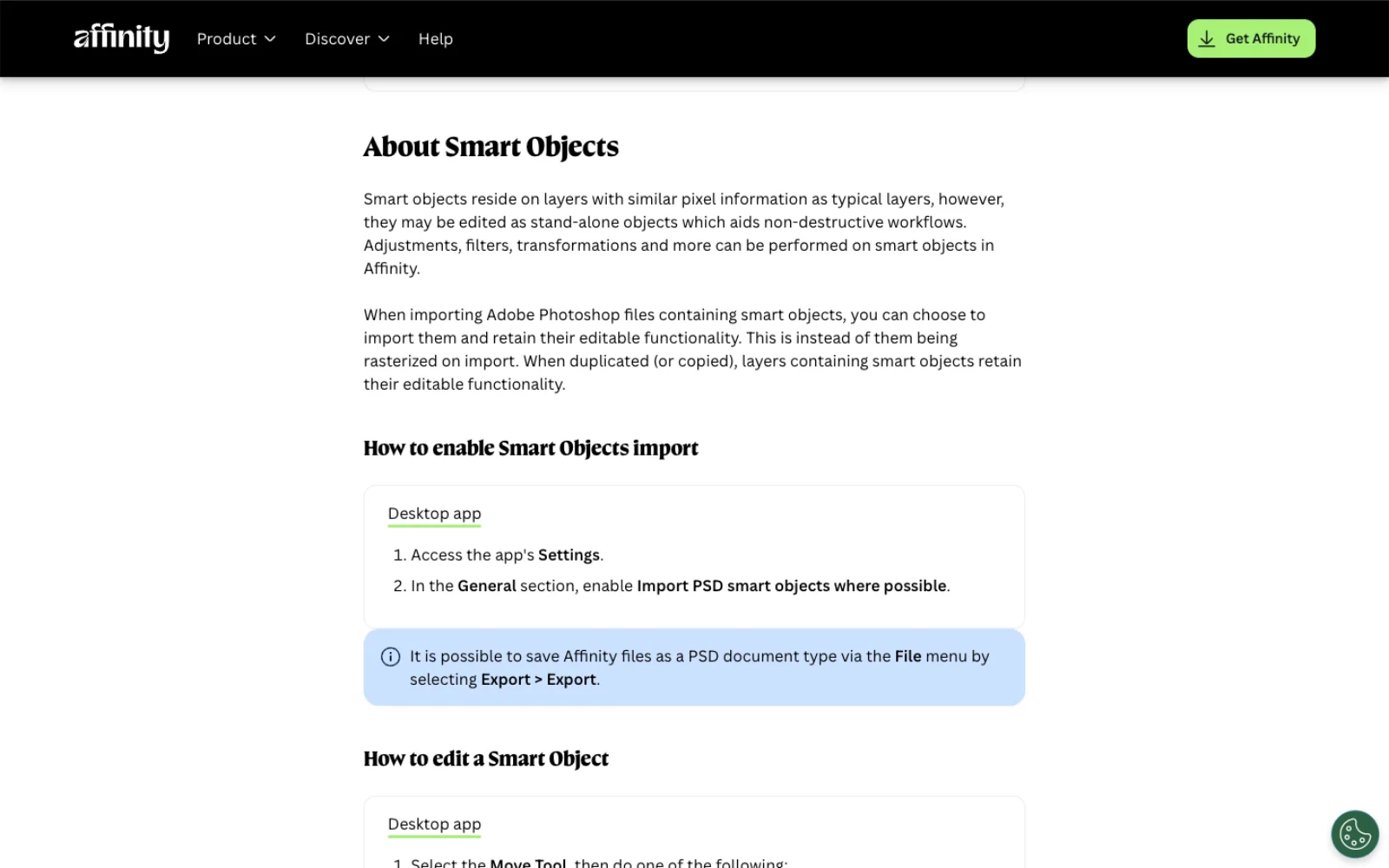
This is the job to test with your own files before deciding. Affinity opens PSD and PSB "with layers intact", maps adjustment layers, and can keep smart objects editable if you enable "Import PSD smart objects where possible" in Settings, alongside "Import PSD text as text rather than bitmap" (Affinity Help). Import is one way: the file becomes an Affinity document, and saving back over the PSD is a separate setting Affinity recommends "only for users who need to use PSD as an interchange format with their Digital Asset Management (DAM) app". On export, the PSD dialog lets you choose per attribute between "Preserve accuracy", which rasterizes, and "Preserve editability", which keeps the original settings (Affinity Help). Live filters, Affinity-only adjustments and blend options are where "preserve editability" cannot be honored, so a round trip through Photoshop flattens them.
Choose Photoshop if you exchange layered PSDs with other Photoshop users every day. Choose Affinity if PSD is an input format you open and an output format you deliver flat or nearly flat.
Batch processing, macros and scripting
Affinity records Macros with parameters you can expose at playback, runs them over folders with Batch Job (parallel, RAW presets applied, output to JPEG, PNG, TIFF, WebP, JPEG XL or EXR), and since 3.3 has a Scripting Studio for JavaScript, labeled beta, with an API reference at sdk.affinity.studio (Affinity Help, macros, batch jobs, scripting). The scripting page is candid: scripts "do not add new tools", "modify the core user interface" or "run continuously in the background", and "some parts of Affinity are not yet scriptable". The 3.3 update also advertises an AI Connector for Claude that drafts scripts (Affinity blog).
Photoshop's Actions, Batch and droplets are decades old, ExtendScript still runs from File > Scripts, and UXP is the modern plugin and scripting surface. Actions are also the input format of Adobe's cloud Photoshop API. The routes, including the community MCP servers that let a coding agent drive desktop Photoshop, are in Photoshop MCP.
Choose Photoshop for automation with any depth: it has a mature scripting object model and an ecosystem of scripts that already exist. Choose Affinity if a recorded macro over a folder is the whole job.
AI features
The two vendors have made opposite bets, and both are honest about the boundary.
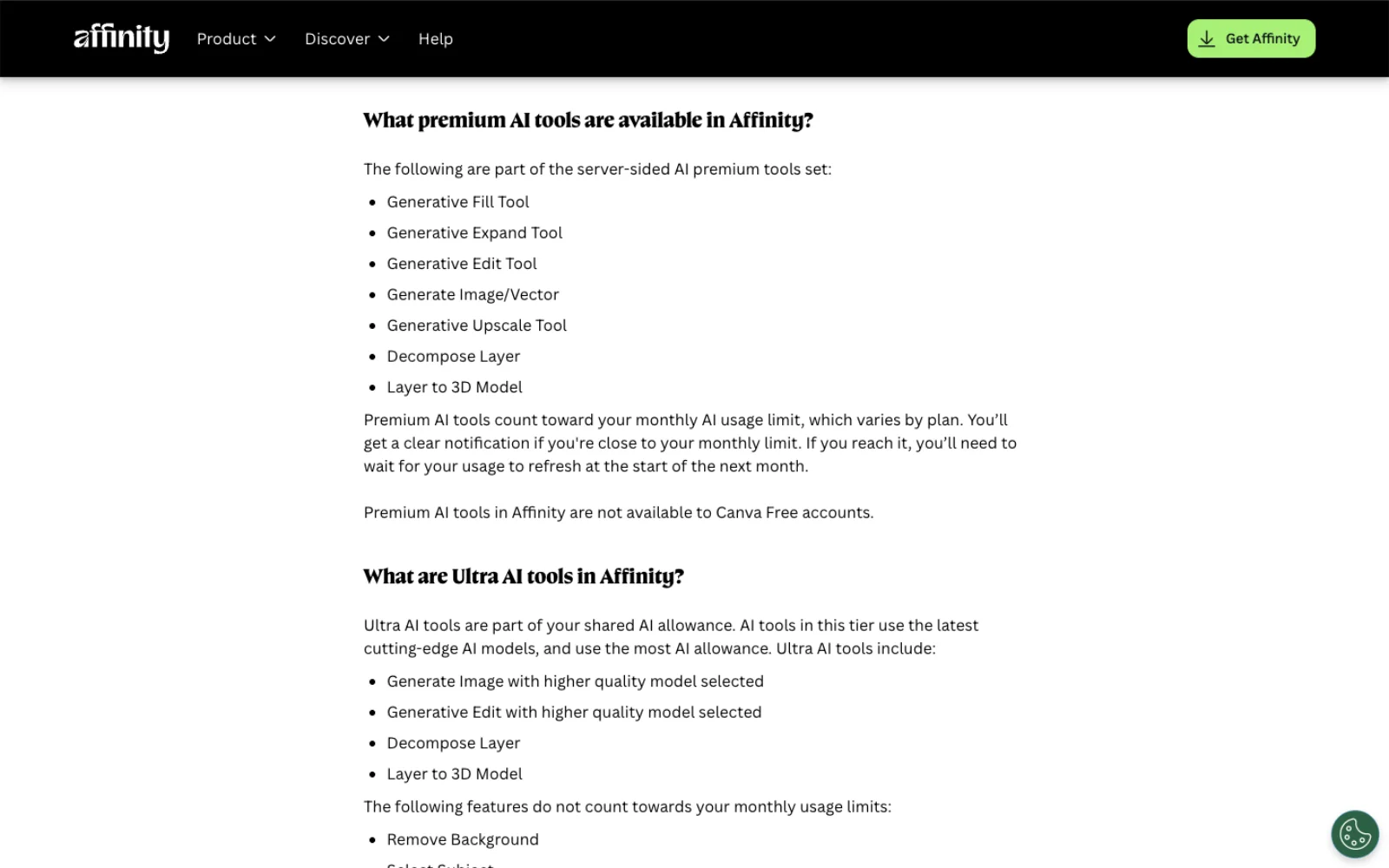
In Affinity, the Canva AI Studio is the only place AI lives, and it splits into three tiers (Affinity Help):
- Server-side premium tools that count against a monthly Canva allowance: Generative Fill, Expand and Edit, Generate Image or Vector, Generative Upscale, Decompose Layer (Scene Decomposition) and Layer to 3D. "Premium AI tools in Affinity are not available to Canva Free accounts."
- Two server tools that do not count: Remove Background and Select Subject.
- On-device ML models you download once and use without limit on a paid plan: object and region detection, Portrait Blur, ML Noise Reduction, Motion Blur Reduction, Mixed Light Correction, SDR to HDR, Colorize and Super Resolution. These need an Apple silicon Mac or a Windows x64 or ARM64 machine; "Machine Learning features are not supported on Intel-based Macs" (Affinity Help).
The allowance is Canva's, shared with the Canva web app. Canva's estimate for Pro is "up to 200 uses for Premium AI tools, OR up to 20 uses for Ultra AI tools" a month; Business and Enterprise get 400 and 40; a Pro trial gets no Affinity premium tools at all (Canva Help). When it runs out, generations continue "with short pauses between tasks" rather than stopping, and an AI Pass add-on raises the cap. Affinity's generative tools have a model selector since 3.3, and the help page says "your content in Affinity is not used to train AI-powered features".
In Photoshop, AI is everywhere and metered. Generative Fill, Expand, Reference Image, Generative Upscale, AI Denoise and AI Sharpen (the last three on Topaz models), a choice of Firefly, Gemini and FLUX inside Generative Fill, Neural Filters, and the AI Assisted Editor beta (Adobe Help, partner models, Adobe Help, Neural Filters). Everything except the Remove Tool draws credits, at 1 for a Firefly fill and 20 to 40 for a partner model.
Choose Photoshop if generative fill is central to your work and you are on the Photography or Creative Cloud Pro plan, where the credits are plentiful. Choose Affinity with Canva Pro if you want mostly corrective ML (noise, blur, mixed light, masks) with occasional generative fills, and you have a machine that runs the local models. Choose plain Affinity if you do not want AI in the editor at all; nothing is missing from the editing tools when the AI Studio is absent.
Plugins
Affinity loads Photoshop-format plugins from a folder you point it at, exposes them under Pixel > Filters, and needs a setting to "Allow 'Unknown' plugins" for anything it has not certified (Affinity Help, RC Astro). The limit is architectural: only compiled filter plugins, the kind that appear under Photoshop's Filter or File > Automate menus, can work. Panels and extensions built on UXP or CEP, which is most of the current Photoshop plugin market, "simply will not run on Affinity", as Greg Benz, who sells such panels, explains (Greg Benz Photography).
Choose Photoshop if a panel plugin is part of your daily work. Choose Affinity if your plugins are filters (noise, sharpening, astro) and you check each one first.
Platforms and iPad
Affinity 3 runs on Mac (Apple silicon or Intel, macOS 10.15 or later) and Windows 10 or 11, including ARM64 (Affinity Help). The iPad version of the unified app is not out: "We're busy building our iPad version - stay tuned!" (Affinity). The old Affinity Photo 2 for iPad is still on the App Store and has been free since October 2025 (CG Channel), but it is the frozen V2 codebase.
Photoshop runs on macOS and Windows, on the web, and on iPad and phones, where Adobe describes it as "a free, standalone app with extra premium features that are available when you purchase a subscription"; any plan with Photoshop includes the iPad app (Adobe).
Choose Photoshop if the iPad is a real working surface for you today. Revisit when Affinity ships its iPad build.
Performance
Neither vendor publishes benchmarks against the other, and none were run for this article. What the requirement pages show is that Affinity asks for less: 8 GB of RAM recommended and 1 to 2.8 GB of disk, against Photoshop's 8 GB minimum, 16 GB recommended, a DirectX 12 or Metal GPU with 1.5 GB of memory and 10 GB of disk (Affinity Help, Adobe Help). Affinity's pitch is GPU-accelerated live filters at full frame rate; Photoshop's generative features run in Adobe's cloud, so a slow connection slows them regardless of hardware.
Learning curve for Photoshop users
The vocabulary maps closely: adjustment layers, masks, clipping, blend modes, Curves, Levels, Liquify. The differences that trip people are structural. Affinity's studios switch the toolset instead of hiding it; Develop is a separate space you enter and leave; there is no Smart Object, only an embedded or linked document; and non-destructive is the default, so the habit of duplicating a layer before a filter becomes unnecessary. Keyboard shortcuts are remappable, and 3.3 added a Feature Finder in the Help menu for locating a command by name (release notes). Affinity's own FAQ has an entry titled "How does Affinity compare to Photoshop?", which is a fair sign of who it expects to arrive.
Cost over one, three and five years
Prices as read on 21 September 2026, at each vendor's standard rate, before tax. Adobe's plans are annual commitments billed monthly; Creative Cloud Pro's three-month discount for new subscribers would take US$105 off year one. Canva's plans are the yearly price.
| Route | Year 1 | 3 years | 5 years | What you get |
|---|---|---|---|---|
| Affinity | US$0 | US$0 | US$0 | Every editing tool, no AI Studio |
| Affinity plus Canva Pro | US$144 | US$432 | US$720 | Above, plus the AI Studio with a 200-use premium allowance |
| Affinity plus Canva Business | US$250 | US$750 | US$1,250 | Above, with a 400-use allowance |
| Photoshop single app | US$275.88 | US$827.64 | US$1,379.40 | Photoshop, 25 credits a month |
| Photography plan | US$239.88 | US$719.64 | US$1,199.40 | Photoshop, Lightroom, 1,000 credits a month |
| Creative Cloud Pro | US$839.88 | US$2,519.64 | US$4,199.40 | 20+ apps, 4,000 credits, unlimited standard generations |
Sources: Adobe, Canva, Affinity. The old one-time model no longer exists on either side: Affinity V2 is only re-downloadable by existing owners, and Photoshop cannot be bought outright.
Two readings. Over five years the cheapest Photoshop route costs about US$1,200 and the most expensive Affinity route about US$1,250, so at the top of Affinity's range the money is a wash and the decision is entirely about the jobs above. And Canva Pro is not a Photoshop equivalent; it is a Canva subscription that happens to unlock Affinity's AI, so anyone already paying for Canva at work gets the AI Studio for nothing extra.
Comparison at a glance
| Job | Affinity 3.3 | Photoshop 27.10 | Edge |
|---|---|---|---|
| Price | Free; Canva account required | US$19.99 to US$69.99/mo, annual commitment | Affinity |
| Retouching | Inpainting, healing, clone, frequency separation, Liquify, Deform | Remove Tool 3, Generative Fill at 1024 by 1024, Reference Image, AI Assisted Editor beta | Photoshop for AI removal, Affinity for manual |
| Non-destructive editing | Adjustment and live filter layers by default, embedded documents | Adjustment layers, Smart Objects and Smart Filters, linked files | Even |
| RAW | Develop Studio, non-destructive RAW layer, presets, Apple engine on Mac | Camera Raw 18.6, AI masking, Blemishes, Generative Remove; Lightroom on the Photography plan | Photoshop |
| HDR, focus merge, panorama | Dedicated dialogs, 32-bit, astro stacking | Photomerge, Merge to HDR Pro, Auto-Blend Stack Images | Affinity |
| Text | Four text types, full Layout Studio | Dynamic Text on paths since 27.10 | Affinity |
| CMYK and soft proof | Soft Proof layer with gamut check, preflight | Proof Setup with custom profiles | Even |
| PSD fidelity | Layers, adjustments, smart objects (setting), PSB; one-way import | Native | Photoshop |
| Batch and scripting | Macros, Batch Job, JavaScript scripting in beta | Actions, droplets, ExtendScript, UXP, cloud API | Photoshop |
| AI | Canva AI Studio on a paid Canva plan; local ML models unlimited | Firefly, Gemini and FLUX models on credits; Neural Filters | Photoshop for breadth, Affinity for cost |
| Plugins | Filter plugins only | Filters plus UXP and CEP panels | Photoshop |
| iPad | Not yet; V2 iPad app free but frozen | Included with any Photoshop plan | Photoshop |
| Hardware | 8 GB RAM recommended, Intel Macs supported (no ML) | 16 GB recommended, GPU required | Affinity |
Frequently asked questions
Is Affinity Photo really free? The editing tools are, with no trial and no watermark; the app is free for individuals and receives free updates (Affinity). You need a Canva account to download and activate it, and the Canva AI Studio needs a paid Canva plan. There is no longer a separate Affinity Photo: it is the Pixel Studio in the unified app.
Can Affinity replace Photoshop? For layered editing, retouching, RAW development, merges and print, yes, and for text and layout it goes further than Photoshop does. It cannot replace Photoshop's plugin panels, its cloud generative features without a Canva plan, Lightroom's catalog, or a workflow that hands layered PSDs back and forth with Photoshop users daily. Test your own PSDs first.
Does Affinity have generative fill? Yes, in the Canva AI Studio, along with Generative Expand and Edit, image and vector generation, Generative Upscale and Scene Decomposition, all requiring Canva Pro or above and counting against a monthly allowance that Canva estimates at up to 200 premium uses on Pro (Affinity Help, Canva Help). Remove Background and Select Subject are on the same plan but do not count.
Does Affinity open PSD files? Yes, including PSB, with layers, mapped adjustment layers, and smart objects kept editable when the setting is on (Affinity Help). It also exports PSD with per-feature choices between accuracy and editability. Affinity-only features such as live filters rasterize on the way out.
Which is cheaper over five years? Affinity alone is US$0. Affinity with Canva Pro is US$720. Photoshop on the Photography plan is US$1,199.40 and on the single-app plan US$1,379.40, at the rates on Adobe's page on 21 September 2026 (Adobe). Creative Cloud Pro is US$4,199.40 at the regular rate.
Is there an Affinity app for iPad? Not the unified one yet; Affinity's site says it is being built. Affinity Photo 2 for iPad is still on the App Store and free, but it is the version 2 app and no longer updated (Affinity, Affinity V2).
Make your next project in Voyager
Create an account, download Voyager, and start making.
