
 Read Markdown
Higgsfield has an official MCP server, and it is not the only thing people mean when they ask for one. Two hosted endpoints do different jobs: mcp.higgsfield.ai/mcp generates images, video and audio on your higgsfield.ai account from any MCP client, and bridge.higgsfield.ai/mcp drives Higgsfield's plugins inside After Effects, Premiere Pro and Blender. Beside them sit an open-source local bridge for After Effects that needs no account, a command-line tool with agent skills, and a separate developer API billed in dollars rather than plan credits. Which one you want depends on whether the output should land in a chat, in a folder, or on a timeline. Details are as of 17 September 2026.
Jump to: the routes · setup · the plugin surfaces · worked example · credits and security · FAQ
The six routes, side by side
| Route | What it is | Signs in with | Bills against | Output lands in |
|---|---|---|---|---|
Hosted MCP (mcp.higgsfield.ai/mcp) | Higgsfield's own remote MCP server for generation | OAuth to your higgsfield.ai account | Plan credits, always | The chat, as returned media |
Plugin bridge (bridge.higgsfield.ai/mcp) | Remote MCP that drives the installed After Effects, Premiere or Blender plugin | OAuth to the same account | Plan credits for any generation | The open comp, sequence or scene |
Local bridge (fnf-local-pluging-bridge-mcp) | MIT stdio server that scripts After Effects on your machine | Nothing; no account | Nothing; it does not generate | The open After Effects project |
CLI plus skills (@higgsfield/cli, higgsfield-ai/skills) | Terminal tool and Markdown skills for coding agents | Browser login, short-lived token | Plan credits | Files on disk |
API (api.higgsfield.ai) | Separate developer product with REST and SDKs | Key ID and secret from console.higgsfield.ai | Prepaid US dollar balance | Your own code |
| Community wrappers | Unofficial MCP servers on GitHub | API keys, or scraped browser cookies | API balance, or your web account | Depends on the wrapper |
The first two are what Higgsfield calls "Higgsfield MCP": a connector that "connects to your existing account and uses your existing plan credits, no API key required" (Higgsfield help centre). Both endpoints answer an unauthenticated request with a 401 and an OAuth protected-resource document naming clerk.higgsfield.ai as the authorization server, the standard shape Claude Code, Claude Desktop, Cursor and Codex complete on their own. The generation endpoint's metadata lists an authorization-code flow for clients that can receive a browser redirect, with claude-code among the named clients, and a device-code flow for terminal agents such as OpenClaw and Hermes that cannot.
Route one: the hosted MCP server
This is the route Higgsfield promotes. Its page lists Claude on web, in Cowork and in Claude Code, ChatGPT, Cursor, OpenClaw, Hermes Agent and NemoClaw, and says any MCP-compatible client can connect (Higgsfield MCP); Manus added it on 19 May 2026 (Manus). Through it an agent generates images, video, Soul characters and audio, and checks the credit balance, across a claimed 30-plus models at up to 4K and 15 seconds; ChatGPT gets no audio and no website-building skill (how to connect).
What it does not do is touch an editor: media comes back into the conversation and you download it. The tool list is only visible after sign-in, so nothing here names individual tools; check /mcp in Claude Code once connected. There is no per-call cost preview, so know the model's credit price before you ask for ten variations.
Route two: the plugin bridge for After Effects, Premiere and Blender
The bridge is a second remote server that only does something useful when a Higgsfield plugin is open on your machine. The Adobe plugin page tells you to install the plugin, then in the agent's connector settings "add a custom connector, name it Higgsfield Bridge, paste the URL" (Higgsfield plugins for Adobe); the Blender plugin uses the same URL (Higgsfield for Blender). The Adobe plugin needs Premiere Pro 2025 (25.0) or After Effects 2025 or newer, installs as a .dmg on macOS or .msi on Windows, and appears under Window, Extensions, Higgsfield.
The agent at the other end is what Higgsfield markets as AI Motion Designer: it "builds titles, transitions, and logo reveals in After Effects and Premiere Pro from a chat prompt", working "directly into whichever comp or timeline you have open", and everything it creates stays editable as "text, colors, layers, timing, and animation" (AI Motion Designer). The After Effects launch post says the agent "works directly with compositions, layers, keyframes, effects, and scripts", can recreate a design from an image reference, write expressions, and import generations into the comp (Higgsfield). In ChatGPT the same agent answers to /use-after-effects (Higgsfield), and Higgsfield's own agent workspace, Supercomputer, detects an installed plugin with no connector setup.
This is the "hosted route" in our After Effects MCP inventory; the Premiere Pro MCP post compares it with the community servers that script Premiere directly.
Route three: the local bridge, open source and offline
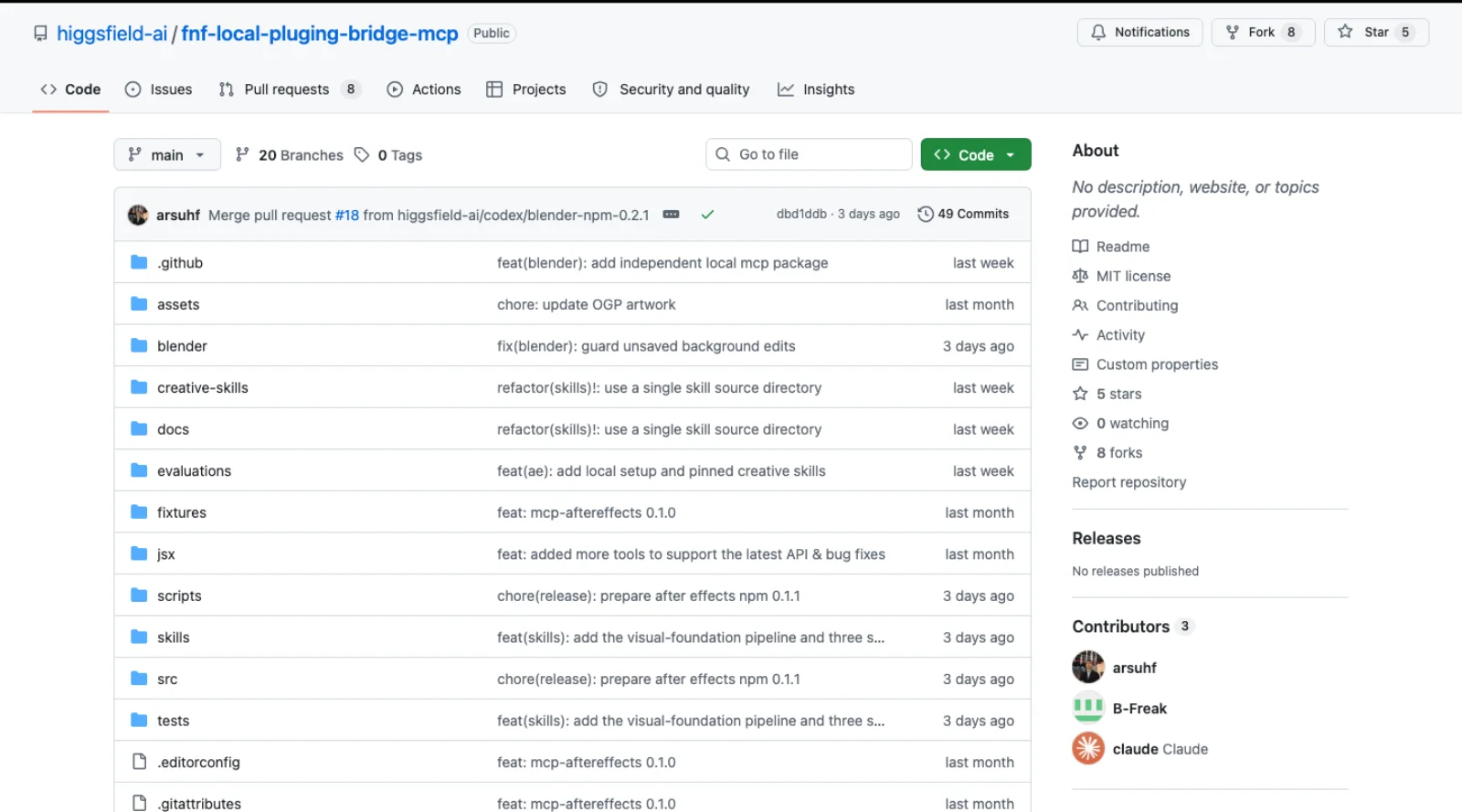
On 10 September 2026 Higgsfield published higgsfield-ai/fnf-local-pluging-bridge-mcp, an MIT-licensed fork of kumoproductions' mcp-aftereffects. It has 5 stars and 8 forks, was last pushed on 17 September 2026, and needs Node 24 or later on macOS or Windows with After Effects 2024 to 2026 (GitHub). Its README states that "no Higgsfield account, cloud relay or installed AE panel is required", and equally clearly that it does not generate media: it is a local scripting bridge that ships Higgsfield's After Effects skills so a coding agent can build rigs without the cloud. A separate package in the same repo covers a background Blender process. There is no Premiere or Resolve package.
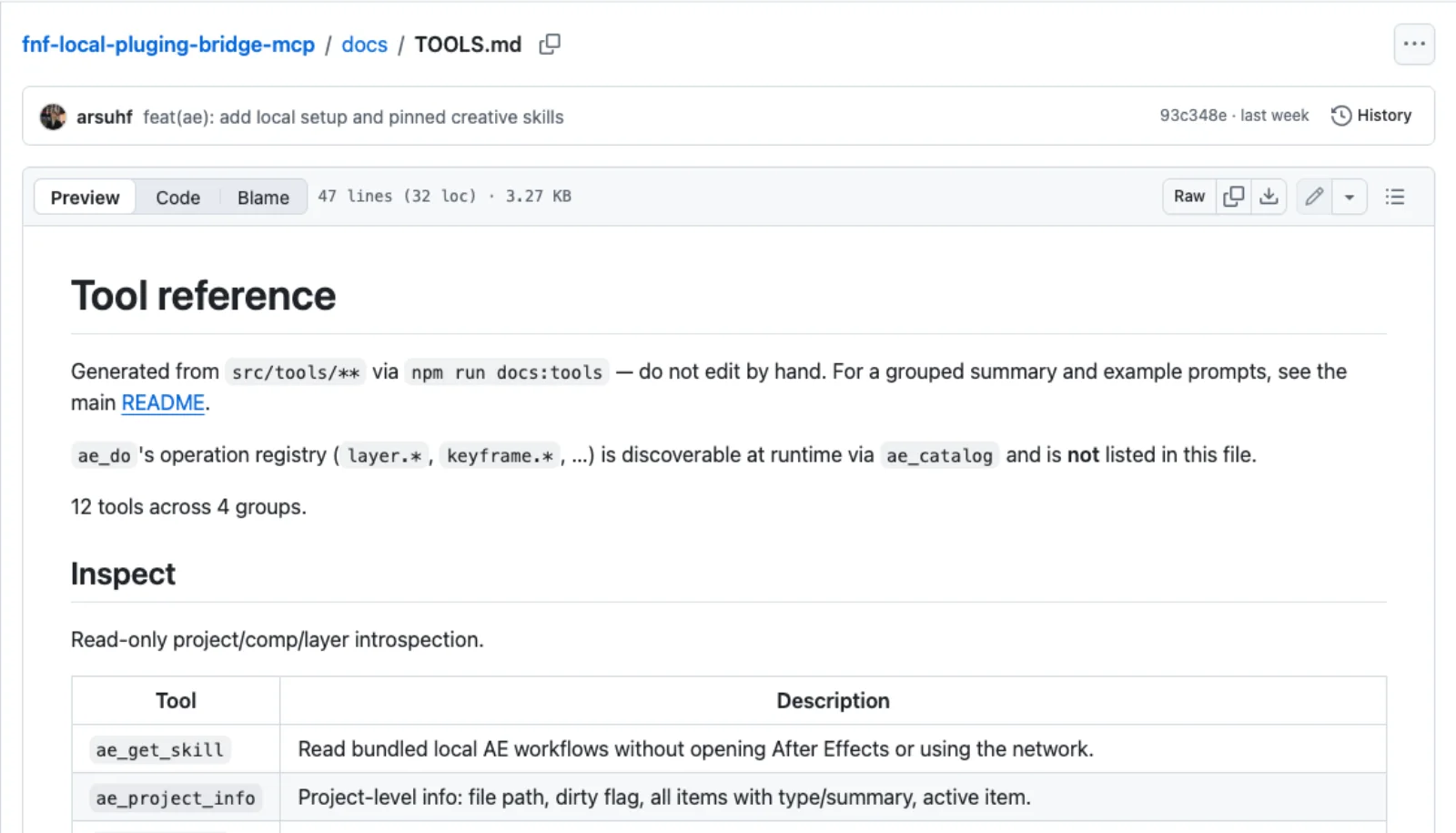
It exposes 12 tools in four groups: six read-only inspectors (ae_get_skill, ae_project_info, ae_comp_info, ae_layer_info, ae_version_info, ae_context), three document tools (ae_save_project, ae_project_export_json, ae_project_import_json), ae_render_frame, and the editing pair ae_catalog and ae_do, where the catalog lists atomic operations such as layer.create_text and ae_do runs one (TOOLS.md). Every call is one automatic undo group.
The caveats are the ones every After Effects bridge should print and most do not. "A consumed request that times out may have executed: inspect before retrying mutations." "batch.run groups operations for undo but does not roll back automatically on failure." Script evaluation is off unless you set AE_MCP_ENABLE_EVAL=1, AE_MCP_READONLY=1 blocks every mutating tool, and the README warns never to use a shared writable directory for the file mailbox through which the bridge talks to After Effects. The installer targets Codex first: node dist/cli.js install-codex registers it as higgsfield-use-after-effects.
Route four: the CLI and the official skills
For Claude Code, OpenClaw and Hermes, Higgsfield's help centre does not point at the MCP URL at all. The instruction is a paste-ready prompt: install the CLI with npm i -g @higgsfield/cli, run higgsfield auth login and finish the sign-in in the browser it opens, then run npx skills add higgsfield-ai/skills (how to connect). The CLI is MIT licensed, at 523 stars and version 1.1.25 as of 14 September 2026, and covers generation, model schemas, workflows, Soul character training, voices, website deployment, and higgsfield account for the credit balance (GitHub). Tokens are short-lived. Because higgsfield generate cost exists, this is the one route where an agent can be told to estimate before it spends.
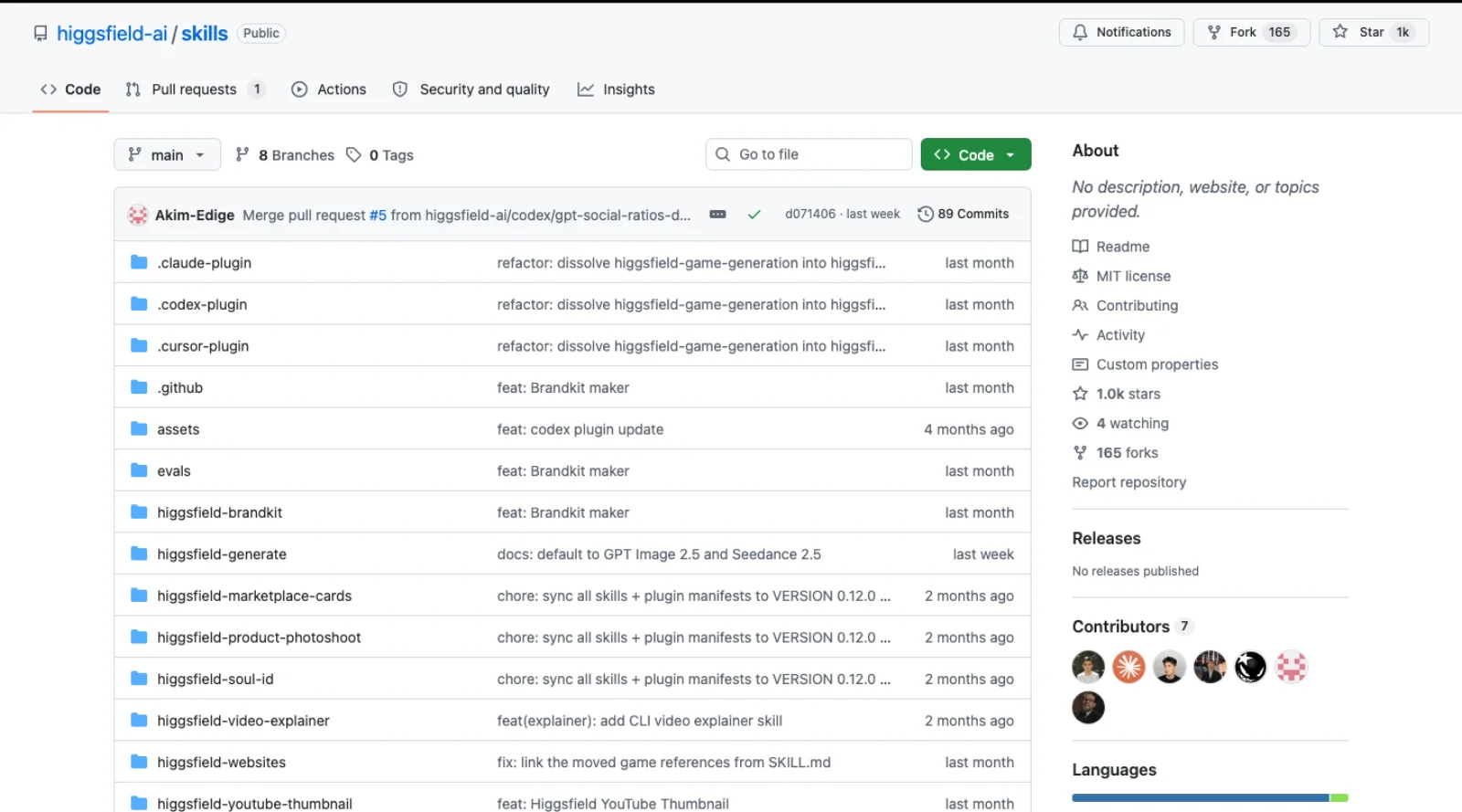
The skills repository is the most-starred thing Higgsfield has on GitHub: 1,009 stars, MIT, pushed 14 September 2026, nine skills from /higgsfield:generate through product photoshoots, brand kits, thumbnails and website builds, with plugin manifests for Claude Code, Codex and Cursor (GitHub). Each install method "handles the Higgsfield CLI install and auth as part of skill setup", so the skills are a layer over the CLI, not over MCP. Cursor is different again: Higgsfield's Cursor plugin is a marketplace entry whose mcp.json points at https://mcp.higgsfield.ai/mcp (GitHub).
Route five: the API, which is a different product
Yes, Higgsfield has a public API, and it is deliberately not connected to your plan. Its documentation describes "one integration point for generative media models": submit to a model endpoint, then poll or receive a webhook, with outputs kept for at least seven days (docs.higgsfield.ai). Authentication is a header of the form Authorization: Key <id>:<secret>, credentials come from console.higgsfield.ai, and billing is "pay-as-you-go from a US dollar balance" with a $5 minimum top-up (help centre). The launch post, dated 16 September 2026, says it plainly: "A plan on higgsfield.ai neither grants API access nor changes API pricing", and the MCP "connects Claude to an existing Higgsfield account" while "the API is a separate developer product billed in dollars per request" (Higgsfield).
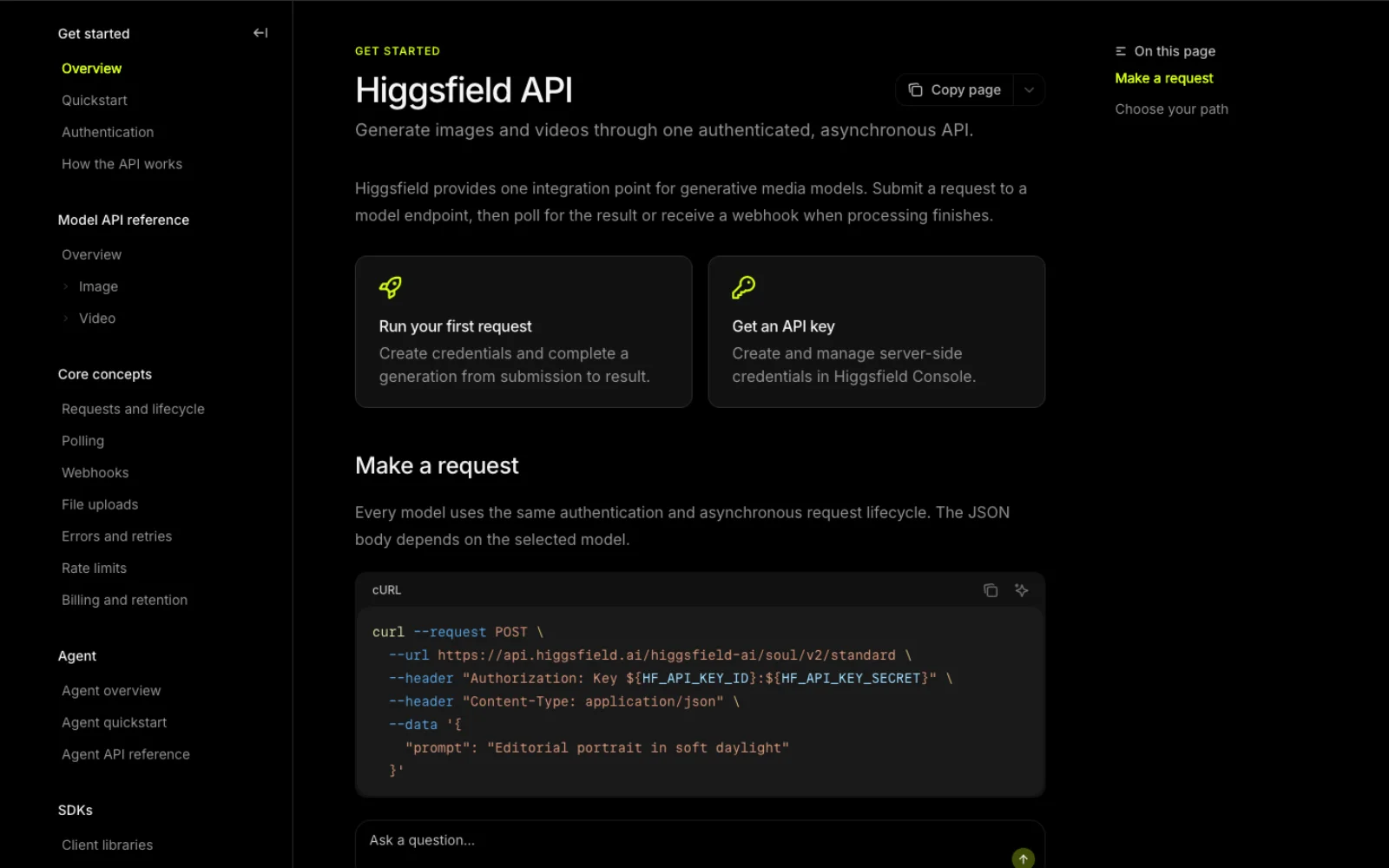
Official SDKs exist for both ecosystems: higgsfield-client for Python (83 stars, Apache-2.0) and higgsfield-js for Node and TypeScript (40 stars), both pushed 17 September 2026. The catalog claims more than 50 models including Seedance, Kling, Wan, MiniMax and Higgsfield's own Soul family. Whether to build on this or another vendor is the question Higgsfield vs Runway and Higgsfield alternatives take up.
Route six: community wrappers, and what they hold
Searching GitHub for Higgsfield MCP servers turns up a few, and they split cleanly by what they authenticate against.
| Repository | Stars | Last push | Wraps | Credentials it holds |
|---|---|---|---|---|
| geopopos/higgsfield_ai_mcp | 41 | 3 Nov 2025 | The official API: image, image-to-video, characters | API key and secret |
| Hikhakk/higgsfield-mcp-unified | 7 | 1 Aug 2026 | Official API, plus an opt-in backend that calls the consumer web app | API key, or a Clerk __client cookie |
| nukIeer/higgsfield-unlimited-mcp | 3 | 22 Jul 2026 | The web app's own generation calls with an unlimited flag | Session id, __client cookie and a DataDome cookie |
| jfikrat/higgsfield-mcp | 3 | 15 Apr 2026 | The web app, through a browser session | Clerk cookies or a pasted JWT |
| Noah3521/higgsfield-mcp-api | 1 | 29 Apr 2026 | The official hosted MCP, re-exposed as a local REST API | Your MCP login |
geopopos' server wraps the developer API, so it costs dollars, not credits, and has not been pushed in ten months. The three that drive the web app use reverse-engineered endpoints and browser cookies; Hikhakk's README says of its own web backend that "driving the consumer app programmatically is almost certainly unsupported. Review the terms before enabling it", and nukIeer's notes that the DataDome cookie "rotates, refresh it if you start getting 403s". They exist because the official MCP always charges credits while Unlimited plans do not on the website, which is also why they can break on any given morning. The larger community output is skills that sit on the official routes, led by OSideMedia's prompt skill (577 stars, pushed 23 August 2026) and AKCodez's 19 Claude Code skills (363 stars, 13 April 2026).
Setup: Claude Code, Claude Desktop, Codex and Cursor
Claude Desktop and claude.ai. Higgsfield's walkthrough: Settings, Connectors, Add custom connector, name it Higgsfield, paste https://mcp.higgsfield.ai/mcp, click Connect, sign in to Higgsfield in the window that opens, and return to Claude (Higgsfield). For the plugin bridge, repeat with https://bridge.higgsfield.ai/mcp and the name Higgsfield Bridge, after installing the Adobe or Blender plugin.
Claude Code, hosted server. Remote HTTP servers are added with one command and authenticated with /mcp (Claude Code docs):
claude mcp add --transport http higgsfield https://mcp.higgsfield.ai/mcp
claude mcp add --transport http higgsfield-bridge https://bridge.higgsfield.ai/mcp
Inside a session run /mcp, pick the server, and complete the sign-in in the browser. claude mcp list shows Connected or Needs authentication next to each; add --scope user to make the entry available in every project. Higgsfield's own Claude Code instruction is the CLI-plus-skills route; the MCP route works because the endpoint publishes standard OAuth metadata, not because Higgsfield documents it for Claude Code.
Claude Code, local bridge. Clone the repository, run npm ci --ignore-scripts && npm run build, then node dist/cli.js doctor and node dist/cli.js config. The last prints the JSON for Claude Desktop's mcpServers, or the command to hand to claude mcp add higgsfield-ae -- node /path/to/dist/cli.js. Enable Allow Scripts to Write Files and Access Network in After Effects and approve the macOS Automation prompt on first connection.
Codex. For the hosted server, the generic remote flow is codex mcp add higgsfield --url https://mcp.higgsfield.ai/mcp then codex mcp login higgsfield (Codex docs); Higgsfield does not list Codex among the hosted server's clients, so treat that as the protocol path rather than a documented one. Higgsfield's documented Codex routes are the skills repository, which ships a .codex-plugin manifest, and the local bridge's install-codex.
Cursor. Type /add-plugin in chat and install Higgsfield from the marketplace; the first connection prompts you to sign in (help centre).
What the bridge can put into After Effects, Premiere and Resolve
After Effects. The plugin offers Reframe, Remove Background, Upscale, Draw to Edit, Edit Video and generation of video and images on the open project (plugins page). Over the bridge the agent additionally builds motion: comps, layers, keyframes, effects, expressions, and imports of generated media into the comp. This is the richest surface.
Premiere Pro. The same panel and tools, with generated clips inserted into the sequence. AI Motion Designer builds "directly into whichever comp or timeline you have open" in Premiere too, so titles and transitions land in the sequence; expect deep layer and expression work to be an After Effects story.
DaVinci Resolve. The Resolve plugin is a workflow integration under Workspace, Workflow Integrations, Higgsfield, for Resolve 19 or newer on macOS or Windows, not the App Store build; results go "into the Media Pool or directly onto the Timeline, through Import to Resolve" (Higgsfield). What no Higgsfield page read for this post gives it is a bridge connection: no agent route into the Resolve plugin is documented. If you need an agent inside Resolve today, the community servers in the DaVinci Resolve MCP inventory script Resolve directly, and Higgsfield's part is the generation beforehand.
Blender. The plugin (Blender 5.1 or later) takes the bridge for scene building, 3D models, character animation, image and video (help centre).
A worked example: three shots from a brief into Premiere
Here is how the bridge route is meant to go, following Higgsfield's documentation rather than a test run of ours. The brief is a 20-second teaser for a matte black water bottle: a slow push-in on wet slate, a macro of condensation beading, and a wide on a trail at golden hour, cut to a 9:16 sequence.
- Open Premiere with the target sequence and the Higgsfield panel signed in under Window, Extensions; the bridge does nothing against a signed-out panel.
- In Claude Desktop with the Higgsfield Bridge connector enabled, paste the brief and ask for three five-second shots, naming the model you have priced. Ask the agent to report the credit cost before it submits.
- Approve the plan. The generations run on Higgsfield's servers, the panel receives them, and the agent imports them. Ask for them on V1 in order, at the durations you specified.
- Check the sequence yourself: read back clip names and in and out points, then scrub the timeline. Reframing a 16:9 result to 9:16 is one more credit spend per clip.
- Ask for the title in the same conversation: "product name, bottom third, fade up over the last shot." That is AI Motion Designer's job, and it builds an editable text layer in the sequence.
Two rules from the local bridge README apply here too: inspect before you retry, because a timed-out call may already have generated a clip you will pay for twice, and save a project version first, because undo across a remote bridge is whatever Premiere's own history gives you.
Which route for which job
| Job | Best route | Why |
|---|---|---|
| Generate stills or clips from a chat and download them | Hosted MCP | One connector, every model, no setup beyond sign-in |
| Generate from a coding agent and save to disk in a pipeline | CLI plus skills | Files land where the script expects; cost estimate before spend |
| Build titles, transitions or a logo reveal in an open After Effects comp | Plugin bridge, or the local bridge if no generation is needed | Bridge edits the comp; local bridge does the same offline |
| Place generated clips onto a Premiere sequence under agent control | Plugin bridge | The only documented route from an agent into a Premiere timeline |
| Rig or clean up After Effects with no cloud, no account, on client work | Local bridge | MIT, offline, read-only mode, eval off by default |
| Ship generation inside your own product or backend | API | Dollar billing, webhooks, SDKs; plan credits are irrelevant |
| Use Unlimited-plan generation from an agent | None that is supported | Unlimited applies only on higgsfield.ai; the wrappers that get around it scrape the web app |
| Drive the Resolve plugin from an agent | Nothing documented; computer use as a last resort | No bridge for Resolve; the panel is human-operated |
| Anything the plugins expose only in their own UI | Computer use, in a sandbox | Slow and brittle; Anthropic's guidance is a dedicated VM and human confirmation of consequential steps (Anthropic) |
Credits, and what a runaway agent can spend
The credit rule is one sentence: "everything generated through MCP deducts credits, regardless of your plan." Unlimited model access and free generations "apply only on higgsfield.ai", not through MCP, the CLI, the plugins or any other automated route (help centre). The Resolve post says the same of the plugin: "every generation through the plugin spends credits from your Higgsfield plan balance." The one documented exception is a limited-time Unlimited MCP trial for new users, announced 28 July 2026, which waives credits on a subset of models at reduced limits (2K images, seven to eight second video, one generation at a time) and which Higgsfield distinguishes from the web-only Unlimited offers on paid plans (Higgsfield). Plan prices, monthly allowances and per-model prices are in Higgsfield pricing; the short version is that a video clip can cost anything from single digits to over fifty credits, and credits on individual plans do not roll over.
That shapes the security picture.
The hosted connectors hold your credits. Once connected, the MCP server and the bridge act as you, and neither has a documented spend cap, per-session budget or confirmation step of its own. Higgsfield's Claude walkthrough suggests setting the connector to Always Allow so generations run without prompts; do not do that on an account with a large balance. Leave tool approval on, ask the agent to state cost before submitting, and remember that a prompt injected through anything the agent reads (a brief in a shared doc, a clip name, a web page) can request generations on your account. Revoke the connector when a project ends.
The local bridge executes inside After Effects. It runs ExtendScript with your user's permissions through an OS scripting call and a file mailbox. Its defaults are conservative: eval off, an allow-list of operation categories, a read-only switch. Keep them; anything that can write to the mailbox directory can run a script in your After Effects.
The wrappers hold your session. The servers that scrape the web app store a Clerk client cookie, a session id or a DataDome token in a local .env. That is your logged-in browser, in a file, readable by whatever else runs as you.
Maturity, honestly
The hosted generation server is the mature piece: in Claude since May 2026, a plugin directory entry in ChatGPT, a marketplace entry in Cursor, new clients through the summer. The plugin bridge is younger and thinner in its documentation: the URL and connector name are published, the capabilities are described in marketing language, and there is no tool reference, no changelog and no Resolve support. The local bridge is a week old, with 5 stars, no releases and a typo in its name, but its README is the most careful of anything here and its upstream is one of the better-maintained After Effects servers. The API launched as a self-serve product the day before this post. The community wrappers are a symptom of the credit rule, not a route to plan on.
Frequently asked questions
Does Higgsfield have an MCP server? Yes, two hosted ones. mcp.higgsfield.ai/mcp generates images, video and audio from any MCP client and returns them to the chat; bridge.higgsfield.ai/mcp drives Higgsfield's plugins inside After Effects, Premiere Pro and Blender. Both sign in with your higgsfield.ai account and spend plan credits. There is also an MIT-licensed local MCP server for After Effects that needs no account and does not generate.
Does Higgsfield have an API? Yes, as a separate developer product at api.higgsfield.ai, documented at docs.higgsfield.ai, with keys from console.higgsfield.ai, Python and TypeScript SDKs, and pay-as-you-go billing from a US dollar balance with a $5 minimum. A higgsfield.ai plan neither grants API access nor affects API pricing.
Can Claude use Higgsfield? Yes, on claude.ai, in Claude Desktop, in Cowork and in Claude Code. Desktop and web add it as a custom connector; Claude Code adds the same URL with claude mcp add --transport http and signs in through /mcp, or follows Higgsfield's own instruction and installs the CLI and skills.
Which apps does the Higgsfield MCP work with? Clients: Claude, ChatGPT, Cursor, Manus, OpenClaw, Hermes Agent and NemoClaw are named; Codex works through the skills plugin and the local bridge. Editors: After Effects, Premiere Pro (2025 or newer) and Blender (5.1 or later) through the bridge; DaVinci Resolve has a plugin but no documented bridge connection.
Does it cost credits? Every generation through MCP, the bridge, the CLI or the plugins deducts plan credits, whatever plan you are on; Unlimited applies only on the website, apart from a limited-time trial for new accounts. The local After Effects bridge costs nothing because it generates nothing. The API costs dollars from a separate balance.
Make your next project in Voyager
Create an account, download Voyager, and start making.
