
 Read Markdown
Start with Comfy Org's official local server if you already run ComfyUI and maintain your own models and custom nodes. Choose its cloud connection if you want hosted execution without maintaining that installation. If you already have an API-format workflow and only need repeatable inputs, a small HTTP client may be enough.
The important distinction is execution versus canvas editing: a server can queue a workflow without controlling the graph visible in your browser. This guide compares those routes using documentation and repository state checked on 17 September 2026. The code example illustrates an API submission; it is not a locally measured generation benchmark.
Jump to: setup · local vs cloud · API example · community tools
Setup, verified against the docs
Official local server with Claude Code
pip install comfy-mcp "comfy-cli>=1.14.0", thencomfy installif you have no workspace, thencomfy launchand leave it running.comfy-mcpdeliberately does not declare comfy-cli as a dependency, because it runs whichevercomfybinary yourPATHresolves to.claude mcp add comfy-mcp -e COMFY_BIN=/path/to/venv/bin/comfy -- comfy-mcp. The--keeps Claude Code from parsing the command as its own option;--scope projectwrites.mcp.jsoninstead of user config (Claude Code MCP docs). Add-e COMFY_API_KEY=...only for partner nodes./mcpin a session should show 40 tools. Ask forserver_info, then "run the workflow at~/workflows/txt2img.jsonand show me the image", the README's own first prompt. On macOS keep ComfyUI out of~/Documents,~/Desktopand~/Downloads, or the launched server fails withOperation not permitted.
Official local server with Codex
The README documents Claude Code, Claude Desktop and Cursor; Codex accepts any stdio server, so codex mcp add comfy-mcp -- comfy-mcp does the same job, or in ~/.codex/config.toml, which the CLI, desktop app and IDE extension share (Codex MCP docs):
[mcp_servers.comfy-mcp]
command = "comfy-mcp"
env = { COMFY_BIN = "/path/to/venv/bin/comfy" }
Cloud connection with Claude Code, Codex or Cursor
- Claude Code:
/plugin marketplace add Comfy-Org/comfy-skills,/plugin install comfy-cloud@comfy-skills, then/mcp, selectcomfy-cloud, Authenticate. - Codex:
codex mcp add comfy-cloud --url https://cloud.comfy.org/mcp, thencodex mcp login comfy-cloud. - Cursor: no OAuth, so create an API key and add
{"url": "https://cloud.comfy.org/mcp", "headers": {"X-API-Key": "${env:COMFY_API_KEY}"}}to~/.cursor/mcp.json.
Running both connections at once is normal; the docs note that "the two sign-ins are separate" (local connection docs).
The routes at a glance
| Route | What it is | Where it runs | Best for |
|---|---|---|---|
| Comfy Cloud MCP (official) | Remote HTTP server at cloud.comfy.org/mcp, OAuth sign-in | Comfy Cloud GPUs | No GPU, Macs, templates and partner models, nothing to install |
comfy-mcp local server (official) | Open-source stdio server wrapping comfy-cli, 40 tools | Your ComfyUI, your models and custom nodes | Running your own workflows, batch variants, queue and process management |
| Canvas custom nodes | Servers installed into custom_nodes that read the graph open in your browser | Inside ComfyUI | Building and editing graphs interactively, "look at this and fix it" |
| Workflow-as-tool servers | Each exported workflow JSON becomes one typed tool | Any client, local or remote ComfyUI | Fixed pipelines exposed to non-experts and other agents |
| The API directly | POST /prompt with API-format JSON, /history, /view, /ws | Anywhere with a shell | Sweeps, batches, CI, anything you will run twice |
| Agent skills | Reference material that teaches node schemas and templates | Documents only | Making any route produce valid workflow JSON |
| Screen control | Computer-use tools driving the node editor by screenshot | Any | One dialog with no API; not graph building |
What Comfy Org ships
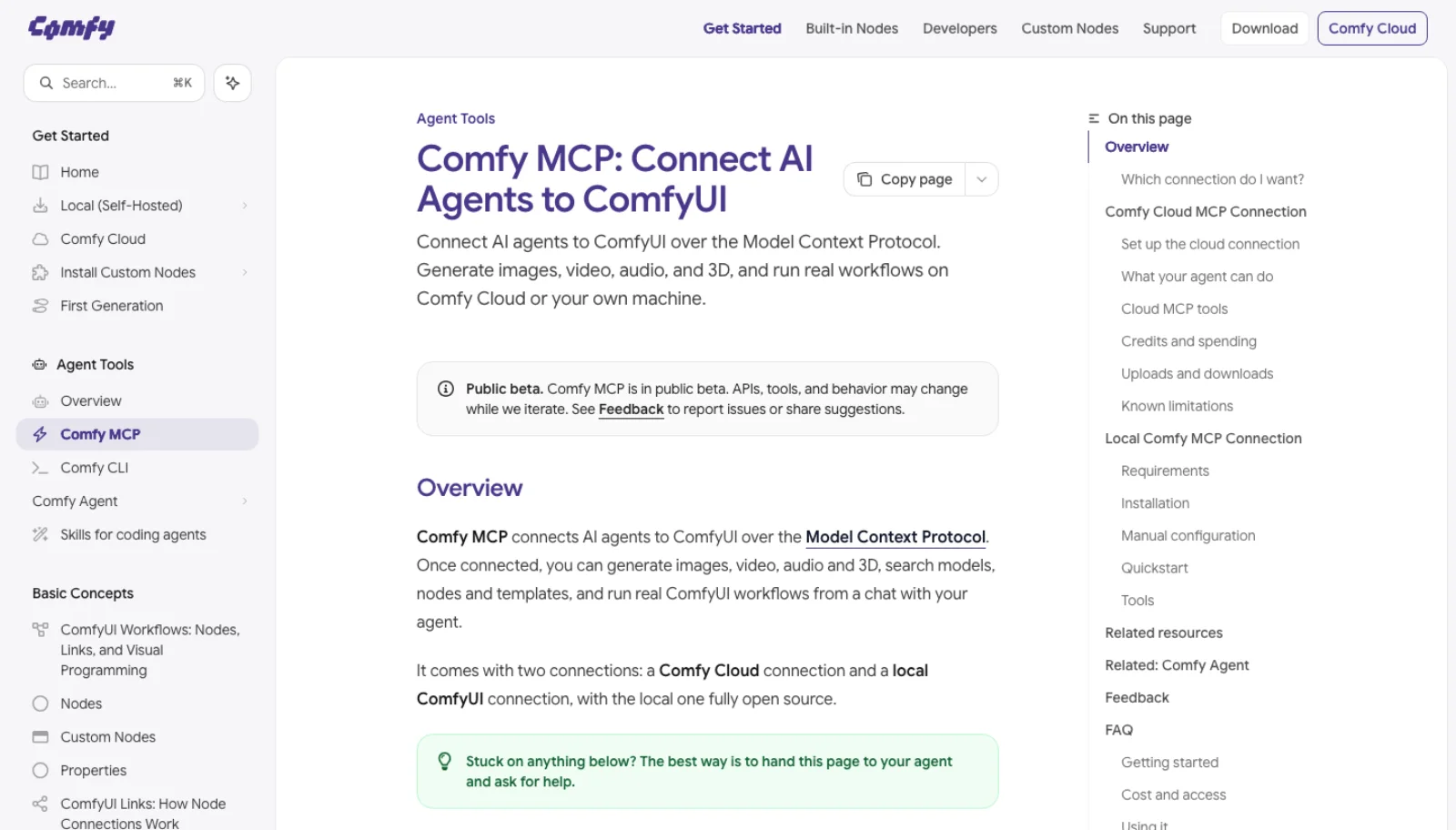
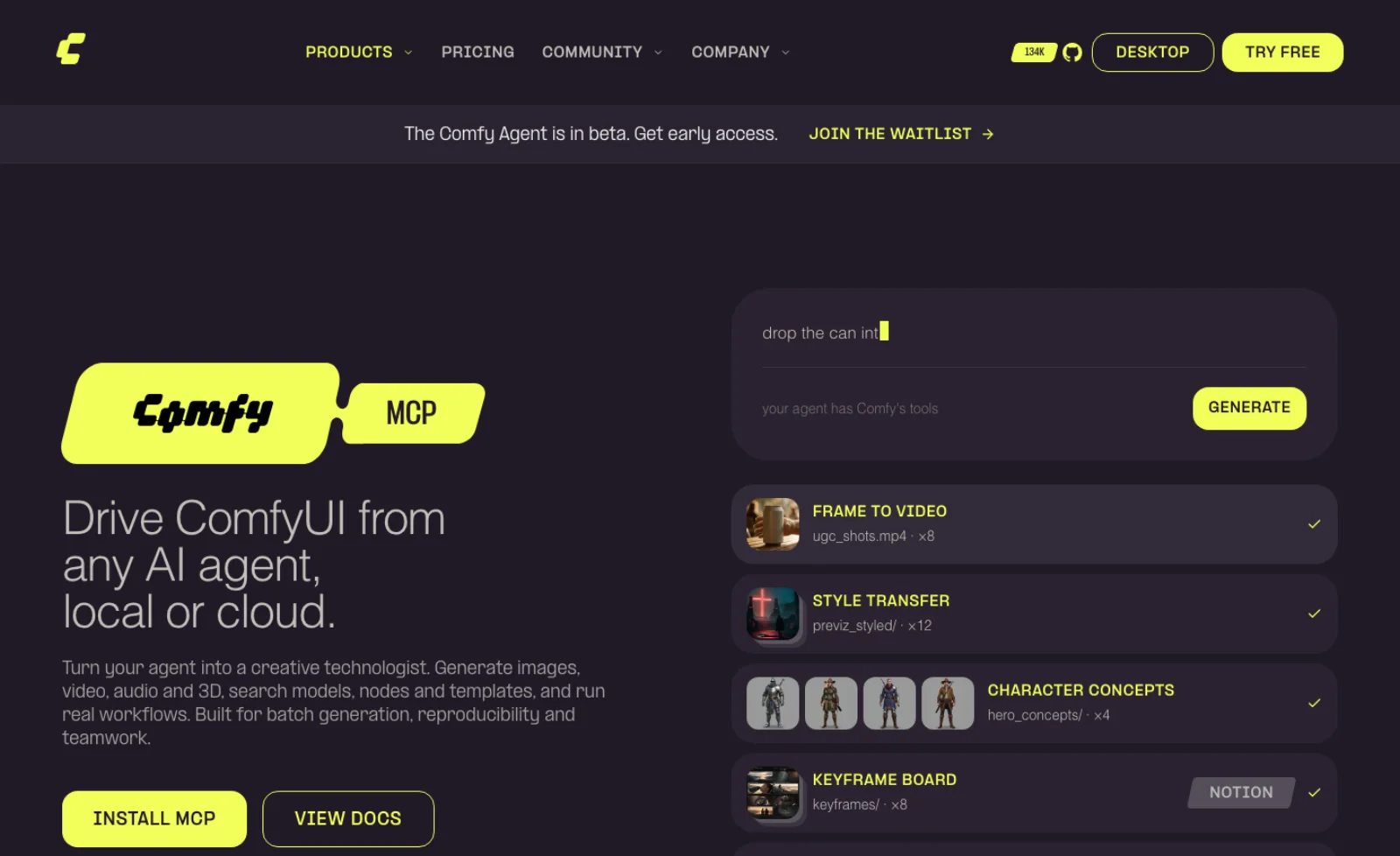
Comfy MCP "connects AI agents to ComfyUI over the Model Context Protocol" so an agent can "generate images, video, audio and 3D, search models, nodes and templates, and run real ComfyUI workflows", and it "comes with two connections: a Comfy Cloud connection and a local ComfyUI connection, with the local one fully open source" (docs.comfy.org). The page carries a "Public beta" notice: "APIs, tools, and behavior may change while we iterate." The June announcement put the goal as "everyone gets their ComfyUI expert" and named Claude Desktop, Codex, Hermes and Cursor as clients (Comfy blog, 29 June 2026).
The cloud connection
The hosted server lives at https://cloud.comfy.org/mcp. Interactive clients sign in with OAuth; Cursor and headless setups use an API key in an X-API-Key header. Discovery tools need only a Comfy account, but generating requires "an active Comfy Cloud subscription", and "a credit or top-up balance alone does not grant access"; new users get five free runs (cloud connection docs). Subscriptions are $20, $35 and $100 a month for Standard, Creator and Pro, with a 30-minute maximum workflow runtime on the lower two (Comfy Cloud pricing).
The tools cover discovery (search_templates, search_models, search_nodes, cql), generation (run_template, submit_workflow, partner_generate, upload_file), jobs (wait_for_job, get_output, cancel_job, submit_batch) and saved workflows (save_workflow, run_saved_workflow, share_workflow). Two documented limits matter: "Assets generated via submit_workflow may not embed workflow metadata" and "Outputs require a shell download step".
The local server
Comfy-Org/comfy-mcp is the open-source half: 228 stars, 227 commits, v0.10.0 released on 10 August, pushed on the day of writing, and dual-licensed "AGPL-3.0-or-later OR Commercial" after a relicense from Apache 2.0 (GitHub). Its architecture decides whether it fits your setup: every tool "shells out to the comfy command with --where local --json" and returns comfy-cli's JSON envelope; it never opens a socket to ComfyUI itself. So you need comfy-cli 1.14.0 or newer on the path (or COMFY_BIN pointing at it), a workspace from comfy install, and a ComfyUI started with comfy launch. A hand-installed ComfyUI can be targeted through COMFYUI_URL, but the process and log tools assume comfy-cli manages it.
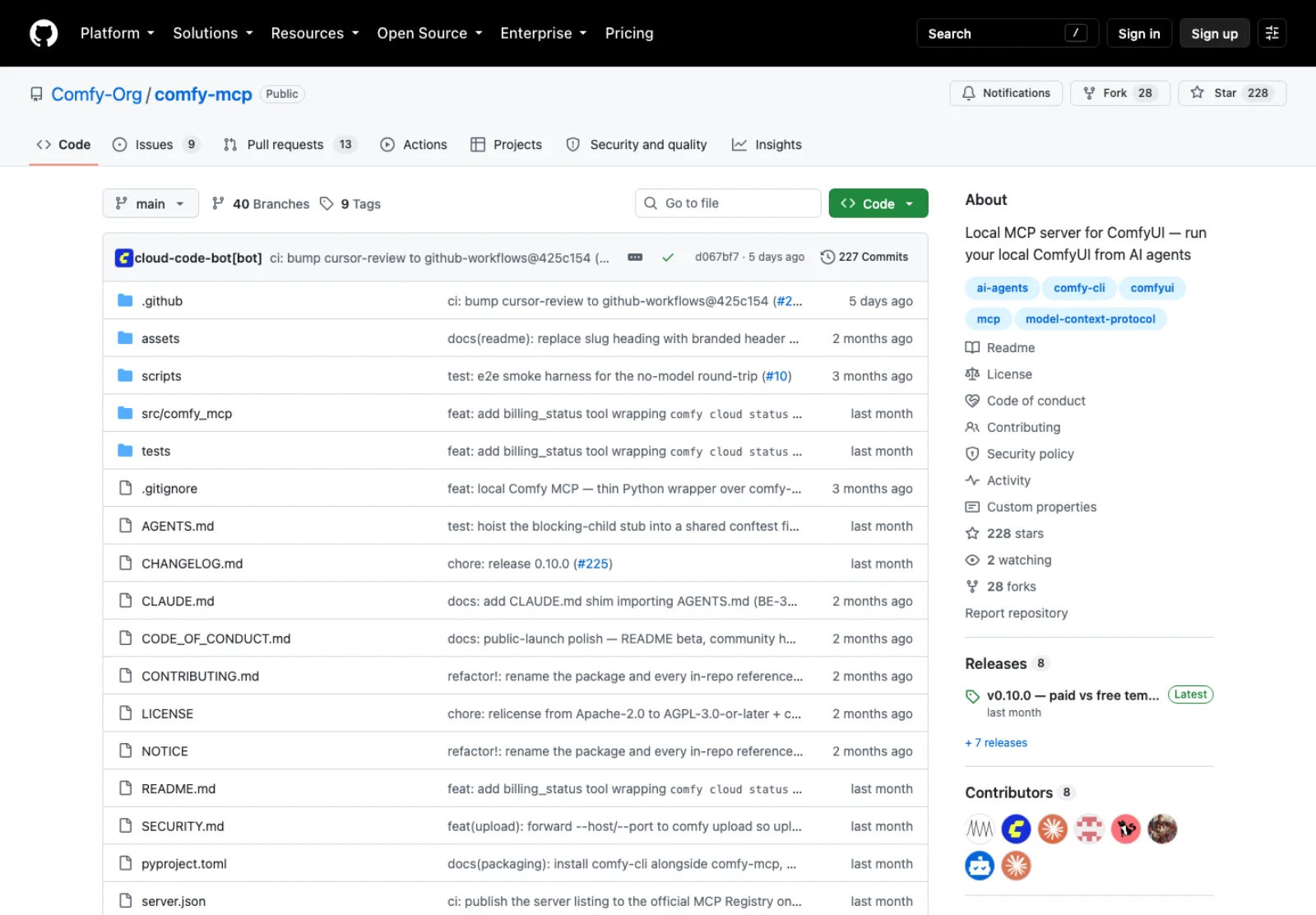
The 40 tools split into six groups: run and monitor (run_workflow for API-format or UI exports, generate_image through a built-in Z-Image Turbo template, run_template, partner_generate, job, fetch_outputs), resources (system_stats, free_memory), diagnostics (server_info, get_logs, billing_status), workflow building (validate_workflow, set_workflow_slot, vary_workflow), discovery (search_templates, fetch_template, nodes, workflow_deps, node_dependencies, search_models) and lifecycle (launch_comfyui, restart_comfyui, update_comfyui, install_node, download_model) (README). Three design choices stand out. nodes reads the live object_info, so it knows your custom nodes, where the cloud server knows a catalogue. workflow_deps maps a workflow's node classes to ComfyUI-Manager packs and reports which are not-installed, closing the loop validate_workflow > workflow_deps > install_node > restart_comfyui. And spending is gated: run_workflow fails closed with spend_consent_required if the graph contains partner (paid) nodes, and partner_generate confirms every call unless COMFY_MCP_ASSUME_CONSENT is set. Local generation itself is free.
The rest of the official stack
- comfy-cli (971 stars, GPL-3.0) is the engine under the local server and a route on its own:
comfy run --workflow ./workflow.jsonsubmits and prints aprompt_id,--waitblocks,comfy downloadcollects results,--where cloudsends the same file to Comfy Cloud, andcomfy generate flux-pro --prompt ...calls partner models with no graph; "UI-format JSON is auto-converted" (comfy-cli). - Comfy Skills (199 stars, MIT) holds the Claude Code plugin that installs the cloud connection plus slash commands, and skills described as "packaged knowledge an agent loads on demand: model guidance, workflow patterns, and ready-made commands" (skills docs).
- Comfy Agent is "an agent that lives inside ComfyUI, local and cloud" that "builds the workflow on your canvas with you", behind a waitlist (comfy.org/agent). It is the official answer to the canvas custom nodes below, and not yet available.
The API underneath every route
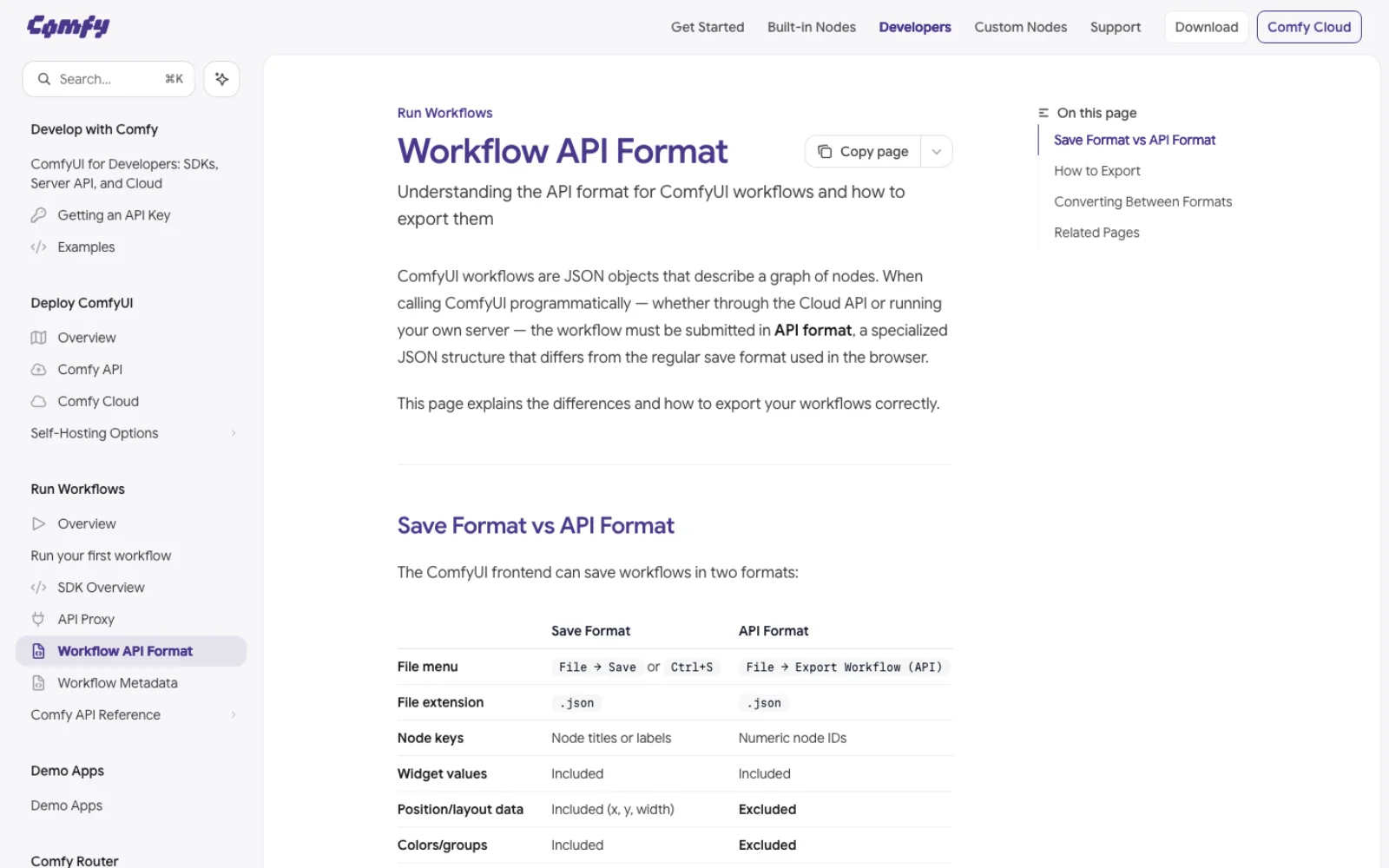
Every server here ends at the same HTTP server, and knowing it lets you judge a server by what it wraps. When you press Queue, the frontend posts the graph to /prompt, "which validates the prompt and adds it to an execution queue, returning either a prompt_id and number (the position in the queue), or error and node_errors if validation fails". The rest is small: GET /history/{prompt_id} for a finished job's outputs, GET /view to download a file by filename, subfolder and type, /queue, /interrupt, /free to unload models, /object_info for every node class and its inputs, /system_stats and /upload/image. Progress arrives over a WebSocket at /ws as status, executing, progress and executed messages (server routes). The reference script in the ComfyUI repository does the whole loop: post prompt and client_id, wait for an executing message whose node is None, read /history/{prompt_id}, fetch each image from /view (websockets_api_example.py).
The payload is the API-format workflow, not the file Save writes. Export it with File > Export Workflow (API). Node IDs are the keys, each node has a class_type, an inputs object and a _meta title, and a connection is written ["4", 0], output 0 of node 4. "API format omits UI metadata" such as positions, colours and groups, which is why it is the form an agent should edit (workflow API format).
Two flags shape the security section: --listen "defaults to 127.0.0.1", and given without an argument "defaults to 0.0.0.0,::"; --disable-api-nodes disables the paid partner nodes and "prevents the frontend from communicating with the internet" (cli_args.py). There is no authentication flag, because there is no authentication.
Community servers and skills compared
A GitHub search for "comfyui mcp" returns 319 repositories. The table keeps those with a distinct approach or a real following; approach is from each README.
| Repository | Stars | Last push | Approach | Licence |
|---|---|---|---|---|
| heshengtao/comfyui_LLM_party | 2,362 | 29 Jul 2026 | The other direction: LLM nodes inside a graph, with an MCP tool node that calls external servers | AGPL-3.0 |
| ATH-MaaS/Pixelle-MCP | 1,115 | 17 Dec 2025 | "Workflow-as-MCP Tool": each workflow becomes a tool, local ComfyUI or RunningHub cloud, Chainlit chat UI | MIT |
| artokun/comfyui-mcp | 753 | 14 Sep 2026 | npx comfyui-mcp, 38 tools, Claude Code plugin, sidebar Agent Panel custom node; unmaintained, archive 9 Oct | MIT |
| joenorton/comfyui-mcp-server | 409 | 17 Feb 2026 | Python, streamable HTTP on port 9000; JSON files in workflows/ with PARAM_* placeholders become tools; regenerate, asset provenance | Apache-2.0 |
| HuangYuChuh/ComfyUI_Skills_OpenClaw | 408 | 26 Aug 2026 | Workflows as skills with a CLI and schema-mapped parameters; OpenClaw, Hermes, Codex, Claude Code; multi-server | MIT |
| LingyiChen-AI/comfyui-workflow-skill | 407 | 9 Apr 2026 | Claude Code skill that writes workflow JSON only: 34 templates, 360+ node definitions from source | MIT |
| jtydhr88/comfyui-custom-node-skills | 283 | 27 Jul 2026 | Nine Claude Code skills for writing custom nodes, V3 and V1 APIs | MIT |
| ConstantineB6/comfy-pilot | 230 | 16 Feb 2026 | Custom node with an embedded Claude Code terminal; 13 tools including get_workflow from the browser, edit_graph, view_image | MIT |
| Comfy-Org/comfy-mcp | 228 | 17 Sep 2026 | Official local server, 40 tools over comfy-cli | AGPL-3.0 or commercial |
| filliptm/ComfyUI_FL-MCP | 124 | 14 Sep 2026 | Custom node: 136 tools, built-in chat, browser bridge for the live canvas, runs on Claude Code or Codex subscriptions, write gates on by default | MIT |
| SlavaSexton/ComfyUI-Agent-Kit | 100 | 3 Sep 2026 | One skill plus MCP driver for Claude Code, Codex, Gemini CLI and Qwen Code; VRAM-aware model picking; OpenColorIO nodes | Apache-2.0 |
| MCKRUZ/ComfyUI-Expert | 92 | 18 Mar 2026 | Claude Code skills for video production: image, video, voice, LoRA training | MIT |
| lalanikarim/comfy-mcp-server | 46 | 2 Mar 2025 | FastMCP, one text-to-image workflow against a remote server; the early one | MIT |
| Overseer66/comfyui-mcp-server | 22 | 4 Nov 2025 | Small Python wrapper | Apache-2.0 |
| pytraveler/local-comfyui-mcp | 12 | 7 Sep 2026 | 64 tools plus an optional bridge node for the on-screen canvas; download host allowlist, refuses pickle formats | GPL-3.0 |
Read the table by the approach column, not by stars. There are four shapes. Wrappers over the HTTP API (joenorton, lalanikarim, the archived artokun server) do what the reference script does with a nicer surface. Workflow-as-tool projects (Pixelle, joenorton's workflows/ folder, Skills_OpenClaw) freeze a graph you built and expose its parameters, the right shape when the people prompting the agent should never see a node. Canvas custom nodes (comfy-pilot, FL-MCP, pytraveler's bridge) do what the API cannot; pytraveler's README puts it exactly: "ComfyUI's HTTP API knows about files, models and the queue. It knows nothing about the workflow being edited: that lives in litegraph, inside the page, and the only copy of its unsaved state is in the tab's memory." Skills connect to nothing; they make whichever route you chose produce valid JSON. The official local server is the first shape one layer up: it wraps comfy-cli, which wraps the API, which is why it manages processes and dependencies and cannot see your canvas.
The three worth describing
Comfy-Org/comfy-mcp is the default. It is maintained by Comfy Org and is the migration target named by artokun, and its tools are built around the failures people actually hit: a template your install cannot run (fetch_template says so up front), a missing node pack (workflow_deps), a graph that will spend money (spend_consent_required). The costs are the comfy-cli dependency, AGPL, and no canvas access.
filliptm/ComfyUI_FL-MCP is a canvas-focused candidate with recent activity: 136 tools across "workflow inspection, graph editing, queue control, Manager v4, model discovery, filesystem inspection, custom node development, and diagnostics", a chat panel in the sidebar, and the same tools exposed to "Claude Desktop, Cursor, Codex, and other agentic development environments". It runs on a Claude Pro or Max login through the Claude Code CLI, or a ChatGPT login through Codex, without copying credentials, and "Queueing, workflow deletion, package changes, file writes, Git operations, and process restarts display an approval card before the tool runs by default" (README).
joenorton/comfyui-mcp-server is the workflow-as-tool pattern at its simplest. Drop API-format files with PARAM_* placeholders into workflows/ and "Workflows are automatically discovered and exposed as MCP tools"; regenerate reruns an asset with overrides and get_asset_metadata keeps "full provenance and parameters" (README). No push since February; check the issues first.
The route with no server: a worked example
An agent with a shell can skip MCP. Export a workflow you built by hand as API JSON, let the agent edit the inputs that change per run, post it, wait, download. Here is the loop for a text-to-image graph with a KSampler and a positive CLIPTextEncode, following the reference script.
import json, time, uuid, urllib.request

BASE = "http://127.0.0.1:8188"
wf = json.load(open("txt2img_api.json"))

# Find nodes by class, not by ID: IDs change between exports.
sampler = next(k for k, n in wf.items() if n["class_type"] == "KSampler")
positive_id = wf[sampler]["inputs"]["positive"][0]     # ["6", 0] -> "6"

wf[positive_id]["inputs"]["text"] = "a lighthouse on a basalt shore at dusk, 35mm"
wf[sampler]["inputs"]["seed"] = 20260917

body = json.dumps({"prompt": wf, "client_id": str(uuid.uuid4())}).encode()
req = urllib.request.Request(f"{BASE}/prompt", body, {"Content-Type": "application/json"})
prompt_id = json.load(urllib.request.urlopen(req, timeout=30))["prompt_id"]

deadline = time.monotonic() + 120
while time.monotonic() < deadline:
    hist = json.load(urllib.request.urlopen(f"{BASE}/history/{prompt_id}", timeout=10))
    if prompt_id in hist:
        entry = hist[prompt_id]
        if entry.get("status", {}).get("status_str") == "error":
            raise RuntimeError(f"Workflow failed: {prompt_id}; inspect history")
        break
    time.sleep(1)
else:
    raise TimeoutError(f"Still queued or running: {prompt_id}; inspect before resubmitting")

for node_out in hist[prompt_id]["outputs"].values():
    for img in node_out.get("images", []):
        q = f"filename={img['filename']}&subfolder={img['subfolder']}&type={img['type']}"
        urllib.request.urlretrieve(f"{BASE}/view?{q}", img["filename"])
A seed sweep is a loop around the middle third; a prompt matrix is two loops. Because /prompt returns immediately with a queue position, an agent can enqueue fifty variants and poll /history once, which beats fifty conversational turns through any server.
Image-to-video is the same pattern with a second exported graph. Take the Wan 2.2 5B image-to-video template, export it as API JSON, and note its classes: a LoadImage, the loaders, two CLIPTextEncode nodes, and a Wan22ImageToVideoLatent node where "you can adjust the size settings and the total number of video frames (length)" (Wan 2.2 tutorial). The agent uploads the still with POST /upload/image, sets the LoadImage node's inputs.image to the returned filename, writes a motion prompt into the positive encoder, sets length, posts the graph and reads /history. The output key differs by save node (images for an animated WebP, a video key for SaveVideo), so read the history object rather than assuming. Which step deserves the prompt budget is the subject of text-to-video versus image-to-video; here the still carries composition and the video prompt carries motion.
The trade against MCP is the same as in the Blender inventory: a server gives the agent a live session, a template catalogue and a repair loop in one conversation; a script is an artefact you can read before it runs and rerun on the next hundred inputs. Comfy Org's design concedes the point: its local server wraps a CLI, and its cloud server says outputs need a shell anyway.
Skills and screen control
Skills stop the agent inventing node inputs. comfyui-workflow-skill ships "360+ node definitions extracted from ComfyUI source code with exact INPUT_TYPES, defaults, and constraints" and only writes JSON for you to load (ComfyUI discussions); comfyui-custom-node-skills teaches the V3 node API for when the fix is a new node. Read a skill file before installing it; it is instructions the agent will follow.
Screen control is the fallback for the editor itself. Anthropic's computer use tool gives Claude "screenshot capabilities and mouse/keyboard control" and recommends "a dedicated virtual machine or container with minimal privileges" (Anthropic docs). When graph tools and API JSON cover the operation, use those instead of dragging connections by screenshot; keep it for a dialog with no route, such as a Manager prompt or a custom node's own panel.
Which route for which job
| Job | Route | Why |
|---|---|---|
| First image from an agent, no ComfyUI installed | Cloud MCP | Five free runs, templates and models already there, no downloads |
| Any generation on a Mac | Cloud MCP, or the API against a remote box | The docs say "today's open-weight models are too large" for Apple GPUs |
| Run your own workflows with your own LoRAs and custom nodes | Official local server | nodes and workflow_deps read the live install; free local runs |
| Parameter sweeps, seed batches, prompt matrices | API script, or vary_workflow | Fifty queue entries in one loop; deterministic, keepable |
| Nightly renders, CI, no chat | comfy run --workflow or the API | Exit codes, prompt_id, comfy download |
| Build or fix a graph while looking at it | FL-MCP, comfy-pilot or pytraveler's bridge | Only canvas servers see unsaved litegraph state and can edit_graph |
| Expose one pipeline to teammates or another agent | joenorton, Pixelle or Skills_OpenClaw | The workflow becomes a typed tool; the graph is never shown |
| Generate a workflow from a description, run it yourself | comfyui-workflow-skill | Writes JSON with real node schemas; you press Queue |
| Partner models (Flux, Kling, Veo) without a GPU | partner_generate on either server, or comfy generate | Spends credits behind a consent gate |
| Debug a broken install or a failing custom node | Official local server, or FL-MCP diagnostics | get_logs and node_dependencies introspect the process and venv, which the API cannot |
| A dialog with no API | Screen control | Last resort; slow |
What works and what is fragile
The reliable jobs are the ones where the graph already exists: running exported workflows, swapping inputs, batch variants, queue management, model and node discovery. Every server's first prompt is some version of "run this workflow and show me the image", and the API was designed for exactly that.
Building graphs from scratch is where the ecosystem is honest about its limits. A hallucinated input name fails /prompt validation with node_errors, which is why the skills bundle extracted schemas and the official server has validate_workflow as a separate step. Custom node dependencies are the second failure: a shared workflow references packs you do not have, and the fix chain (identify, install, restart, check imports) is several tools long and needs ComfyUI-Manager. Model paths are the third: filenames must match what the loader lists, the local search_models returns "filenames only, no cloud enrichment", and a template can name a model you lack, which fetch_template now flags. Expect the first run of any new graph to be a conversation and every run after it to be a script.
Performance and hardware
ComfyUI runs on NVIDIA, AMD, Intel and Apple Silicon GPUs, and on CPU with --cpu, "slower"; Python 3.13 is recommended (system requirements). MCP adds nothing to generation time, only turn latency, so the official run_workflow defaults to a 110-second wait and returns timed_out: true with the prompt_id still pollable; on slow hardware the README says prefer wait=False and poll. For video, "the Wan2.2 5B version should fit well on 8GB vram with the ComfyUI native offloading", while the 14B image-to-video models are separate high-noise and low-noise files with an fp8 text encoder, a different class of card (Wan 2.2 tutorial). If a local LLM also drives the agent, the README's VRAM coordination section and free_memory tool exist for a reason: two models on one GPU is the usual cause of a run that worked yesterday failing today.
Security notes
ComfyUI listens on 127.0.0.1:8188 with no authentication, and a bare --listen opens it on every interface. In March 2026 a campaign targeted "over 1,000 publicly accessible ComfyUI instances" to mine cryptocurrency and build a proxy botnet; the attackers first checked which custom nodes were installed for unsafe ones, then used CVE-2025-67303 in ComfyUI-Manager before 3.38 "to remotely install a malicious node of the operator's choosing" (Cloud Security Alliance, 8 April 2026). For agents the lesson is that install_node is a code-execution tool: custom nodes are Python that runs inside the server, and Comfy's registry rules exist because eval and exec in nodes "are direct attack vectors for Remote Code Execution" (Comfy security update).
The official server says it plainly: "ComfyUI has no authentication, so --listen on a non-loopback address" or --enable-cors-header "would publish its full API (arbitrary workflow execution, plus file reads/writes...) to anything that can reach this machine", so launch_comfyui asks before passing those flags, and a remote target "must be reachable and unauthenticated on that network (the private network is the boundary)" (README). Keep ComfyUI on localhost; if an agent elsewhere needs it, use a VPN or an authenticating proxy, or the community ComfyUI-Login node (233 stars) for basic auth. Treat install and download tools as privileged; pytraveler's allowlisted hosts and refusal of .ckpt and other pickle formats is the model. Keep partner spending behind the consent gates rather than setting COMFY_MCP_ASSUME_CONSENT globally. And read any skill before installing it: a "Model Links" section is a list of URLs the agent will download.
Frequently asked questions
Does ComfyUI have an MCP server? Yes, two official ones since summer 2026: Comfy Cloud MCP, hosted at cloud.comfy.org/mcp on Comfy Cloud GPUs, and comfy-mcp, an open-source local server that drives your own ComfyUI through comfy-cli (docs). Both are in public beta. Community servers predate them, and several are now unmaintained.
Does ComfyUI have an API? Yes, and every MCP server wraps it: POST /prompt with an API-format workflow, /history and /view for outputs, /queue, /interrupt, /object_info, and a /ws WebSocket for progress (routes). Export the JSON with File > Export Workflow (API).
Can Claude build ComfyUI workflows? It can write valid API-format JSON when given node schemas, which the skills supply, and edit a graph live through the canvas servers or the official set_workflow_slot and vary_workflow tools. Expect validation errors on the first attempt at anything unusual, and custom node and model path problems to take more turns than the graph.
Is it free? The official local server is open source. Check each community project's licence separately, and account for local hardware and model costs. The cloud connection needs a Comfy Cloud subscription from $20 a month after five free runs, and partner models such as Flux, Kling and Veo spend credits on either connection.
Local or cloud? Cloud if you want hosted compute and supported templates without local downloads. Being on a Mac alone does not rule out local execution; model support, memory and throughput decide that. Local if you have your own LoRAs, custom nodes and workflows, or enough volume that per-second GPU billing adds up. The docs recommend cloud for new users and local for people who already run ComfyUI or live in a coding agent; running both at once is supported.
Make your next project in Voyager
Create an account, download Voyager, and start making.
